







Question: 1) What is the command used to test the connection between the PCs and the web server? 2) The above command to 192.168.10.5 was successful
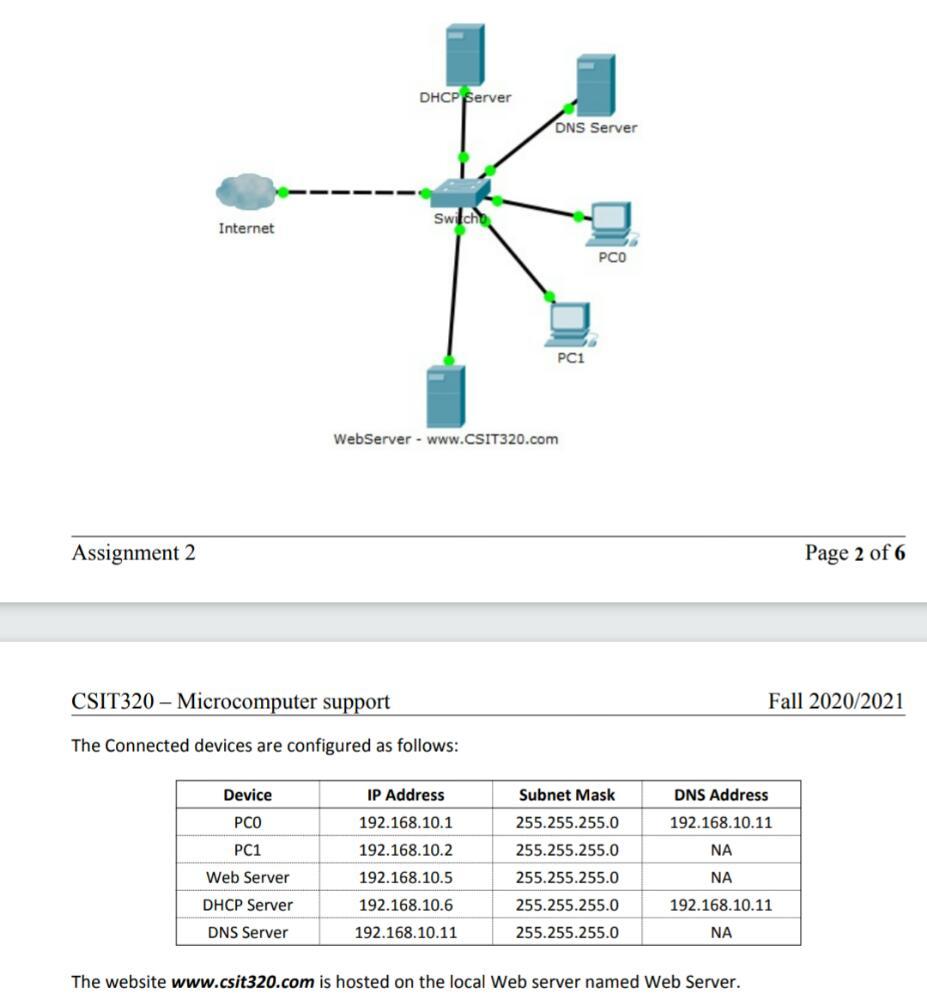
1) What is the command used to test the connection between the PCs and the web server?
2) The above command to 192.168.10.5 was successful from the client desktops PC0 and PC1, but the website www.csit320.com is not reachable from both PC0 and PC1. What could the problem be? A. DNS Server not set on Web Server B. A record of the domain name www.csit320.com with its IP is not added on the DNS Server C. Incorrect IP configuration on the client PCs D. Internet connectivity is down
3) After solving the problem mentioned above, the website became accessible from PC0 but still not accessible from PC1. What could be the problem? What do you suggest to solve it?
4) Currently PC0 and PC1 are configured with manual IP configuration. You have been asked to switch to DHCP configuration. - What is the benefit of DHCP configuration in a network?
- List the steps to configure the PCs to get IP configuration from DHCP server (Windows 7 or above)
DHCP Server DNS Server Switch Internet PCO PC1 WebServer - www.CSIT320.com Assignment 2 Page 2 of 6 CSIT320 - Microcomputer support Fall 2020/2021 The Connected devices are configured as follows: IP Address Subnet Mask DNS Address Device PCO 192.168.10.1 192.168.10.11 PC1 NA Web Server 255.255.255.0 255.255.255.0 255.255.255.0 255.255.255.0 255.255.255.0 192.168.10.2 192.168.10.5 192.168.10.6 192.168.10.11 NA 192.168.10.11 DHCP Server DNS Server NA The website www.csit320.com is hosted on the local Web server named Web Server
Step by Step Solution
There are 3 Steps involved in it

Get step-by-step solutions from verified subject matter experts
 Study Help