







Question: Question 1 505212 Assignment B2: Causal Loop Diagrams in Vensim ( 30 points) This is an individual assignment that you will complete by uploading a
Question 1
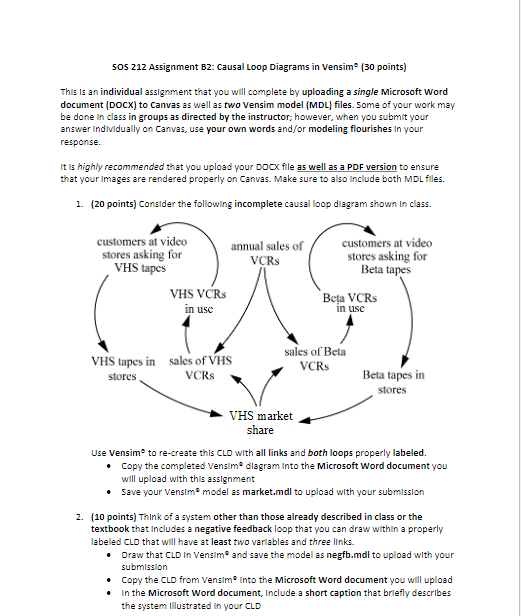
505212 Assignment B2: Causal Loop Diagrams in Vensim ( 30 points) This is an individual assignment that you will complete by uploading a single Microsoft Word document (DOCX) to Canvas as well as two Vensim model (MDL) files. Some of your work may be done in class in groups as directed by the instructor; however, when you submit your answer individually on Canvas, use your own words and/or modeling flourishes in your response. It is highly recommended that you upload your DOCX file as well as a PDF version to ensure that your Images are rendered properly on Canvas. Make sure to also Include both MDL files. 1. (20 points) Consider the following incomplete causal loop diagram shown in class. Use vensime to re-create this CLD with all links and both loops properly labeled. - Copy the completed Vensim" dlagram Into the Microsoft Word document you will upload with this asslgnment - Save your Vensim 2 model as market.mdl to upload with your submission 2. (10 points) Think of a system other than those already described in class or the textbook that Includes a negative feedback loop that you can draw within a properly labeled CLO that will have at least two varlables and three links. - Draw that CLD In Vensime 2 and save the model as negfb.mdl to upload with your submission - Copy the CLD from Vensim Into the Microsoft Word document you will upload - In the Microsoft Word document, Include a short caption that brlefly describes the system lllustrated in your CLD 505212 Assignment B2: Causal Loop Diagrams in Vensim ( 30 points) This is an individual assignment that you will complete by uploading a single Microsoft Word document (DOCX) to Canvas as well as two Vensim model (MDL) files. Some of your work may be done in class in groups as directed by the instructor; however, when you submit your answer individually on Canvas, use your own words and/or modeling flourishes in your response. It is highly recommended that you upload your DOCX file as well as a PDF version to ensure that your Images are rendered properly on Canvas. Make sure to also Include both MDL files. 1. (20 points) Consider the following incomplete causal loop diagram shown in class. Use vensime to re-create this CLD with all links and both loops properly labeled. - Copy the completed Vensim" dlagram Into the Microsoft Word document you will upload with this asslgnment - Save your Vensim 2 model as market.mdl to upload with your submission 2. (10 points) Think of a system other than those already described in class or the textbook that Includes a negative feedback loop that you can draw within a properly labeled CLO that will have at least two varlables and three links. - Draw that CLD In Vensime 2 and save the model as negfb.mdl to upload with your submission - Copy the CLD from Vensim Into the Microsoft Word document you will upload - In the Microsoft Word document, Include a short caption that brlefly describes the system lllustrated in your CLD
Step by Step Solution
There are 3 Steps involved in it

Get step-by-step solutions from verified subject matter experts
 Study Help