







Question: Question 1: Question 2: Applying Excel 12: Break-even units Which of the following formulas correctly calculates the number of break-even units in cell D10? Hint:
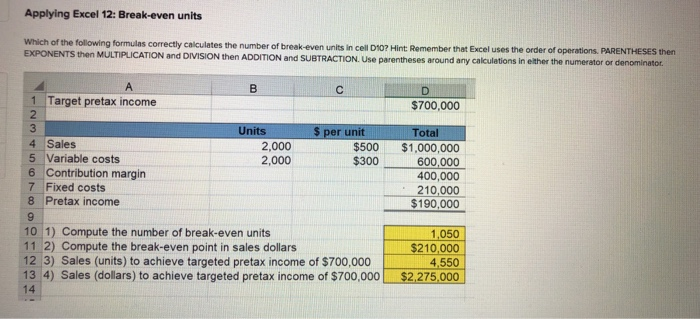
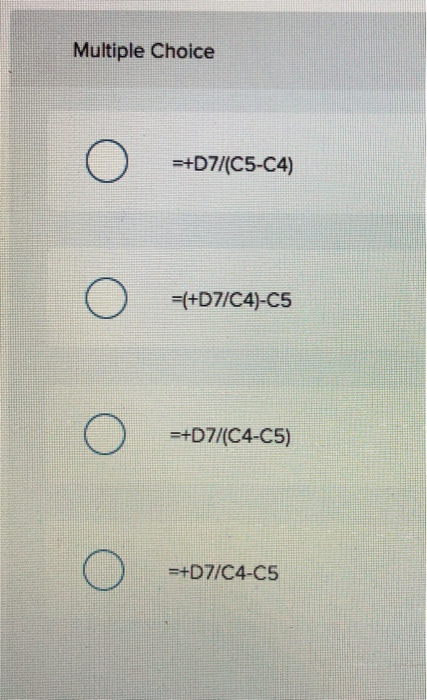
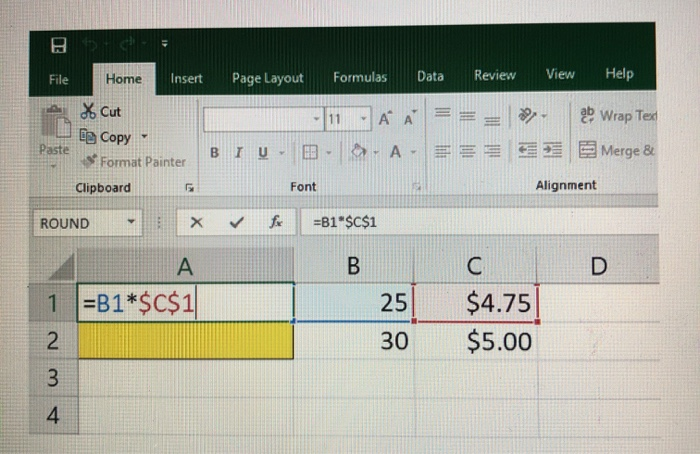
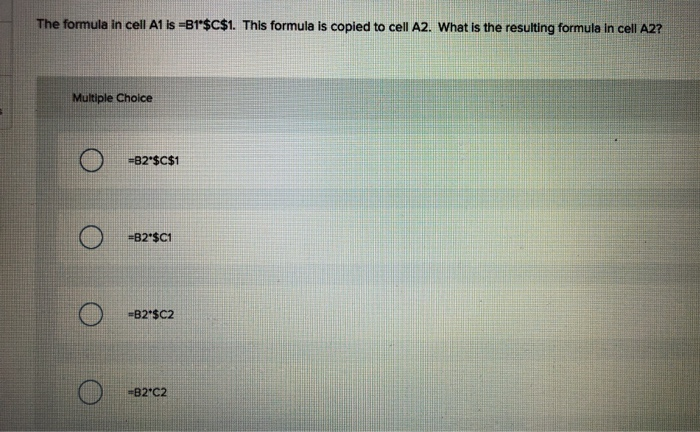
Applying Excel 12: Break-even units Which of the following formulas correctly calculates the number of break-even units in cell D10? Hint: Remember that Excel uses the order of operations. PARENTHESES then EXPONENTS then MULTIPLICATION and DIVISION then ADDITION and SUBTRACTION. Use parentheses around any calculations in either the numerator or denominator. D $700,000 B 1 Target pretax income 2 3 Units $ per unit 4 Sales 2,000 $500 5 Variable costs 2,000 $300 6 Contribution margin 7 Fixed costs 8 Pretax income 9 10 1) Compute the number of break-even units 11 2) Compute the break-even point in sales dollars 12 3) Sales (units) to achieve targeted pretax income of $700,000 13 4) Sales (dollars) to achieve targeted pretax income of $700,000 14 Total $1,000,000 600,000 400,000 210,000 $190,000 1,050 $210,000 4,550 $2,275.000 Multiple Choice =+D7/(C5-C4) (0) =(+D7/C4)-C5 =+D7/(C4-C5) C ) =+D7/C4-05 53- File Home Insert Page Layout Formulas Data Review View Help * Cut e Copy 11 - A A ab Wrap Text - A - E 33 E 3 Merge & Paste BIU Format Painter Clipboard Font Alignment ROUND X fx =B1"$C$1 B D 1 =B1*$C$1 2 25 $4.75 $5.00 30 3 4 The formula in cell A1 is =B1"$C$1. This formula is copied to cell A2. What is the resulting formula in cell A2? Multiple Choice =B2"$C$1 =B2*$c1 =B2*$C2 -B2-C2
Step by Step Solution
There are 3 Steps involved in it

Get step-by-step solutions from verified subject matter experts
 Study Help