







Question: QUESTION 10 Analyse the class diagram below. The relationship between Fill in the blank v and Fill in the blank v classes has NOT been
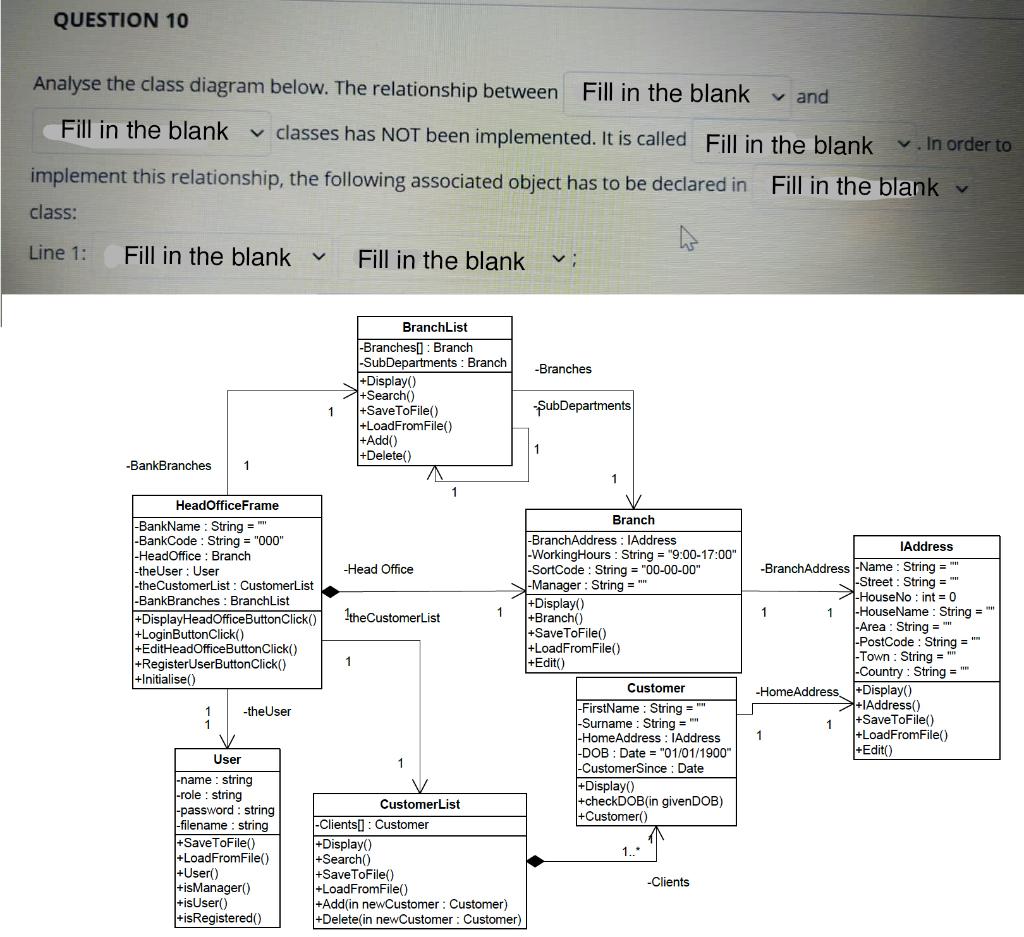
QUESTION 10 Analyse the class diagram below. The relationship between Fill in the blank v and Fill in the blank v classes has NOT been implemented. It is called Fill in the blank v. In order to implement this relationship, the following associated object has to be declared in Fill in the blank v class: Line 1: Fill in the blank Fill in the blank ; BranchList -Branches[] : Branch -SubDepartments : Branch -Branches +Display 1+Search() 1 +SaveToFile() SubDepartments +LoadFromFile() +Add() +Delete() -BankBranches 1 1 1 Head Office Frame Branch - BankName : String = " -BankCode: String = "000" -BranchAddress : IAddress -Head Office : Branch -Working Hours: String = "9:00-17:00" -theUser: User -Head Office -SortCode : String = "00-00-00" -the CustomerList : Customer List -Manager : String = -BankBranches : BranchList +Display() +DisplayHead OfficeButtonClick() Ithe Customerlist +Branch() +LoginButtonClick() +SaveToFile() +EditHead OfficeButtonClick() +LoadFromFile() +RegisterUserButtonClick() 1 +Edit() +Initialise() Customer -theUser -FirstName : String = 1 -Surname : String = Home Address : IAddress -DOB : Date = "01/01/1900" User -Customer Since : Date -name: string +Display -role: string Customer List -password: string |+checkDOB(in given DOB) +Customer() -filename: string -Clients[: Customer +SaveToFile() +Display 1.." +LoadFromFile() +Search() |+User() +SaveToFile() -Clients +isManager() +LoadFromFile() 1+isUser() +Add(in newCustomer : Customer) +isRegistered) +Delete(in newCustomer : Customer) IAddress -BranchAddress -Name : String = -Street: String = -HouseNo: int = 0 1 1 -HouseName : String = "" -Area : String = " -PostCode : String = "" -Town : String = " -Country: String = """ -Home Address + Display +1 Address() |+SaveToFile() 1 1 +LoadFromFile() +Edit)
Step by Step Solution
There are 3 Steps involved in it

Get step-by-step solutions from verified subject matter experts
 Study Help