







Question: Question 14 22 pts Fig 3. Display a result message Please enter a number for an invalid input. Fig 4. Display a result message Please
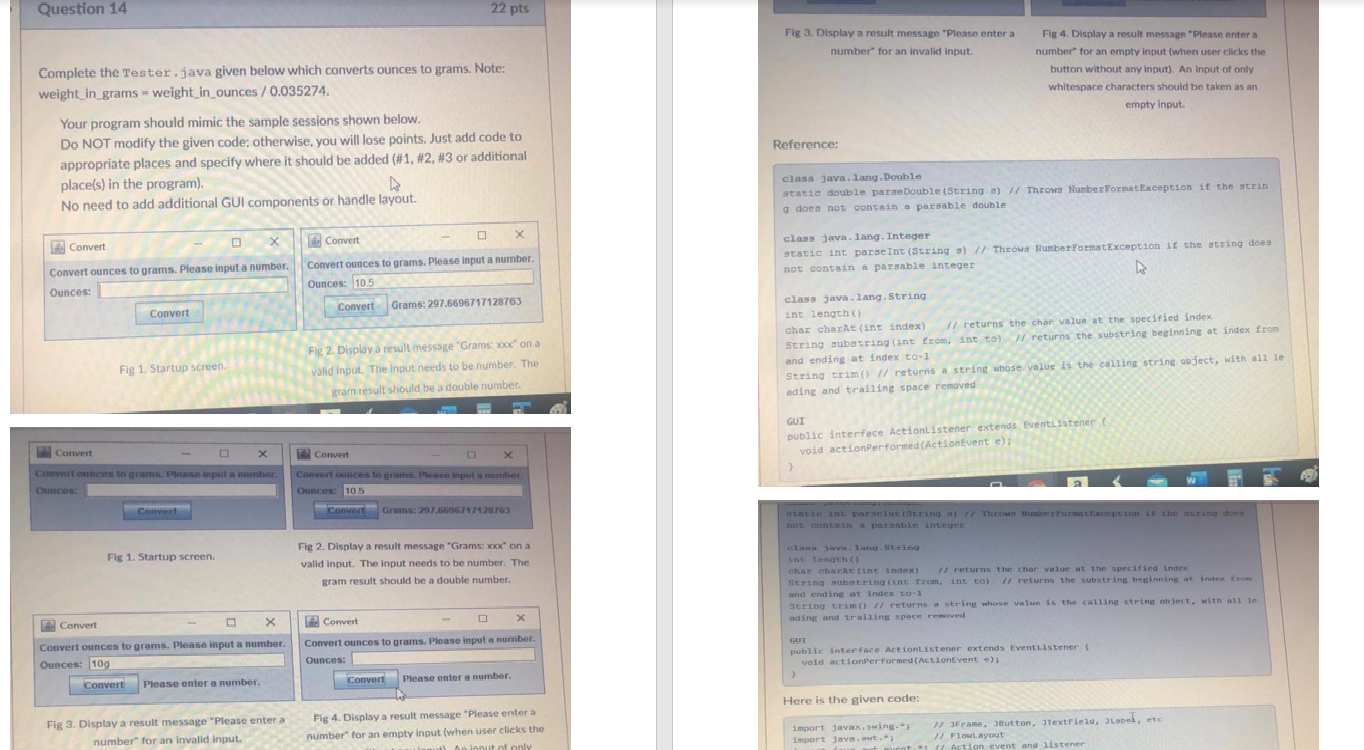
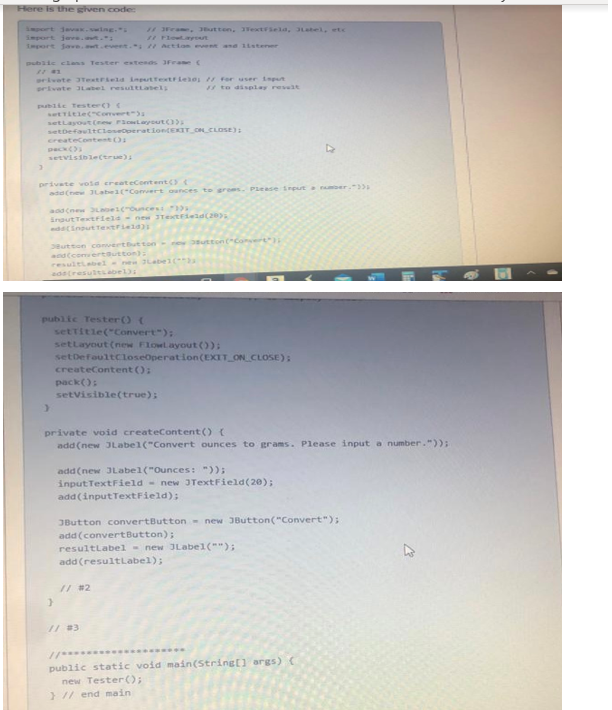
Question 14 22 pts Fig 3. Display a result message "Please enter a number for an invalid input. Fig 4. Display a result message "Please enter a number for an empty input (when user clicks the button without any input). An input of only whitespace characters should be taken as an empty Input Complete the Tester.java given below which converts ounces to grams. Note: weight_in_grams = weight_in_ounces / 0.035274. Your program should mimic the sample sessions shown below. Do NOT modify the given code; otherwise, you will lose points. Just add code to appropriate places and specify where it should be added (#1, #2, #3 or additional place(s) in the program). No need to add additional GUI components or handle layout Reference: class java.lang.Double statie double paraeDouble (String b) // Throws NumberFormatException if the strin does not contain a parsable double Convert Convert class java.lang. Integer static int parseInt(String ) // Throws Number FormatException if the string does not contain a parsable integer Convert ounces to grams. Please input a number Ounces: Convert ounces to grams. Please input a number Ounces: 10.5 Convert Grams: 297.6696717128763 Convert class java.lang. String int length char charAt(int index) // returns the char value at the specified index String substring(int from, int to returns the substring beginning at index from and ending at index to-1 String trim() // returns a string whose value is the calling string object, with all le ading and trailing space removed Fig 2. Display a result message "Grams:xod" on a valid input. The input needs to be number. The gram result should be a double number Fig 1. Startup screen GUI public interface ActionListener extends EventListener i void actionPerformed(ActionEvent e); Convert Convert Cut Bunces to put a number Ounces Convert unces to Pinput number Ouncesc 10.5 CVT Grums: 257.6606747426763 Convert Entient In (String // Throw Farmon if the time don Fig 1. Startup screen, Fig 2. Display a result message "Grams: Xoc on a valid input. The input needs to be number. The gram result should be a double number. che ha intindest) returns the char value at the Scified index String wind (nt from, into) 1 returns the substrins beginning at inde from and endine at index to-1 String trim() // returns a string whose value is the calline string ohject. with all le ading and trailing space removed Convert X Convert ounces to grams. Please input a number. Ounces: 109 F Convert Convert ounces to grams. Please input a number Ounces: Convert Please enter a number. GU public interface ActionListener extends EventListener void actionPerformed (ActionEvent e): Convert Please enter a number. Here is the given code: Fig 3. Display a result message "Please enter a number for an invalid input. Fig 4. Display a result message "Please enter a number for an empty input (when user clicks the Annuit of only import javax.swing. 1JFrame, Button, JTextField, Label, etc import java.awt. FlowLayout munt. 11 Action event and listener Here is the siven code # Jutton. Nextela, el. et port out action to listen be closesterte wote tid intextfied for user ut Title) Layout 3 Layout stefattoration EXIT OR CLOSE Createcontesto SEVISblet 3 private void createContent Comert cances to Piese input inautextfield - TextField(20) intext Dutton comertutto - recco converteutton public Tester() { setTitle("Convert"): setLayout (new Flowlayout()); setDefaultCloseOperation (EXIT_ON_CLOSE); createContent(); pack setVisible(true); 3 private void createContent() add(new JLabel("Convert ounces to grams. Please input a number.")); add(new JLabel("Ounces:")) inputTextField - new JTextField(20); add (inputTextField); JButton convert Button - new JButton("Convert"); add (convert Button); resultLabel = new JLabel(""); add (resultLabel); he // #2 > public static void main(String[] args) new Tester(); ) // end main
Step by Step Solution
There are 3 Steps involved in it

Get step-by-step solutions from verified subject matter experts
 Study Help