





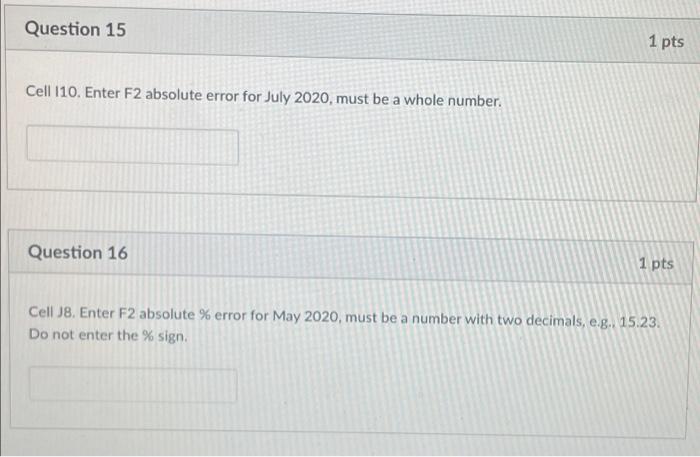
Question: Question 15 1 pts Cell 110. Enter F2 absolute error for July 2020, must be a whole number. Question 16 1 pts Cell 18. Enter
Question 15 1 pts Cell 110. Enter F2 absolute
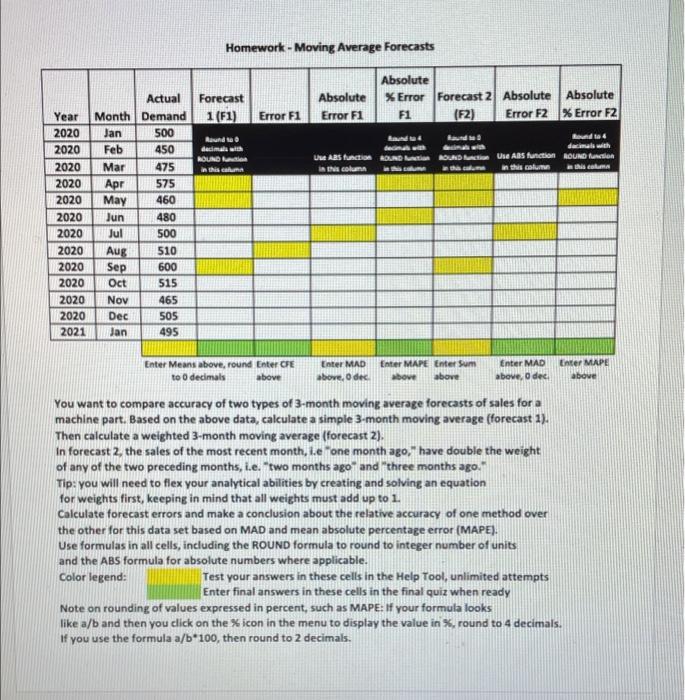
Question 15 1 pts Cell 110. Enter F2 absolute error for July 2020, must be a whole number. Question 16 1 pts Cell 18. Enter F2 absolute % error for May 2020, must be a number with two decimals, e.g. 15.23. Do not enter the % sign. Homework - Moving Average Forecasts Forecast 1 (F1) Absolute Error F1 Absolute XError Forecast 2 Absolute Absolute F1 (F2) Error F2 % Error F2 Error F1 Rundt decimal ROUND in this can UW ARS function ROUND in this column Lauda Bunda damals with ASUADA Ure ABS function ROUND scalu this column Apr Actual Year Month Demand 2020 Jan 500 2020 Feb 450 2020 Mar 475 2020 575 2020 May 460 2020 Jun 480 2020 Jul 500 2020 Aug 510 2020 Sep 600 2020 Oct 515 2020 Nov 465 2020 Dec 505 2021 Jan 495 Enter Means above, round Enter CPE to decimals above Enter MAD above, oder Enter MAPE Enter Sum above above Enter MAD above, Oded Enter MAPE above You want to compare accuracy of two types of 3-month moving average forecasts of sales for a machine part. Based on the above data, calculate a simple 3-month moving average (forecast 1). Then calculate a weighted 3-month moving average (forecast 2). In forecast 2. the sales of the most recent month, i.e "one month ago," have double the weight of any of the two preceding months, i.e. two months ago and three months ago Tip: you will need to flex your analytical abilities by creating and solving an equation for weights first, keeping in mind that all weights must add up to 1 Calculate forecast errors and make a conclusion about the relative accuracy of one method over the other for this data set based on MAD and mean absolute percentage error (MAPE). Use formulas in all cells, including the ROUND formula to round to integer number of units and the ABS formula for absolute numbers where applicable. Color legend: Test your answers in these cells in the Help Tool, unlimited attempts Enter final answers in these cells in the final quiz when ready Note on rounding of values expressed in percent, such as MAPE: If your formula looks like a/b and then you click on the % icon in the menu to display the value in %.round to 4 decimals. If you use the formula a/b*100, then round to 2 decimals

Step by Step Solution

There are 3 Steps involved in it

1 Expert Approved Answer
Step: 1 Unlock blur-text-image

Question Has Been Solved by an Expert!

Get step-by-step solutions from verified subject matter experts

Step: 2 Unlock
Step: 3 Unlock

Students Have Also Explored These Related General Management Questions!