





Question: Question 2 (33 points) Given: Only the information in the Case Study below Derive: Sequence Diagram (Hand-drawn) Submit: Your work using the text area or
Question 2 (33 points) Given: Only the
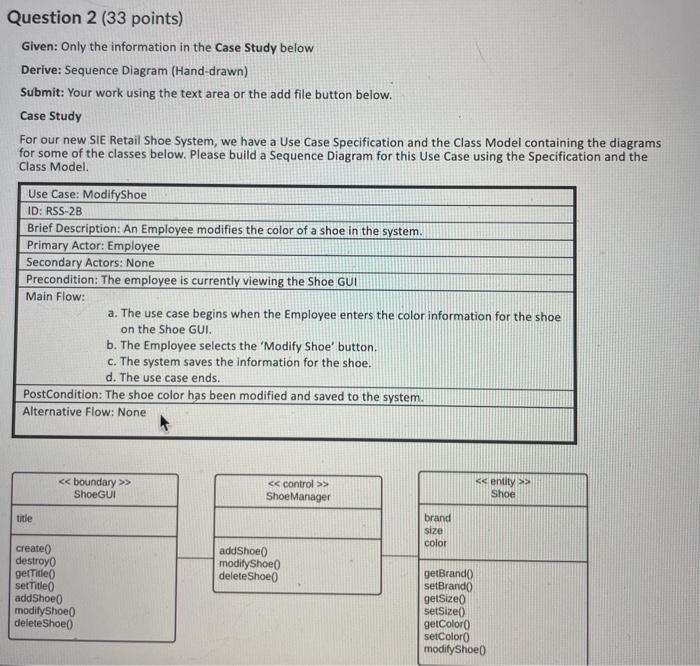
Question 2 (33 points) Given: Only the information in the Case Study below Derive: Sequence Diagram (Hand-drawn) Submit: Your work using the text area or the add file button below. Case Study For our new SIE Retail Shoe System, we have a Use Case Specification and the Class Model containing the diagrams for some of the classes below. Please build a Sequence Diagram for this Use Case using the Specification and the Class Model Use Case: ModifyShoe ID: RSS-2B Brief Description: An Employee modifies the color of a shoe in the system. Primary Actor: Employee Secondary Actors: None Precondition: The employee is currently viewing the Shoe GUI Main Flow: a. The use case begins when the Employee enters the color information for the shoe on the Shoe GUI. b. The Employee selects the 'Modify Shoe' button. c. The system saves the information for the shoe. d. The use case ends. PostCondition: The shoe color has been modified and saved to the system. Alternative Flow: None > ShoeGUI > Shoe Manager > Shoe title brand size color addShoe modityShoe deleteShoe create destroyo getTitle serTitle addShoe modify Shoe delete Shoe getBrando setBrando gelsize setSize() getColor setColor modify Shoe Question 2 (33 points) Given: Only the information in the Case Study below Derive: Sequence Diagram (Hand-drawn) Submit: Your work using the text area or the add file button below. Case Study For our new SIE Retail Shoe System, we have a Use Case Specification and the Class Model containing the diagrams for some of the classes below. Please build a Sequence Diagram for this Use Case using the Specification and the Class Model Use Case: ModifyShoe ID: RSS-2B Brief Description: An Employee modifies the color of a shoe in the system. Primary Actor: Employee Secondary Actors: None Precondition: The employee is currently viewing the Shoe GUI Main Flow: a. The use case begins when the Employee enters the color information for the shoe on the Shoe GUI. b. The Employee selects the 'Modify Shoe' button. c. The system saves the information for the shoe. d. The use case ends. PostCondition: The shoe color has been modified and saved to the system. Alternative Flow: None > ShoeGUI > Shoe Manager > Shoe title brand size color addShoe modityShoe deleteShoe create destroyo getTitle serTitle addShoe modify Shoe delete Shoe getBrando setBrando gelsize setSize() getColor setColor modify Shoe

Step by Step Solution

There are 3 Steps involved in it

1 Expert Approved Answer
Step: 1 Unlock blur-text-image

Question Has Been Solved by an Expert!

Get step-by-step solutions from verified subject matter experts

Step: 2 Unlock
Step: 3 Unlock

Students Have Also Explored These Related General Management Questions!