







Question: Question 2 - SQL Table B Effective Date Tier Premium Tier Premium 919 928 1008 B 1394 B 1380 1467 1452 Policynumber ABCD100001 ABCD100003 ABCD100004
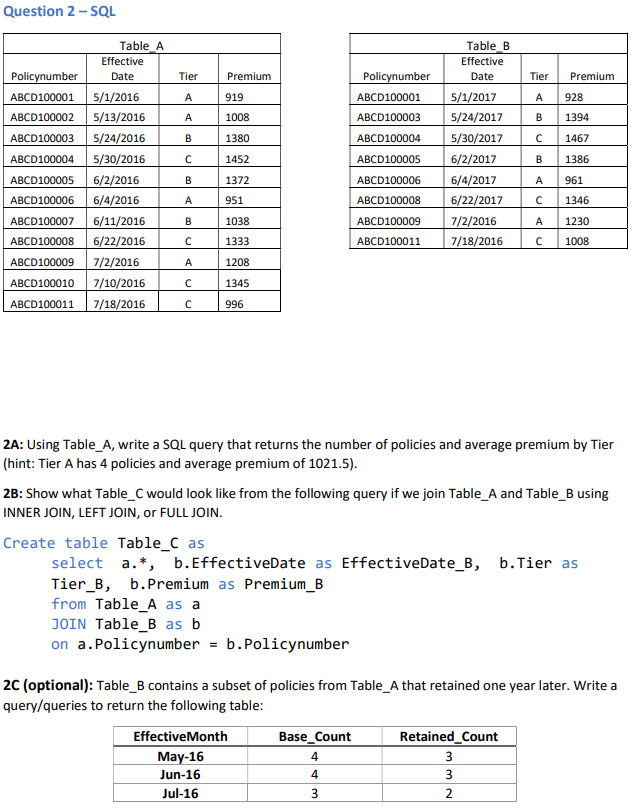
Question 2 - SQL Table B Effective Date Tier Premium Tier Premium 919 928 1008 B 1394 B 1380 1467 1452 Policynumber ABCD100001 ABCD100003 ABCD100004 ABCD100005 ABCD100006 ABCD100008 ABCD100009 ABCD100011 B Table_A Effective Policynumber Date ABCD100001 5/1/2016 ABCD100002 5/13/2016 ABCD100003 5/24/2016 ABCD100004 5/30/2016 ABCD100005 6/2/2016 ABCD100006 6/4/2016 ABCD100007 6/11/2016 ABCD100008 6/22/2016 ABCD100009 7/2/2016 ABCD100010 7/10/2016 ABCD100011 7/18/2016 1386 5/1/2017 5/24/2017 5/30/2017 6/2/2017 6/4/2017 6/22/2017 7/2/2016 7/18/2016 B 1372 961 A 951 1346 B 1038 1230 1333 1008 A 1208 1345 996 2A: Using Table_A, write a SQL query that returns the number of policies and average premium by Tier (hint: Tier A has 4 policies and average premium of 1021.5). 2B: Show what Table_C would look like from the following query if we join Table_A and Table_B using INNER JOIN, LEFT JOIN, or FULL JOIN. Create table Table_C as select a.*, b.EffectiveDate as EffectiveDate_B, b.Tier as Tier_B, b.Premium as Premium_B from Table_A as a JOIN Table_B as b on a.Policynumber = b.Policynumber 2C (optional): Table_B contains a subset of policies from Table_A that retained one year later. Write a query/queries to return the following table: EffectiveMonth Base_Count Retained_Count May-16 Jun-16 3 Jul-16 3 4 4 3 2
Step by Step Solution
There are 3 Steps involved in it

Get step-by-step solutions from verified subject matter experts
 Study Help