







Question: Question 4 Write a GUI-based program to perform encryption and decryption using shift cipher. The following screenshots illustrate the GUI and the functionalities of
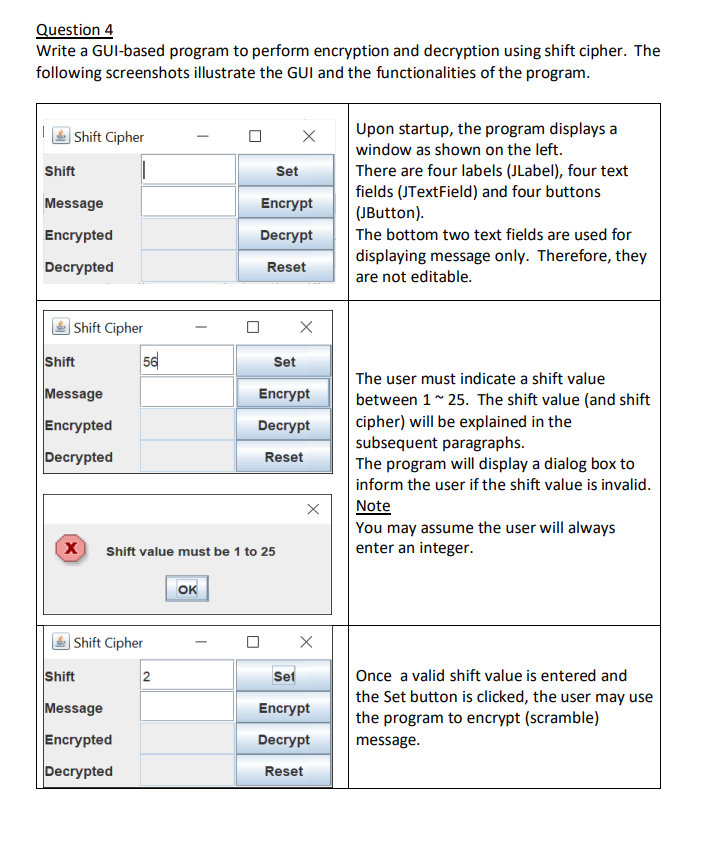
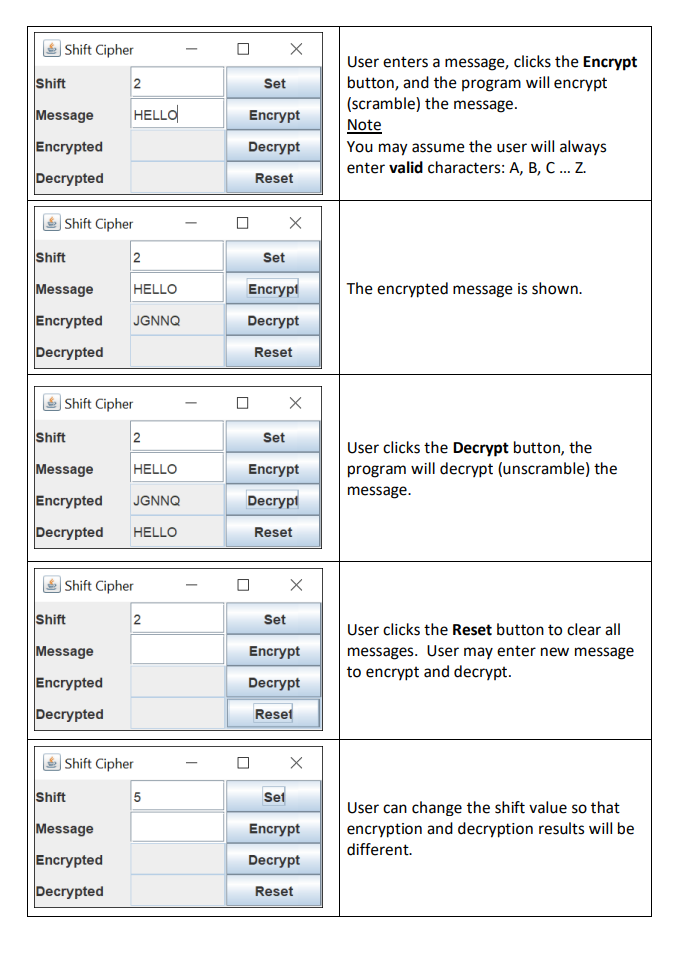
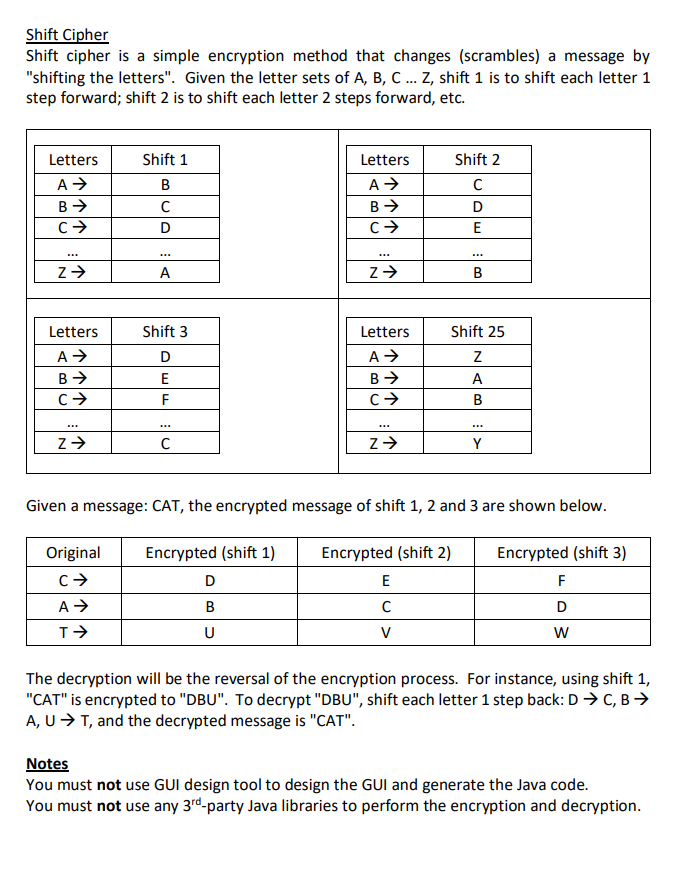
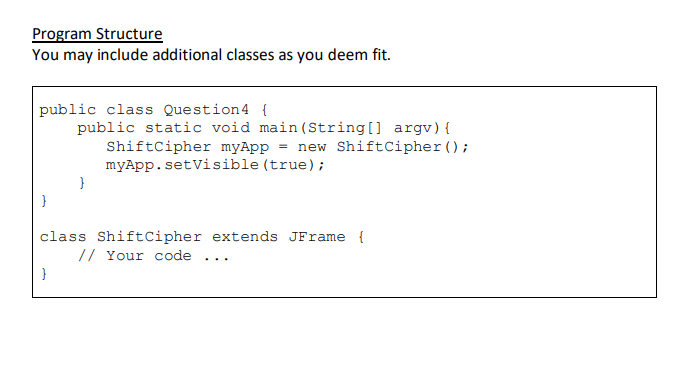
Question 4 Write a GUI-based program to perform encryption and decryption using shift cipher. The following screenshots illustrate the GUI and the functionalities of the program. Shift Cipher Shift Message Encrypted Decrypted Shift Cipher Shift Message Encrypted Decrypted X Shift 56 Shift Cipher Message Encrypted Decrypted Shift value must be 1 to 25 2 OK X Set Encrypt Decrypt Reset X Set Encrypt Decrypt Reset X X Set Encrypt Decrypt Reset Upon startup, the program displays a window as shown on the left. There are four labels (JLabel), four text fields (JTextField) and four buttons (JButton). The bottom two text fields are used for displaying message only. Therefore, they are not editable. The user must indicate a shift value between 1 ~ 25. The shift value (and shift cipher) will be explained in the subsequent paragraphs. The program will display a dialog box to inform the user if the shift value is invalid. Note You may assume the user will always enter an integer. Once a valid shift value is entered and the Set button is clicked, the user may use the program to encrypt (scramble) message. Shift Cipher Shift Message Encrypted Decrypted Shift Shift Cipher Message HELLO Encrypted JGNNQ Decrypted Shift 2 Shift Cipher HELLO 2 Message HELLO Encrypted JGNNQ Decrypted HELLO Shift Message Encrypted Decrypted 2 Shift Cipher Shift Message Encrypted Decrypted Shift Cipher 2 5 Set Encrypt Decrypt Reset X Set Set Encrypt Decrypt Reset X Set X Encrypt Decrypt Reset X Encrypt Decrypt Reset X Set Encrypt Decrypt Reset User enters a message, clicks the Encrypt button, and the program will encrypt (scramble) the message. Note You may assume the user will always enter valid characters: A, B, C... Z. The encrypted message is shown. User clicks the Decrypt button, the program will decrypt (unscramble) the message. User clicks the Reset button to clear all messages. User may enter new message to encrypt and decrypt. User can change the shift value so that encryption and decryption results will be different. Shift Cipher Shift cipher is a simple encryption method that changes (scrambles) a message by "shifting the letters". Given the letter sets of A, B, C... Z, shift 1 is to shift each letter 1 step forward; shift 2 is to shift each letter 2 steps forward, etc. Letters A B C *** Z Letters A B C Z Shift 1 B D Original C A T *** A Shift 3 D E F C Encrypted (shift 1) Letters A B C D B U Z Letters A B C Z Given a message: CAT, the encrypted message of shift 1, 2 and 3 are shown below. Encrypted (shift 2) E C Shift 2 C D E V B Shift 25 Z A B Y Encrypted (shift 3) F D W The decryption will be the reversal of the encryption process. For instance, using shift: "CAT" is encrypted to "DBU". To decrypt "DBU", shift each letter 1 step back: D C, B A, U T, and the decrypted message is "CAT". Notes You must not use GUI design tool to design the GUI and generate the Java code. You must not use any 3rd-party Java libraries to perform the encryption and decryption. Program Structure You may include additional classes as you deem fit. public class Question4 { public static void main (String[] argv) { ShiftCipher myApp = new ShiftCipher (); myApp.setVisible (true); } class Shift Cipher extends JFrame { // Your code }
Step by Step Solution
There are 3 Steps involved in it
import javaxswing import javaawteventActionEvent import javaawteventActionListener import javautilLo... View full answer

Get step-by-step solutions from verified subject matter experts
 Study Help