







Question: QUESTION 5 BioSinar Sdn. Bhd plan to develop a VB system to store their employee details. You are hired as a programmer to build this
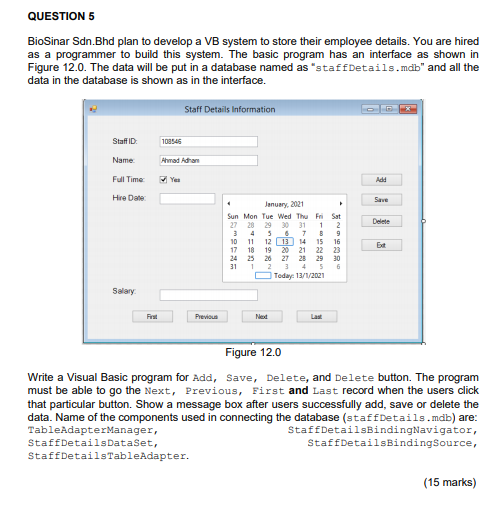
QUESTION 5 BioSinar Sdn. Bhd plan to develop a VB system to store their employee details. You are hired as a programmer to build this system. The basic program has an interface as shown in Figure 12.0. The data will be put in a database named as "staffDetails.mdb" and all the data in the database is shown as in the interface. Staff Details information Staff 109545 Ahmad Adron Name Full Time Add Hire Date Save Delete January, 2021 Sun Mon Tue Wed Thu Fri Sat 27 31 1 2 3 4 5 8 7 B 9 10 11 12 13 14 15 16 17 18 19 20 21 22 23 24 25 20 27 28 29 30 31 1 4 5 6 O Today: 13/1/2021 Exit Salary First Previous Need Last Figure 12.0 Write a Visual Basic program for Add, Save, Delete, and Delete button. The program must be able to go the Next, Previous, First and Last record when the users click that particular button. Show a message box after users successfully add, save or delete the data. Name of the components used in connecting the database (staffDetails.mdb) are: TableAdapterManager, Staff DetailsBindingNavigator, Staff Details Dataset, Staff DetailsBindingSource, Staff DetailsTableAdapter. (15 marks) QUESTION 5 BioSinar Sdn. Bhd plan to develop a VB system to store their employee details. You are hired as a programmer to build this system. The basic program has an interface as shown in Figure 12.0. The data will be put in a database named as "staffDetails.mdb" and all the data in the database is shown as in the interface. Staff Details information Staff 109545 Ahmad Adron Name Full Time Add Hire Date Save Delete January, 2021 Sun Mon Tue Wed Thu Fri Sat 27 31 1 2 3 4 5 8 7 B 9 10 11 12 13 14 15 16 17 18 19 20 21 22 23 24 25 20 27 28 29 30 31 1 4 5 6 O Today: 13/1/2021 Exit Salary First Previous Need Last Figure 12.0 Write a Visual Basic program for Add, Save, Delete, and Delete button. The program must be able to go the Next, Previous, First and Last record when the users click that particular button. Show a message box after users successfully add, save or delete the data. Name of the components used in connecting the database (staffDetails.mdb) are: TableAdapterManager, Staff DetailsBindingNavigator, Staff Details Dataset, Staff DetailsBindingSource, Staff DetailsTableAdapter. (15 marks)
Step by Step Solution
There are 3 Steps involved in it

Get step-by-step solutions from verified subject matter experts
 Study Help