







Question: Question 6 20 points Save An The below is the code you did in the class. We learned two ways to make loop statement. Change
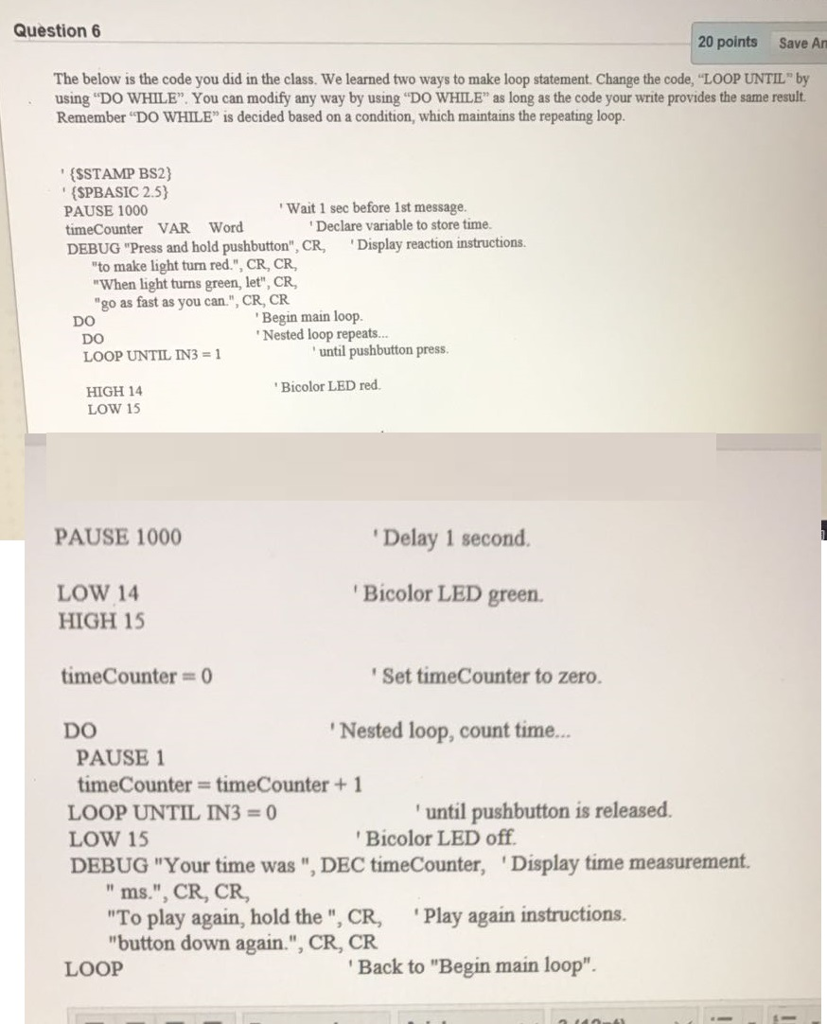
Question 6 20 points Save An The below is the code you did in the class. We learned two ways to make loop statement. Change the code, "LOOP UNTIL"y using "DO WHILE". You can modify any way by using "DO WHILE" as long as the code your write provides the same result Remember "DO WHILE" is decided based on a condition, which maintains the repeating loop. (SSTAMP BS2) (SPBASIC 2.5) Wait 1 sec before 1st message. PAUSE 1000 timeCounter VAR Word DEBUG "Press and hold pushbutton", CR, Display reaction instructions. Declare variable to store time. to make light turn red.", CR, CR, When light turns green, let", CR, "go as fast as you can.", CR, CR DO LOOP UNTIL IN31 HIGH 14 LOW 15 Begin main loop. Nested loop repeats... DO until pushbutton press. Bicolor LED red PAUSE 1000 Delay 1 second. LOW 14 Bicolor LED green. HIGH 15 timeCounter = 0 DO Set timeCounter to zero. Nested loop, count time... PAUSE 1 timeCounter timeCounter1 LOOP UNTIL IN3- LOW 15 DEBUG "Your time was ", DEC timeCounter, Display time measurement. until pushbutton is released. Bicolor LED off " ms.", CR, CR, "To play again, hold the", CR, Play again instructions. button down again.", CR, CR LOOP Back to "Begin main loop
Step by Step Solution
There are 3 Steps involved in it

Get step-by-step solutions from verified subject matter experts
 Study Help