







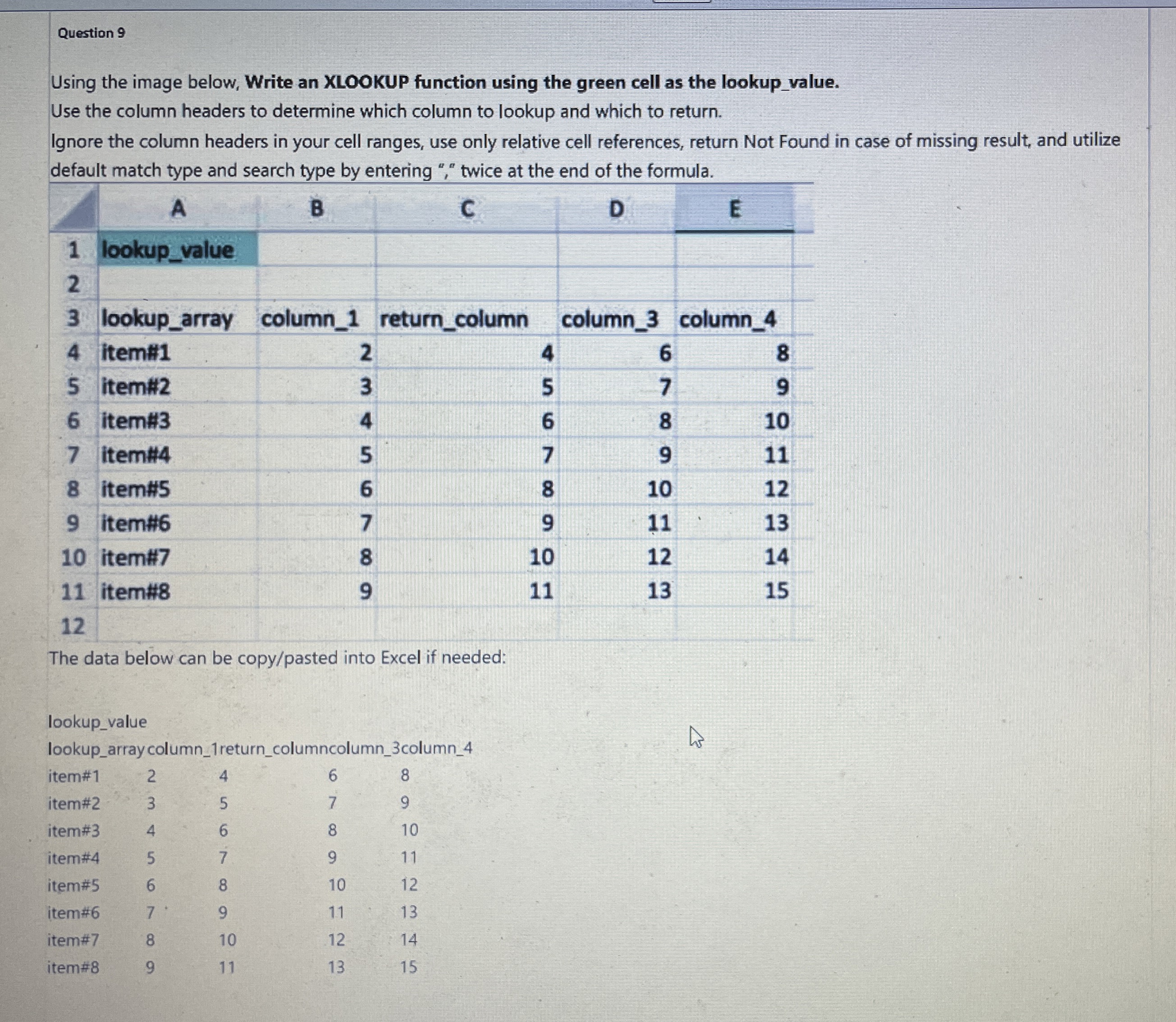
Question: Question 9 Using the image below, Write an XLOOKUP function using the green cell as the lookup _ value. Use the column headers to determine
Question
Using the image below, Write an XLOOKUP function using the green cell as the lookupvalue.
Use the column headers to determine which column to lookup and which to return.
Ignore the column headers in your cell ranges, use only relative cell references, return Not Found in case of missing result, and utilize default match type and search type by entering twice at the end of the formula.
tableABCDElookupvalue,,,,lookuparray,columnreturncolumn,columncolumnitem#
Step by Step Solution
There are 3 Steps involved in it
1 Expert Approved Answer
Step: 1 Unlock

Question Has Been Solved by an Expert!
Get step-by-step solutions from verified subject matter experts
Step: 2 Unlock
Step: 3 Unlock
 Study Help