







Question: Question: How to complete this program with processing? void draw() { image(bgImg, 0, 0); // display the background image(robotImg, robotX, robotY); // display the robot
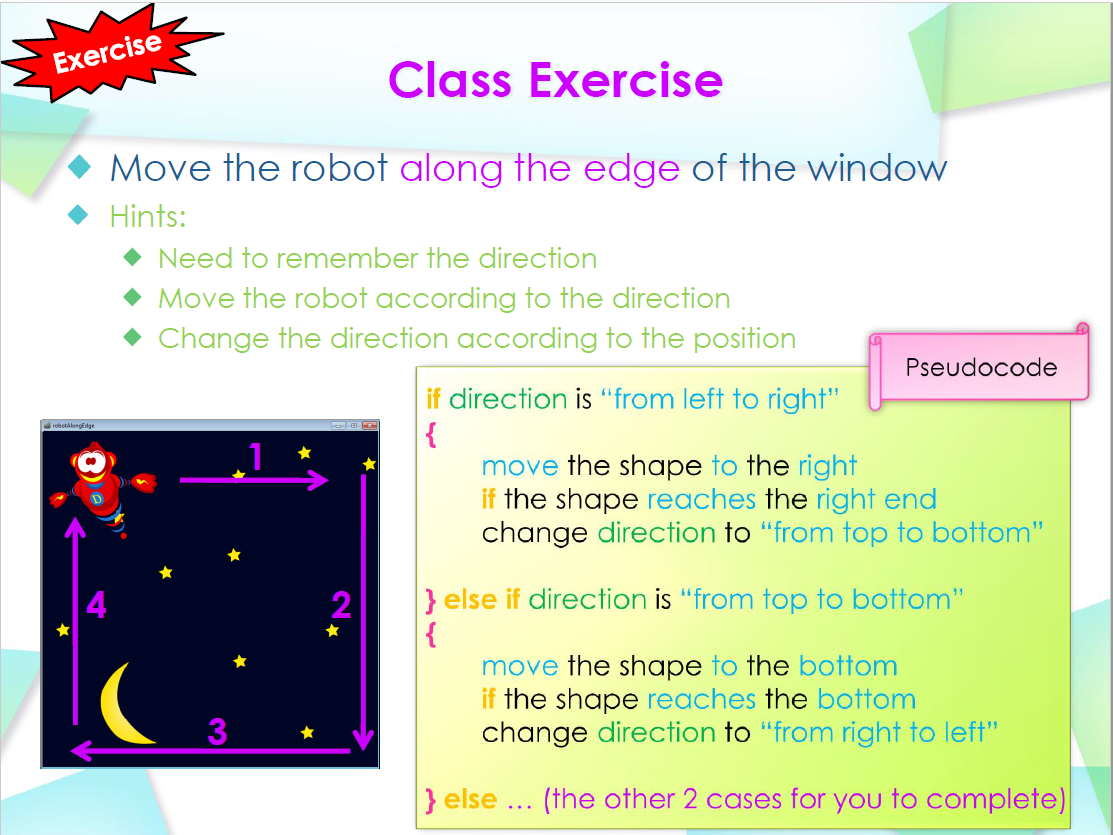
Question: How to complete this program with processing?
void draw() { image(bgImg, 0, 0); // display the background image(robotImg, robotX, robotY); // display the robot if(direction == 1) { velX = speed; velY = 0; if(robotX == width-300)//reach the right end { direction = 2; } }else if(direction == 2) { velX = 0; velY = speed; if(robotY == height-300)//reach the lower edge { direction = 3; }
Exercise Move the robot along the edge of the window Hints: Need to remember the direction Move the robot according to the direction Change the direction according to the position Pseudocode if direction is "from left to right" robotlongEdge move the shape to the right change direction to "from top to bottom" } else if direction is "from top to bottom" if the shape reaches the bottom change direction to "from right to left" } else ... (the other 2 cases for you to complete)
Step by Step Solution
There are 3 Steps involved in it

Get step-by-step solutions from verified subject matter experts
 Study Help