







Question: 1. Write a GUI program that displays your name and address when a button is clicked. The program's window should appear as the sketch
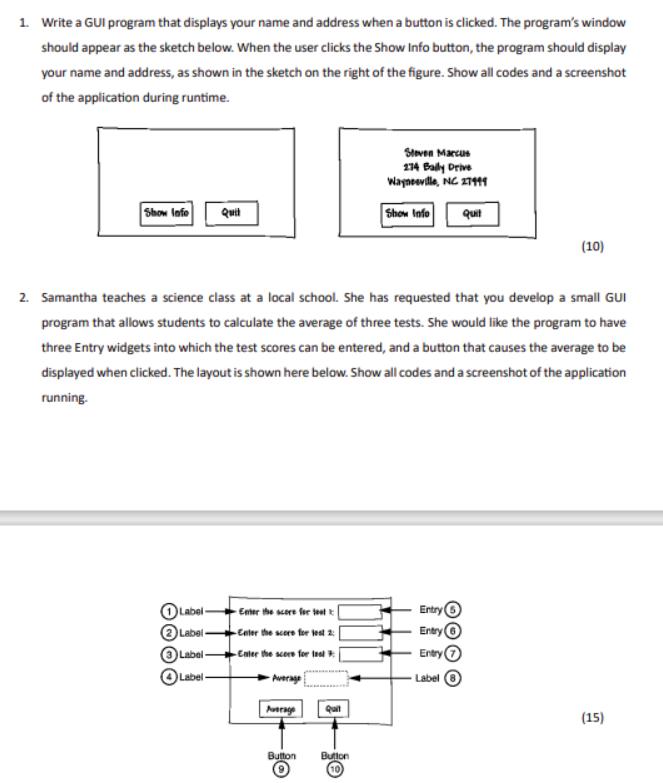
1. Write a GUI program that displays your name and address when a button is clicked. The program's window should appear as the sketch below. When the user clicks the Show Info button, the program should display your name and address, as shown in the sketch on the right of the figure. Show all codes and a screenshot of the application during runtime. Show Info Quit Label- Label Label- Label Enter the score for test -Enter the score for test 2: -Enter the score for test Average 2. Samantha teaches a science class at a local school. She has requested that you develop a small GUI program that allows students to calculate the average of three tests. She would like the program to have three Entry widgets into which the test scores can be entered, and a button that causes the average to be displayed when clicked. The layout is shown here below. Show all codes and a screenshot of the application running. Average Button Quil Steven Marcus 274 Bally Drive Waynesville, NC 27999 Show Info Button Quit Entry Entry Entry( Label (10) (15)
Step by Step Solution
3.41 Rating (157 Votes )
There are 3 Steps involved in it
Here In this GUI program Ill use Python and the Tkinter library to create a simple program that displays your name and address when a button is clicke... View full answer

Get step-by-step solutions from verified subject matter experts
 Study Help