







Question: Question#1: Complete the Python program below to display the name of the most recently added dataset and collect the total number of datasets currently listed
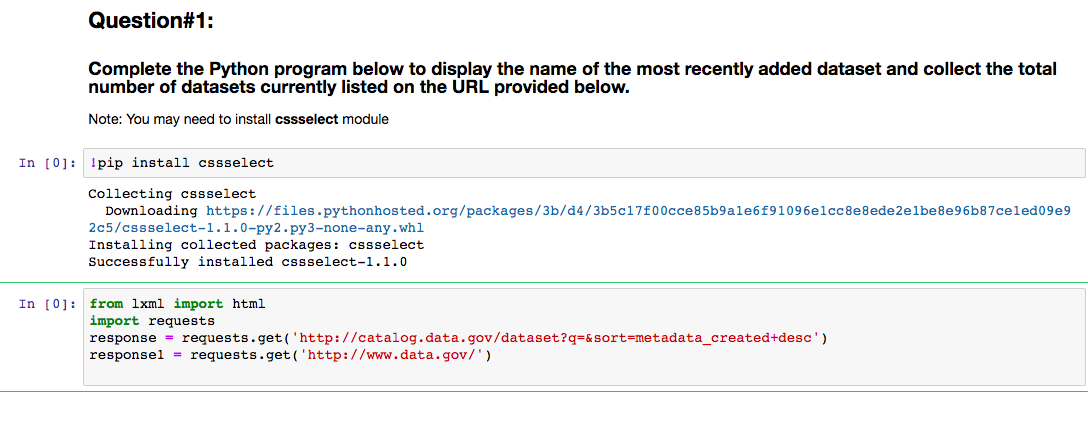
Question#1: Complete the Python program below to display the name of the most recently added dataset and collect the total number of datasets currently listed on the URL provided below. Note: You may need to install cssselect module In [0]: pip install cssselect Collecting cssselect Downloading https://files.pythonhosted.org/packages/3b/d4/3b5c17f00cce85b9ale6f91096e1cc8e8ede2elbe8e96b87celed09e9 2c5/cssselect-1.1.0-py2.py3-none-any.whl Installing collected packages: cssselect Successfully installed cssselect-1.1.0 In [0]: from lxml import html import requests response = requests.get('http://catalog.data.gov/dataset?q=&sort=metadata_created+desc') responsel = requests.get('http://www.data.gov/') Question#1: Complete the Python program below to display the name of the most recently added dataset and collect the total number of datasets currently listed on the URL provided below. Note: You may need to install cssselect module In [0]: pip install cssselect Collecting cssselect Downloading https://files.pythonhosted.org/packages/3b/d4/3b5c17f00cce85b9ale6f91096e1cc8e8ede2elbe8e96b87celed09e9 2c5/cssselect-1.1.0-py2.py3-none-any.whl Installing collected packages: cssselect Successfully installed cssselect-1.1.0 In [0]: from lxml import html import requests response = requests.get('http://catalog.data.gov/dataset?q=&sort=metadata_created+desc') responsel = requests.get('http://www.data.gov/')
Step by Step Solution
There are 3 Steps involved in it

Get step-by-step solutions from verified subject matter experts
 Study Help