







Question: Ran the application but getting error code message. Need assistance in fixing the error. Public Class frmMain Dim a As String Dim c As String
Ran the application but getting error code message. Need assistance in fixing the error.
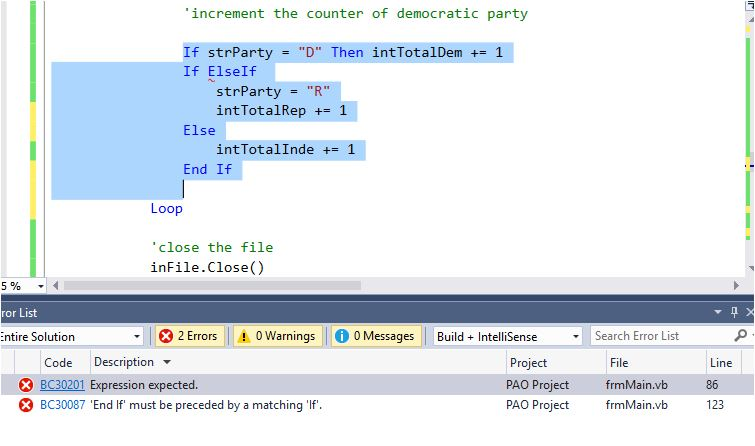
Public Class frmMain Dim a As String
Dim c As String
Dim fileLoc As String = "A:\One.txt"
Private Sub btnWrite_Click(ByVal Sender As Object, ByVal e As System.EventArgs) Handles btnWrite.Click Dim OutFile As IO.StreamWriter 'check whether the input text box for party and age remains empty or not If txtParty.Text String.Empty AndAlso txtAge.Text String.Empty Then 'if it is not empty, open the text file "pao.txt" using AppendText() method to write the data 'into the file. 'open the file for append OutFile = IO.File.AppendText("Pao.txt") OutFile.WriteLine(txtParty.Text.ToUpper)
'the WriteLine() method accepts the input pararmeter 'txtAge', writes a data 'into the sequential access file; and each data should be followed by the new line character
OutFile.WriteLine(txtAge.Text) 'Close the file OutFile.Close()
'Clear the text boxes and set the focus txtParty.Text = String.Empty txtAge.Text = String.Empty txtParty.Focus()
'clear the labels that display the totals
'refresh the labels boxes when the user needs to choose another political party 'clear the labels that display the totals
lblDemo.Text = String.Empty lblRep.Text = String.Empty lblInde.Text = String.Empty
'the MessageBox.Show() method displays the number fo test scores in the file Else MessageBox.Show("Please enter a party and age.", "Political Awareness Organization", MessageBoxButtons.OK, MessageBoxIcon.Information)
End If
End Sub
Private Sub btnTotals_Click(ByVal sender As Object, ByVal e As System.EventArgs) Handles btnTotals.Click 'declare the variables
Dim strParty As String Dim strAge As String
'declare the Stream Reader variable Dim inFile As IO.StreamReader
'counter for total Democrats Dim intTotalDem As Integer 'counter for total Republicans Dim intTotalRep As Integer 'Counter for total Independents Dim intTotalInde As Integer
'determine whether the file exists If IO.File.Exists("PAO.txt") = True Then 'if the file exists, open the file to read the data from file 'Open the file for input inFile = IO.File.OpenText("PAO.txt")
'process the loop instructions until there are no more characters to read Do Until inFile.Peek() = -1
'read the party and age strParty = inFile.ReadLine.ToUpper strAge = inFile.ReadLine
'update the appropriate counter value for Democratic party 'if the party value is 'D' 'increment the counter of democratic party
If strParty = "D" Then intTotalDem += 1 If ElseIf strParty = "R" intTotalRep += 1 Else intTotalInde += 1 End If
Loop
'close the file inFile.Close()
'Display the total democrats in a label box lblDemo.Text = intTotalDem.ToString lblRep.Text = intTotalRep.ToString lblInde.Text = intTotalInde.ToString Else MessageBox.Show("Can't find pao.txt file", "Political Awareness Organization", MessageBoxButtons.OK, MessageBoxIcon.Information) End If End Sub
Private Sub btnExit_Click(sender As Object, e As EventArgs) Handles btnExit.Click 'Close the form Me.Close() End Sub
Private Sub txtParty_TextChanged(sender As Object, e As EventArgs) Handles txtParty.TextChanged
End Sub
Private Sub txtParty_KeyPress(ByVal Sender As Object, ByVal e As System.Windows.Forms.KeyPressEventArgs) Handles txtParty.KeyPress 'allow the text box to accept only specific letters and the backspace key 'the keys such as specific letters and backspace key are only allowed to enter
If e.KeyChar "D" AndAlso e.KeyChar "d" AndAlso e.KeyChar "R" AndAlso e.KeyChar "r" AndAlso e.KeyChar "I" AndAlso e.KeyChar "i" AndAlso e.KeyChar ControlChars.Back Then e.Handled = True End If End Sub
Private Sub TextBox2_TextChanged(sender As Object, e As EventArgs) Handles txtAge.TextChanged
End Sub
Private Sub txtAge_KeyPress(sender As Object, e As KeyPressEventArgs) Handles txtAge.KeyPress 'allow the text to accept only specific letters and the backspace key 'the keys 0 to 9, period, and backspace are only allowed to enter If (e.KeyChar "9") AndAlso e.KeyChar ControlChars.Back Then e.Handled = True End If End Sub End Class
increment the counter of democratic party If strParty-"D" Then intTotalDem += 1 If ElseIf strParty = "R" intTotalRep += 1 Else intTotallnde += 1 End If Loop close the file inFile.Close() 5% ror List ntire Solution *2 Errors | A0Warnings | 0 Messages Build-IntelliSense Search Error List Project PAO Project PAO Project File frmMain.vb frmMain.vb Code Description BC30201 Expression expected. BC30087 'End If must be preceded by a matching 'If ine 86 123
Step by Step Solution
There are 3 Steps involved in it

Get step-by-step solutions from verified subject matter experts
 Study Help