







Question: Trying to fix this code for my VB class, I want to keep the code I have and fix it. Can anyone help? Option Explicit
Trying to fix this code for my VB class,
I want to keep the code I have and fix it. Can anyone help?
Option Explicit On Option Strict On Option Infer Off
'declare arrays Private intMins As Integer = {465, 415, 350, 300, 0} Private strGrade As String = {"A", "B", "C", "D", "F"}
Public Class frmMain Private intMins As Object
Private Sub btnExit_Click(sender As Object, e As EventArgs) Handles btnExit.Click Me.Close() End Sub
Private Sub txtPoints_Enter(sender As Object, e As EventArgs) Handles txtPoints.Enter txtPoints.SelectAll() End Sub
Private Sub txtPoints_KeyPress(sender As Object, e As KeyPressEventArgs) Handles txtPoints.KeyPress ' accepts only numbers and the Backspace key
If (e.KeyChar "9") AndAlso e.KeyChar ControlChars.Back Then e.Handled = True End If End Sub
Private Sub txtPoints_TextChanged(sender As Object, e As EventArgs) Handles txtPoints.TextChanged lblGrade.Text = String.Empty End Sub
Private Sub btnDisplay_Click(sender As Object, e As EventArgs) Handles btnDisplay.Click Dim intGrade As Integer Dim searchForPoints As Integer Dim intPoints() As Integer = {450, 400, 350, 300, 0} Dim strGrades() As String = {"A", "B", "C", "D", "F"} Dim dblPoints As Double Dim intSub As Integer searchForPoints = Integer.Parse(Me.txtPoints.Text)
If searchForPoints >= 0 Or searchForPoints
End If For intGrade = 0 To 4
Next If searchForPoints
lblGrade.Text = strGrades(intGrade + 1) End If Double.TryParse(txtPoints.Text, dblPoints) If dblPoints 500 Then MessageBox.Show("Points must be within the range of 0 - 500") Else For intSub As Integer = intMins.GetUpperBound(0) To 0 Step -1
Next Dim blnDone As Boolean = Nothing If dblPoints >= Int(intSub) AndAlso blnDone = False Then strGrades = strGrades(intSub) blnDone = True End If
Next intSub lblGrade.Text = strGrades End If txtPoints.Focus() End Sub End Class
Here is the assignment:
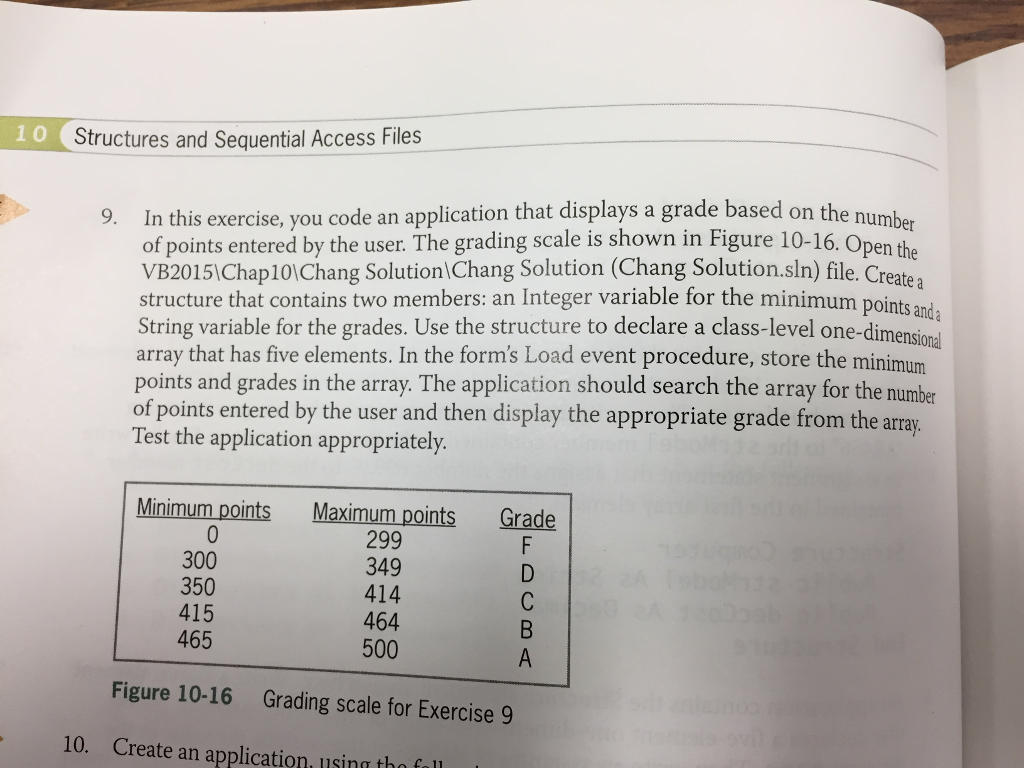
1 0 Structures and Sequential Access Files 9. In this exercise, you code an application that displays a grade based on the number of points entered by the user. The grading scale is shown in Figure 10-16. Open the VB20151Chap101Chang Solution Chang Solution (Chang Solution.sln) file. Create: structure that contains two members: an Integer variable for the minimum points and String variable for the grades. Use the structure to declare a class-level one-dime array that has five elements. In the form's Load event procedure, store the minimum points and grades in the array. The application should search the array for the number of points entered by the user and then display the appropriate grade from the array Test the application appropriately. mensional Minimum points Maximum points Grade 300 350 415 465 299 349 414 464 500 Figure 10-16 Grading scale for Exercise 9 10. Create an application. using tha fall 1 0 Structures and Sequential Access Files 9. In this exercise, you code an application that displays a grade based on the number of points entered by the user. The grading scale is shown in Figure 10-16. Open the VB20151Chap101Chang Solution Chang Solution (Chang Solution.sln) file. Create: structure that contains two members: an Integer variable for the minimum points and String variable for the grades. Use the structure to declare a class-level one-dime array that has five elements. In the form's Load event procedure, store the minimum points and grades in the array. The application should search the array for the number of points entered by the user and then display the appropriate grade from the array Test the application appropriately. mensional Minimum points Maximum points Grade 300 350 415 465 299 349 414 464 500 Figure 10-16 Grading scale for Exercise 9 10. Create an application. using tha fall
Step by Step Solution
There are 3 Steps involved in it

Get step-by-step solutions from verified subject matter experts
 Study Help