







Question: Random Number Guessing Game Your program Assignment Write a program that generates a random number between 1 and 100 and asks the user to guess
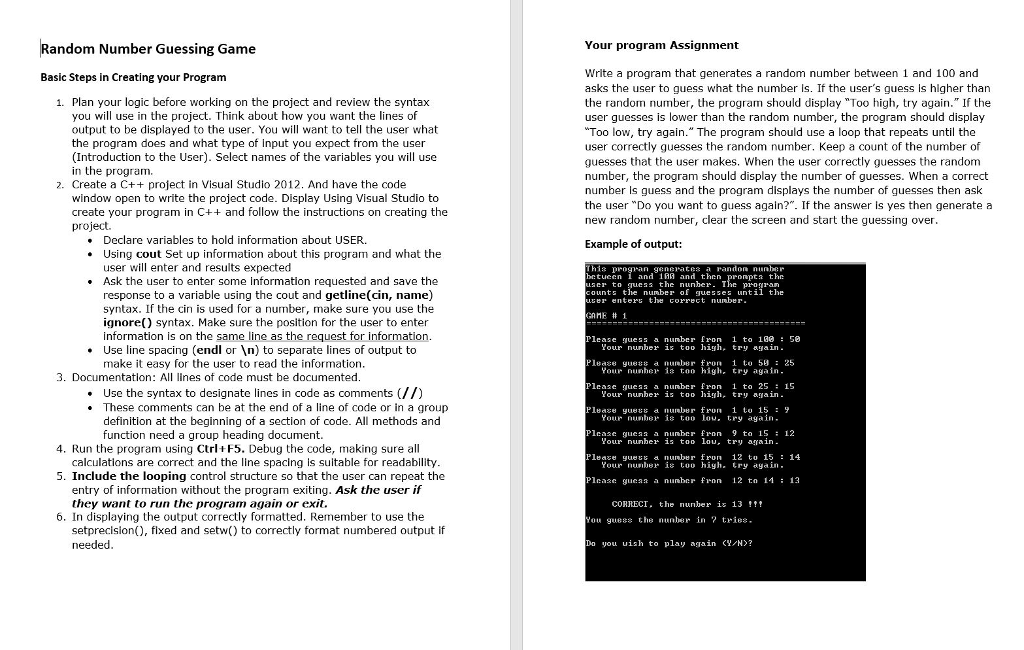
Random Number Guessing Game Your program Assignment Write a program that generates a random number between 1 and 100 and asks the user to guess what the number Is. If the user's guess is higher than the random number, the program should display "Too high, try again." If the user guesses is lower than the random number, the program should display Too low, try again." The program should use a loop that repeats until the user correctly guesses the random number. Keep a count of the number of guesses that the user makes. When the user correctly guesses the random number, the program should display the number of guesses. When a correct number Is guess and the program displays the number of guesses then ask the user "Do you want to guess again?". If the answer is yes then generate a new random number, clear the screen and start the guessing over Basic Steps in Creating your Program 1. Plan your logic before working on the project and review the syntax you will use in the project. Think about how you want the lines of output to be displayed to the user. You will want to tell the user what the program does and what type of input you expect from the user (Introduction to the User). Select names of the variables you will use in the program. 2. Create a C++ project in Visual Studio 2012. And have the code window open to write the project code. Display Using Visual Studio to create your program in C++ and follow the instructions on creating the project . Declare variables to hold information about USER. . Using cout Set up information about this program and what the Example of output: user will enter and results expected be tuen i and and then Ask the user to enter some information requested and save the ser to quessthe nunher. The p-ogran zer enter the correct nunber nME # 1 ounts the nunber f guesses until the response to a variable using the cout and getline(cin, name) syntax. If the cin is used for a number, make sure you use the ignore) syntax. Make sure the position for the user to enter information is on the same line as the request for information Please guess a nunber fron 1 to 100 : 50 Your nunber is too high, try again . Use line spacing (endl or n) to separate lines of output to makeit easy for the user to read the information Pleaze gues a number tron 1to 5 25 Your nunher i too high. try again 3. Documentation: All lines of code must be documented Please guess a nunber fron 1 to 2515 Your nunber is too high, try again . Use the syntax to designate lines in code as comments(//) . These comments can be at the end of a line of code or in a group Pleaze yue a nunber fron 1 to 15 Your nunber is too lou. try again definition at the beginning of a section of code. All methods and function need a group heading document. Plcase gueaa a nunber fron 9 ta 1512 Your nunher is too lou. try arain 4. Run the program using Ctrl F5. Debug the code, making sure all calculations are correct and the line spacing is suitable for readability Pleaze gues a nunber fron 12 to 15 14 Your nuber is too high. try again S. Include the looping control structure so that the user can repeat the Plcase gueas a nunber fron 12 t 1113 entry of information without the program exiting. Ask the user if they want to run the program again or exit CORRECI. the nunber is 13 !! guess the nunber in 6. In displaying the output correctly formatted. Remember to use the tries ou setprecision, flxed and setw) to correctly format numbered output if needed Do you uish to play againN
Step by Step Solution
There are 3 Steps involved in it

Get step-by-step solutions from verified subject matter experts
 Study Help