







Question: re the default gateway CIS 2 7 1 - Module 1 Lab: Build A Small Network Submit one Word document with a screenshot of: (
re the default gateway CIS Module Lab: Build A Small Network
Submit one Word document with a screenshot of: change orientation to landscape if needed for topology
Topology including documentation
Any PC: ARP table entries showing
Laptop: IP Configuration screen showing DHCP functioning correctly
Laptop: Successful ping to PC on other LAN
Laptop: Successful access to Server webpage using domain name on port
Any Switch: ARP table entries showing
Any Switch: MAC Address Table entries showing
Both Routers: Show IP interface brief
Both Routers: Routing table routes in the table, route in the table
Example Topology
Add documantation to the topology
C estacnds
Jbu wasword Nr insoly
mAMe XX:AITMN
manre ncimbaht
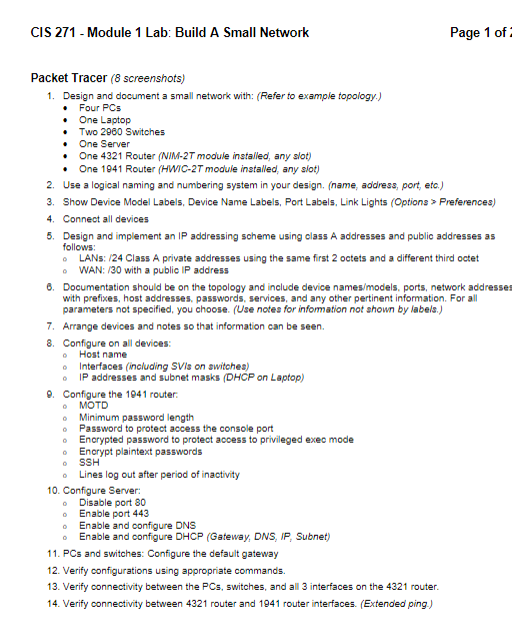
Verify configurations using appropriate commands.
Verify connectivity between the PCs switches, and all interfaces on the router.
Verify connectivity between router and router interfaces. Extended ping.
CIS Module Lab: Build A Small Network Page of
Submit one Word document with a screenshot of: change orientation to landscape if needed for topology
Topology including documentation
Any PC: ARP table entries showing
Laptop: IP Configuration screen showing DHCP functioning correctly
Laptop: Successful ping to PC on other LAN
Laptop: Successful access to Server webpage using domain name on port
Any Switch: ARP table entries showing
Any Switch: MAC Address Table entries showing
Both Routers: Show IP interface brief
Both Routers: Routing table routes in the table, route in the table
Example Topology Add documentation to the topology screenshot. Any PC: ARP table entries showing
Laptop: IP Configuration screen showing DHCP functioning correctly
Laptop: Successful ping to PC on other LAN
Laptop: Successful access to Server webpage using domain name on port
Any Switch: ARP table entries showing
Any Switch: MAC Address Table entries showing
Both Routers: Show IP interface brief
Both Routers: Routing table routes in the table, route in the table
Example Topology Add documentation to the topology
Do not use the same numbers used here
Step by Step Solution
There are 3 Steps involved in it
1 Expert Approved Answer
Step: 1 Unlock

Question Has Been Solved by an Expert!
Get step-by-step solutions from verified subject matter experts
Step: 2 Unlock
Step: 3 Unlock
 Study Help