



Question: Read a text file and output: - The alphabetic character ( s ) that appear most frequently in the file ( note: for all counts,
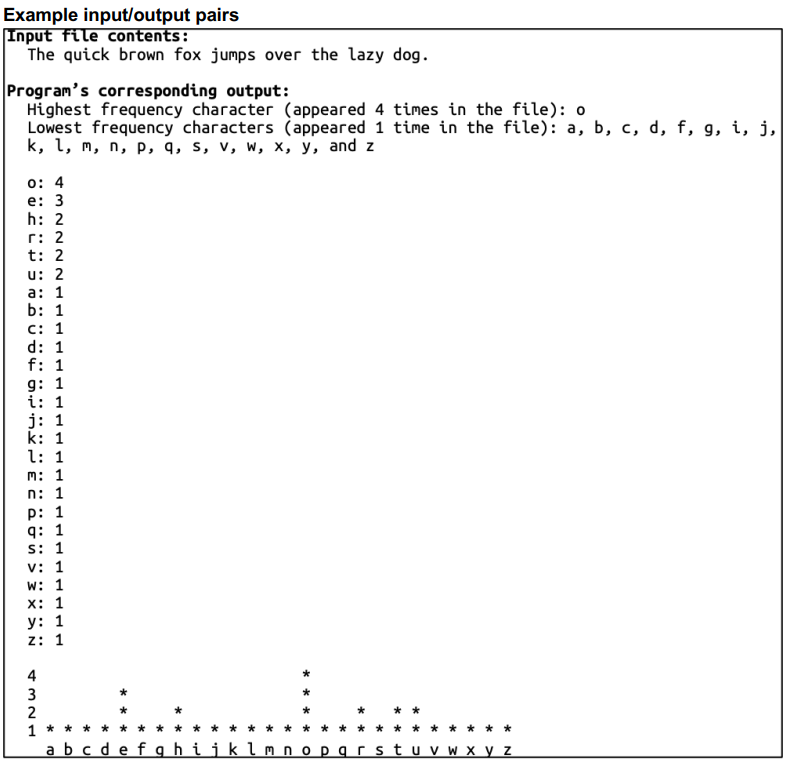
Read a text file and output: The alphabetic characters that appear most frequently in the file note: for all counts, ignore the characters case. eg treat a and A as the same character The alphabetic characters that appear least frequently in the file A list of the characters and their frequencies, sorted from most frequent to least frequent. Characters that appear with the same frequency should be sorted alphabetically A bar chart displaying the frequencies of each character with the bars displaying with asterisk. The horizontal axis should be the characters from az with a space between each character.
Specifications All output should be directed to the standard output device using cout. Output formatting should match the example above and the sample output files given for the tests provided. Note the proper use of singular and plural character characters, timetimes and use of commas and and when listing characters. Your main functions signature should be: mainint argc, char argv Your program will be run with the program name followed by the name of the input file your file should open and read argv For example, if one types program testinput.txt at the command prompt, program should open testinput.txt from the current directory, read all of the text in the file, and produce output to the standard output device using cout Your main function must be implemented in programcpp Place the function prototypes for all functions you write to call in your main in programfunctions.h Place the function implementations for all functions you write to call in your main in programfunctions.cpp The only header files that may be included in your code are: iostream, fstream, iomanip, cmath, cctype, and programfunctions.h You will submit a zip file only a zip file will be accepted containing programcpp programfunctions.h and programfunctions.cpp Testing Text files containing sample input and the corresponding expected output for program are also attached to the assignment. A makefile has been included to run your program with the sample input and compare the results to the expected output. In order to use the makefile, ensure that your programfunctions.h programfunctions.cpp and programcpp files and all of the files attached to the assignment checkitcpp correcttesttxt correcttesttxt makefile, test input.txt testinput.txt are in the same directory. Your program will be graded using this same method with different inputoutput file pairs. To run the included tests on your program, type: make programtest make programtest
Example inputoutput pairs
Input file contents:
The quick brown fox jumps over the lazy dog.
Program's corresponding output:
Highest frequency character appeared times in the file: o
Lowest frequency characters appeared time in the file: a b c d f g i j k l m n p q s v w x y and z
:
e:
h:
r:
t:
u:
a:
b:
c:
d:
f:
g:
i:
j:
k:
l:
m:
n:
p:
q :
s:
v :
w:
x :
y:
z:
abcdefghijklmnopqrstuvwxyz
Step by Step Solution
There are 3 Steps involved in it
1 Expert Approved Answer
Step: 1 Unlock

Question Has Been Solved by an Expert!
Get step-by-step solutions from verified subject matter experts
Step: 2 Unlock
Step: 3 Unlock