







Question: Read and complete the first case study from our Business Analytics eText. Your case study will require you to demonstrate your understanding and application of
Read and complete the first case study from our Business Analytics eText. Your case study will require you to demonstrate your understanding and application of business analytics concepts. You will be asked to complete Excel functions and tasks and answer questions from the text. Your case study will be found in Chapter 1. Some of the numbers listed in your text will be different from the file provided to you. Use the file provided in the Content area of our course, week 3, Case Study Assignment 1 Excel File.
Worth 50 points, your case study will explore concepts covered in Weeks 1, 2 and 3 and encourage critical analysis. Your case study will ask for opinions and recommendations. Your claims should be supported by evidence including references from the text, valid outside resources, or rational arguments. Your case study should exhibit strong structure and organization. A concise introduction with a clear preview, a well-written body using complete sentences, in-text citations when necessary and a clear summary in the conclusion are expected.
Excel functions you will use include SUM, division, multiplication, COUNTIF, copy and pasting, Gross Sales are overall sales unadjusted for costs, and Market Share (corporation total sales/ industry total sales). You will also need to use filtering and sorting.
Aside from just describing the analysis, discuss your interpretation of the data. You may include images from your analysis in the report, but images should not constitute the majority of the report. If you use a table or image, you must spend some time discussing it within the body of the text. A good rule of thumb is at least a paragraph of text to describe each image.
College-level writing is expected, points will be deducted for grammar and spelling errors. Include and upload your accompanying Excel file. Your submission must be in APA format. Include a title page with your name, case study title, and date. Your report should be at least 2 full pages, 1-inch margins 12-point Times New Roman font, double-spaced. References and citations must be provided. Your Reference List should be provided at the end of your paper. Your report should be submitted in Word (.docx) format. Information for downloading MS Office 2016 for free is provided in the "Start Here" module. Please refer to the Case Study Assignment tab in the Assignment Overview module for a copy of the rubric for evaluation of your Case Study. Your submitted Excel file will be evaluated under the Content section of the rubric.
Make sure you complete each of the tasks listed in your eText for PLE Case Study 1.
Here are some details you need to complete the file.
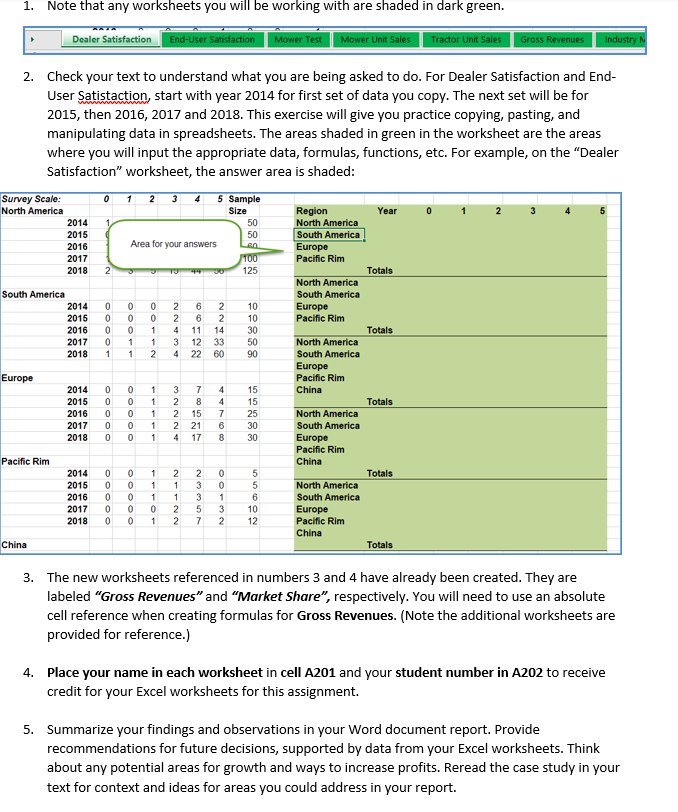
1. Note that any worksheets you will be working with are shaded in dark green. Dealer Satisfaction End-User Satisfaction Mower Test Mower Unit Sales Tractor Unit Sales Gross Revenues Industry M 2. Check your text to understand what you are being asked to do. For Dealer Satisfaction and End- User Satistaction, start with year 2014 for first set of data you copy. The next set will be for 2015, then 2016, 2017 and 2018. This exercise will give you practice copying, pasting, and manipulating data in spreadsheets. The areas shaded in green in the worksheet are the areas where you will input the appropriate data, formulas, functions, etc. For example, on the "Dealer Satisfaction" worksheet, the answer area is shaded: 0 1 2 3 4 5 Sample Survey Scale: North America Size Region Year 0 5 2014 50 North America South America 2015 50 2016 Area for your answers Lea Europe 2017 Pacific Rim 100 125 2018 2 Totals North America South America South America 2014 0 0 0 Europe 2015 0 0 10 10 30 0 2016 0 0 1 Pacific Rim 14 Totals 2017 0 1 1 North America 33 50 60 90 2018 1 1 2 South America Europe Europe Pacific Rim 1 China 15 15 1 Totals 2014 0 0 2015 0 2016 0 2017 2018 0 1 North America 25 30 0 0 1 South America 1 4 17 8 30 Europe Pacific Rim China Pacific Rim 2014 1 2 2 0 Totals 2015 0 1 3 0 1 1 3 1 2016 2017 0 North America South America Europe 0 2 5 3 10 12 2018 0 0 1 2 7 2 Pacific Rim China China Totals 3. The new worksheets referenced in numbers 3 and 4 have already been created. They are labeled "Gross Revenues" and "Market Share", respectively. You will need to use an absolute cell reference when creating formulas for Gross Revenues. (Note the additional worksheets are provided for reference.) 4. Place your name in each worksheet in cell A201 and your student number in A202 to receive credit for your Excel worksheets for this assignment. 5. Summarize your findings and observations in your Word document report. Provide recommendations for future decisions, supported by data from your Excel worksheets. Think about any potential areas for growth and ways to increase profits. Reread the case study in your text for context and ideas for areas you could address in your report. Oooo Ooo ooooo 0000 1 22434 3 ANNNW 2 2 66122 22438 78727 15 2 21 447600 55602 1. Note that any worksheets you will be working with are shaded in dark green. Dealer Satisfaction End-User Satisfaction Mower Test Mower Unit Sales Tractor Unit Sales Gross Revenues Industry M 2. Check your text to understand what you are being asked to do. For Dealer Satisfaction and End- User Satistaction, start with year 2014 for first set of data you copy. The next set will be for 2015, then 2016, 2017 and 2018. This exercise will give you practice copying, pasting, and manipulating data in spreadsheets. The areas shaded in green in the worksheet are the areas where you will input the appropriate data, formulas, functions, etc. For example, on the "Dealer Satisfaction" worksheet, the answer area is shaded: 0 1 2 3 4 5 Sample Survey Scale: North America Size Region Year 0 5 2014 50 North America South America 2015 50 2016 Area for your answers Lea Europe 2017 Pacific Rim 100 125 2018 2 Totals North America South America South America 2014 0 0 0 Europe 2015 0 0 10 10 30 0 2016 0 0 1 Pacific Rim 14 Totals 2017 0 1 1 North America 33 50 60 90 2018 1 1 2 South America Europe Europe Pacific Rim 1 China 15 15 1 Totals 2014 0 0 2015 0 2016 0 2017 2018 0 1 North America 25 30 0 0 1 South America 1 4 17 8 30 Europe Pacific Rim China Pacific Rim 2014 1 2 2 0 Totals 2015 0 1 3 0 1 1 3 1 2016 2017 0 North America South America Europe 0 2 5 3 10 12 2018 0 0 1 2 7 2 Pacific Rim China China Totals 3. The new worksheets referenced in numbers 3 and 4 have already been created. They are labeled "Gross Revenues" and "Market Share", respectively. You will need to use an absolute cell reference when creating formulas for Gross Revenues. (Note the additional worksheets are provided for reference.) 4. Place your name in each worksheet in cell A201 and your student number in A202 to receive credit for your Excel worksheets for this assignment. 5. Summarize your findings and observations in your Word document report. Provide recommendations for future decisions, supported by data from your Excel worksheets. Think about any potential areas for growth and ways to increase profits. Reread the case study in your text for context and ideas for areas you could address in your report. Oooo Ooo ooooo 0000 1 22434 3 ANNNW 2 2 66122 22438 78727 15 2 21 447600 55602
Step by Step Solution
There are 3 Steps involved in it

Get step-by-step solutions from verified subject matter experts
 Study Help