







Question: Really need help with this problem. And I know JavaFX but not familar with Swing. Here is the problem: Create, test, and document a Java
Really need help with this problem. And I know JavaFX but not familar with Swing.
Here is the problem:
Create, test, and document a Java program with the following classes.
Figure: This abstract class (given to you) represents a figure that can be drawn on the GUI.
Rectangle: This extends Figure and implements the functionality needed to draw filled
rectangles with a given color.
Circle: This extends Figure and implements the functionality needed to draw filled circles with
a given color. The GUI should appear as below. (Minor deviations are fine.)
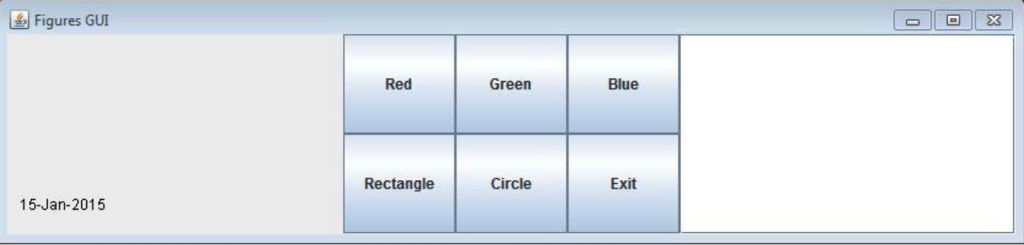 See the GUI specifications:
The current date should appear in the bottom left corner of the drawing. All figures appearing in the GUI should be listed with their String representations in the JTextArea appearing on the right side.
As in the video file, to draw the rectangle, the user first clicks one coordinate and then clicks the second coordinate. To draw a circle, the user first clicks the center and then the second click point is on the circumference.
When the exit button is clicked, serialize the figures and the content of the text area to disk in a file named figures. When the GUI is started, check for the existence of a file named figures and if it exists, open it to populate the figures and the corresponding list in the text area. You must not assume any specific directory structure. For example, do not write to a file named C:\Temp\figures. Instead, use figures to ensure that it gets stored in or retrieved from the current direc
Thanks a lot!
Figures GUI Red Green Blue RectangleCircle Exit 15-Jan-2015
Step by Step Solution
There are 3 Steps involved in it

Get step-by-step solutions from verified subject matter experts
 Study Help