







Question: Recreate the following Website using HTML and CSS Re-create the following homepage using the Bootstrap CSS Framework Rutgers School of Communications homepage: https://comminfo.rutgers.edu/ Re-create the
Recreate the following Website using HTML and CSS
Re-create the following homepage using the Bootstrap CSS Framework
Rutgers School of Communications homepage: https://comminfo.rutgers.edu/ Re-create the homepage in JSBin using Bootstrap v3.x and any custom CSS of your choosing to make the homepage responsive and mobile friendly.
You are to use JSBin which is a website that helps you code in HTML and CSS however if you can do it in another way that works too. - For the slider section, you can use a single image placeholder instead of an actual slider. - For any images or logo, you may use any you would like http://placehold.it or http://placekitten.com to get an image placeholder. - For any backgrounds, you may use plain colors or whatever images you'd like.
- For drop down menus. Only one is good the other drop downs do not need to be added.
- For the slider on the right side YOU CAN HAVE ONE BIG PICTURE THAT SHOWS THE SAME EFFECT.
This is a picture of the homepage:
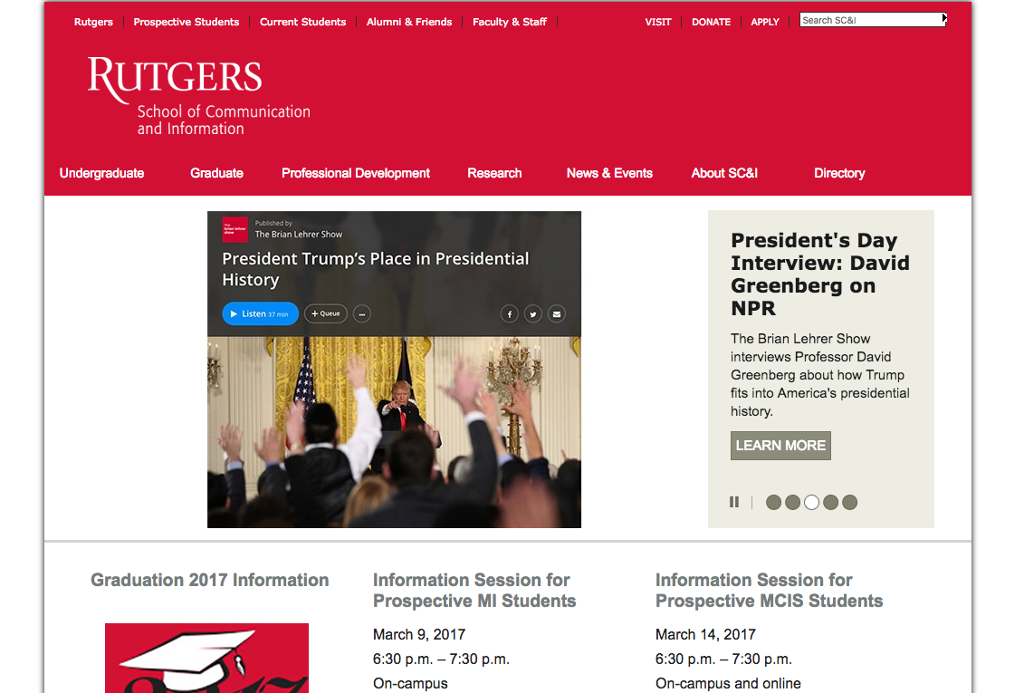
VISIT DONATE APPLY Search SC Rutgers Prospective Students Current Students Alumni & Friends Faculty & Staff RUTGERS School of Communication and Information Undergraduate Graduate Professional Development Research News & Events About SC&l Directory The Brian Lehrer Show President's Day President Trump's Place in Presidential Interview: David History Greenberg on NPR Listen min +Queue The Brian Lehrer Show interviews Professor David Greenberg about how Trump fits into America's presidential history. LEARN MORE Graduation 2017 Information nformation Session for Information Session for Prospective MI Students Prospective MCIS Students March 9, 2017 March 14, 2017 6:30 p.m. 7:30 p.m. 6:30 p.m. 7:30 p.m. On-campus and online On-campus
Step by Step Solution
There are 3 Steps involved in it

Get step-by-step solutions from verified subject matter experts
 Study Help