







Question: Recreate this photograph in a basic 2D OpenGL scene to include the bed, fridge, window and walls/floors. While this OpenGL scene does not have to
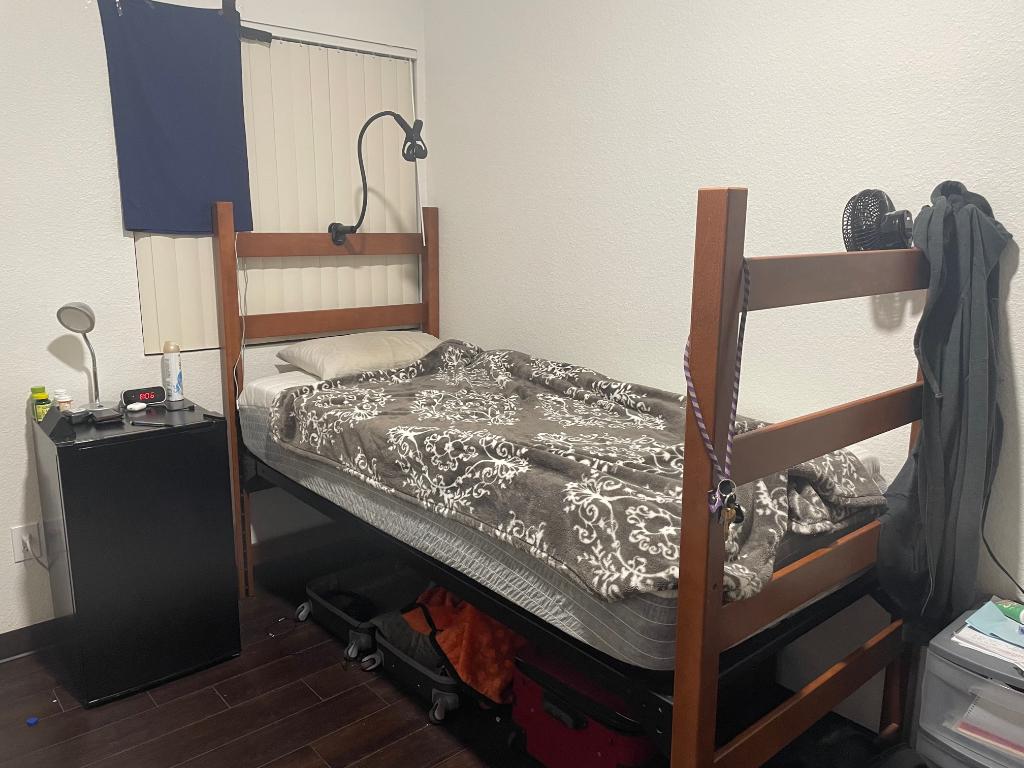
Recreate this photograph in a basic 2D OpenGL scene to include the bed, fridge, window and walls/floors. While this OpenGL scene does not have to be perfect in any way, it still needs to be recognizable. Please post source code, any shaders used and command for running the program! I will be sure to like quick if response is good! Here is what I have so far, feel free to use it at a starting point. Thanks!
#include
int main(void) { GLFWwindow* window;
if (!glfwInit()) return -1;
window = glfwCreateWindow(640, 480, "OpenGL Test", NULL, NULL); if (!window) { glfwTerminate(); return -1; }
glfwMakeContextCurrent(window);
while (!glfwWindowShouldClose(window)) { int width, height; glfwGetFramebufferSize(window, &width, &height); glViewport(0, 0, width, height);
// Clear the screen to white glClearColor(1.0, 1.0, 1.0, 1.0); glClear(GL_COLOR_BUFFER_BIT);
// Draw the bed glBegin(GL_QUADS); glColor3f(0.8, 0.8, 0.8); glVertex2f(-0.7, -0.7); glVertex2f(0.7, -0.7); glVertex2f(0.7, -0.5); glVertex2f(-0.7, -0.5); glEnd();
// Draw the floor glBegin(GL_QUADS); glColor3f(0.9, 0.9, 0.9); glVertex2f(-1.0, -1.0); glVertex2f(1.0, -1.0); glVertex2f(1.0, -0.7); glVertex2f(-1.0, -0.7); glEnd();
// Draw the window glBegin(GL_QUADS); glColor3f(0.7, 0.7, 1.0); glVertex2f(0.6, 0.6); glVertex2f(0.8, 0.6); glVertex2f(0.8, 0.8); glVertex2f(0.6, 0.8); glEnd();
// Draw the fridge glBegin(GL_QUADS); glColor3f(0.5, 0.5, 0.5); glVertex2f(-0.9, -0.7); glVertex2f(-0.7, -0.7); glVertex2f(-0.7, 0.7); glVertex2f(-0.9, 0.7); glEnd();
glfwSwapBuffers(window);
glfwPollEvents(); }
glfwTerminate(); return 0; }
COMMAND FOR RUNNING THIS:
g++ -o test test.cpp -lglfw -lGL -lX11
./test
Step by Step Solution
There are 3 Steps involved in it

Get step-by-step solutions from verified subject matter experts
 Study Help