







Question: Rectangle Class code: import java.awt.Color; import java.awt.Graphics; public class Rectangle { // instance variables: attributes a Rectangle object has private int x; private int y;
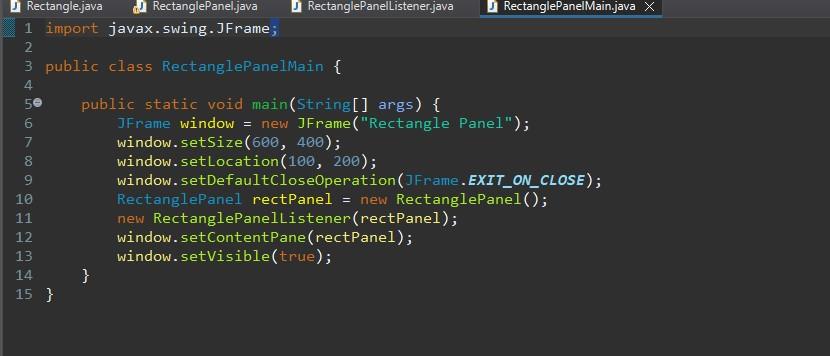
Rectangle Class code:
import java.awt.Color; import java.awt.Graphics;
public class Rectangle { // instance variables: attributes a Rectangle object "has" private int x; private int y; private int width; private int height; private Color color; // constructor public Rectangle(int x, int y, int width, int height, Color color) { this.x = x; this.y = y; this.width = width; this.height = height; this.color = color; } // instance methods: things a Rectangle object can "do" public void draw(Graphics g) { g.setColor(color); g.fillRect(x, y, width, height); g.setColor(Color.BLACK); g.drawRect(x, y, width, height); } public int getX() { return x; } public int getY() { return y; } public int getWidth() { return width; } public int getHeight() { return height; } public Color getColor() { return color; } public void setX(int x) { this.x = x; }
public void setY(int y) { this.y = y; } public void setWidth(int width) { this.width = width; } public void setHeight(int height) { this.height = height; } public void setColor(Color color) { this.color = color; } // *** (1) note there are 2 versions of containsPoint methods // what do you think containsPoint from a Rectangle object's perspective is doing? public boolean containsPoint(int x, int y) { return (x > this.x && x this.y && y
Rectangle Panel Listener Class Code:
import java.awt.Color; import java.awt.event.*;
public class RectanglePanelListener implements MouseListener, MouseMotionListener{ private RectanglePanel rectPanel; //***Reference to the Rectangle we are dragging. This is like Method 2 // that we did in class. Remember, if we save this reference, we can change // the state of the Rectangle being dragged, without having to delete and redraw // Rectangles constantly private Rectangle currentlyDraggingRectangle = null; private int offsetX, offsetY; private boolean dragging; public RectanglePanelListener(RectanglePanel panel) { rectPanel = panel; // save reference to the panel we are listening on rectPanel.addMouseListener(this); // register listener with panel rectPanel.addMouseMotionListener(this); }
// mouseClicked (press/release in same spot) means I want to create a new rectangle // mousePressed (press and hold) means I'm going to possibly start dragging a rectangle @Override public void mouseClicked(MouseEvent ev) { int width = 30; int height = 20; Color color; if (ev.isMetaDown()) { color = Color.BLUE; } else { color = Color.RED; } // modify state to include a new rectangle rectPanel.addRectangle(new Rectangle(ev.getX(), ev.getY(), width, height, color)); // repaint so user can see this new state rectPanel.repaint(); }
@Override public void mouseEntered(MouseEvent ev) { }
@Override public void mouseExited(MouseEvent ev) { currentlyDraggingRectangle = null; }
@Override public void mousePressed(MouseEvent ev) { if(rectPanel.containsPoint(ev.getX(), ev.getY()) != null) { dragging = true; offsetX = ev.getX(); offsetY = ev.getY(); currentlyDraggingRectangle = rectPanel.containsPoint(ev.getX(), ev.getY()); } else { rectPanel.repaint(); } }
public void mouseReleased(MouseEvent ev) { dragging = false; }
@Override public void mouseDragged(MouseEvent e) { if (dragging == true) { offsetX = e.getX()- offsetX; offsetY = e.getY()- offsetX; // offsetX = e.getX() - currentlyDraggingRectangle.getX(); // offsetY = e.getY() - currentlyDraggingRectangle.getY(); currentlyDraggingRectangle.setX(e.getX() + offsetX); currentlyDraggingRectangle.setY(e.getY() + offsetY); rectPanel.repaint(); } rectPanel.repaint(); }
@Override public void mouseMoved(MouseEvent e) { // TODO Auto-generated method stub }
}
Using these 4 classes follow these requirements:
5) Implement the mousePressed method. If there is no rectangle that contains the point, return without doing anything. If you find that there is a Rectangle on the spot you clicked and held on -- store a reference to that rectangle to currentlyDraggedRectangle. Also, consider how to account for the fact that you could be clicking on anywhere inside the rectangle...how are you going to redraw the Rectangle smoothly as you drag it?
6) Implement the mouseDragged method. If currentlyDraggedRectangle is null, this method should return without doing anything. Otherwise change the state of the Rectangle[] with the new Rectangle. Since currentlyDraggedRectangle is a reference to the Rectangle you are dragging, you can modify its attributes, and then have it redrawn in RectanglePanel's paintComponent() with those new coordinates.
7) Implement the mouseReleased and mouseExited methods to set the currentlyDraggedRectangle to null.
a demo video : https://www.youtube.com/watch?v=MOfqM-zy2r0
Also when you first click a spot on the rectangle if you are wanting to move it, make sure that the rectangle doesn't shift a bit to where ever you press you rectangle. It has to start moving where it starts.
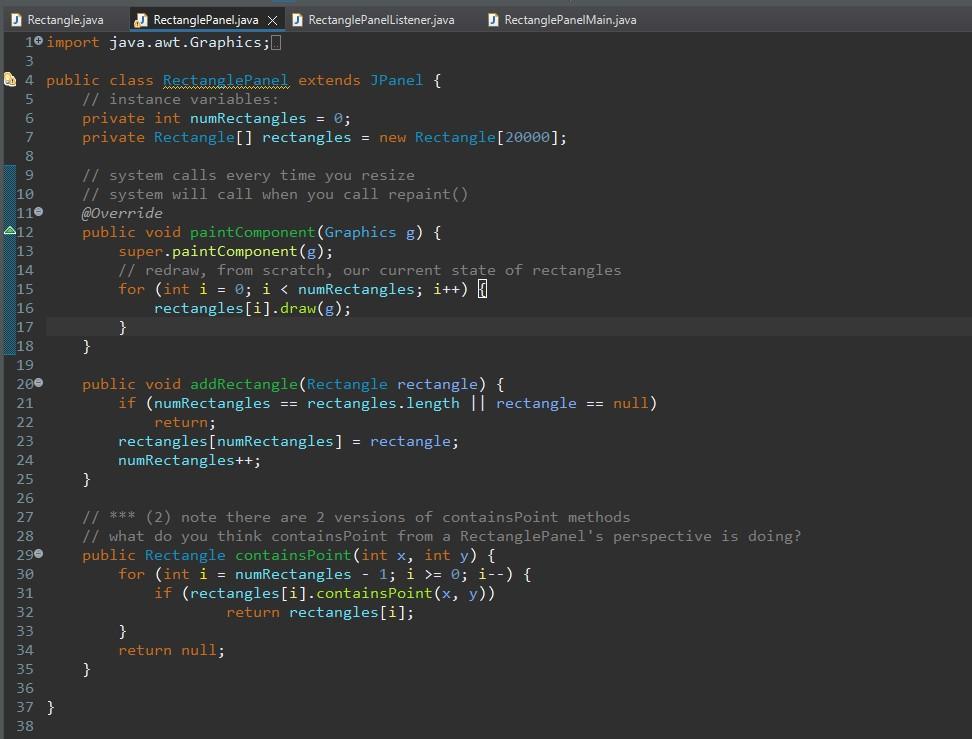
Rectangle.java RectanglePanel.java \ RectanglePanelListenerjava RectanglePanelMain.java tangle.java RectanglePanel.java J RectanglePanelListener.java RectanglePanelMain.java import java. awt. Graphics; public class Rectanglepanel extends JPanel \{ 1/ instance variables: private int numRectangles =0; private Rectangle[] rectangles = new Rectangle[20000]; I/ system calls every time you resize II system will call when you cal1 repaint() @0verride public void paintcomponent(Graphics g) \{ super.paintComponent(g); II redraw, from scratch, our curpent state of rectangles for (int i=;i=0;i ) \{ if (rectangles [i].containsPoint (x,y)) return rectangles [i]; 3 return null; 3 \}
Step by Step Solution
There are 3 Steps involved in it

Get step-by-step solutions from verified subject matter experts
 Study Help