







Question: RED = Primary KEY Green = Foreign key Refer to the attached image of a logical model prepared for Assignment #4. Provide CREATE TABLE SQL
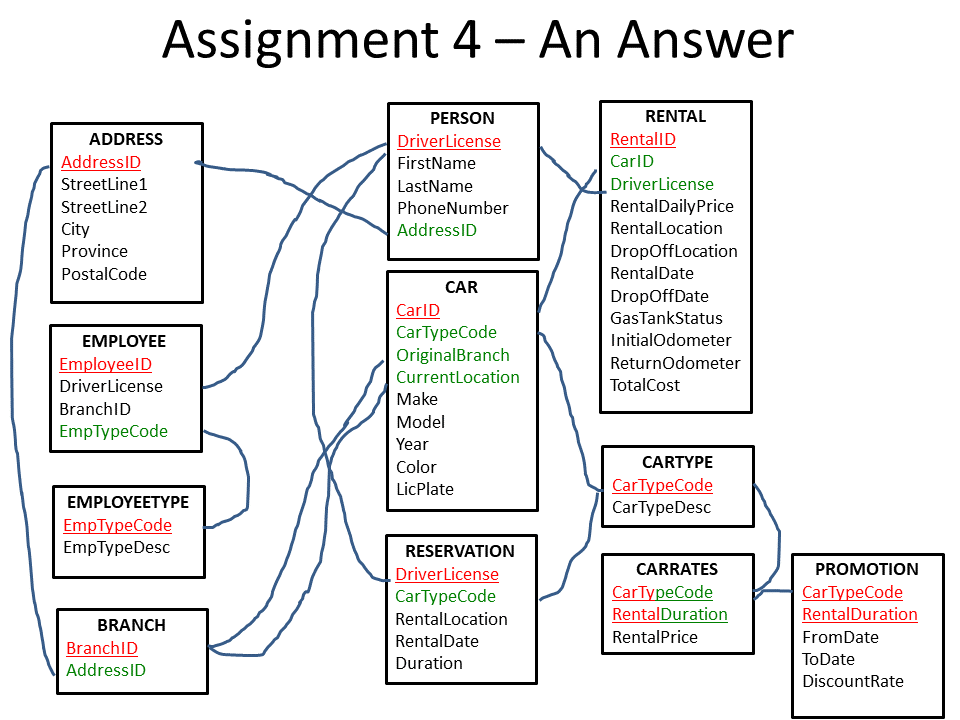
RED = Primary KEY
Green = Foreign key
Refer to the attached image of a logical model prepared for Assignment #4.
- Provide CREATE TABLE SQL statements with that includes definitions of PRIMARY KEY and FOREIGN KEYS.
- Provide CREATE INDEX SQL statements on table columns that you would consider using them for joining or being part of criteria to retrieve records.
- Provide INSERT SQL statements to add at least 10 records of sample data in each table.
I was trying to do this assigment for the last 3hours, But i can not figure out how to setup the primary keys and foreign keys. because it kept giving me error on microsoft access.
Assignment 4 An Answer ADDRESS AddressID StreetLine1 StreetLine2 City Province PostalCode PERSON DriverLicense FirstName Last Name Phone Number Address ID RENTAL Rentalis CarID DriverLicense RentalDaily Price RentalLocation DropOffLocation RentalDate DropOffDate Gas TankStatus InitialOdometer ReturnOdometer TotalCost EMPLOYEE EmployeeID DriverLicense BranchID EmpTypeCode CAR CarlD CarTypeCode OriginalBranch CurrentLocation Make Model Year Color LicPlate CARTYPE CarTypeCode CarTypeDesc EMPLOYEETYPE EmpTypeCode EmpType Desc RESERVATION DriverLicense CarTypeCode RentalLocation RentalDate Duration CARRATES CarTypeCode RentalDuration Rental Price BRANCH BranchID Address ID PROMOTION CarTypeCode RentalDuration FromDate ToDate DiscountRate
Step by Step Solution
There are 3 Steps involved in it

Get step-by-step solutions from verified subject matter experts
 Study Help