







Question: Refactor your war.cpp program by introducing functions to handle different aspects of the game. You will be provided with function prototypes to guide your implementation.
Refactor your war.cpp program by introducing functions to handle different aspects of the game. You will be provided with function prototypes to guide your implementation.
What to Do
Part 1: Review and Prepare
- Ensure your display is correct. Correct any mistakes before proceeding.
Part 2: Implementing Functions
You are provided with the following function prototypes. Implement each function according to its description.
Function Prototype: void preparation();
- Description: Set up any initial states or configurations needed before the game starts. This function does not require input from the user or return any values.
- What it improves: Encapsulates the setup logic, making the
mainfunction cleaner.
Function Prototype: void drawCards(int &card1Value, int &card1Suit, int &card2Value, int &card2Suit);
- Description: Randomly selects two different cards from the deck and assigns their values and suits to the reference parameters provided.
- What it improves: Isolates the card drawing logic, making it reusable and testable.
Function Prototype: void displayCards(const int card1Value, const int card1Suit, const int card2Value, const int card2Suit);
- Description: Clears the screen, displays the game title, and shows the two drawn cards using the values provided.
- What it improves: Separates the display logic from the game logic, allowing for different display options in the future.
Function Prototype: void statistics(int &totalBattles, int &youWon, int &youLost, int &tie, const int card1Value, const int card2Value);
- Description: Updates and displays the game statistics. It modifies the total battles, wins, and ties based on the current hand.
- What it improves: Centralizes the statistics tracking, making it easier to add new statistics in the future.
Function Prototype: bool continueBattle();
- Description: Prompts the user to decide whether to continue the game and returns true for 'y' or false for 'n'.
- What it improves: Provides a clear decision point for continuing the game, making the
mainfunction's flow easier to understand.
Given Code(In C++):
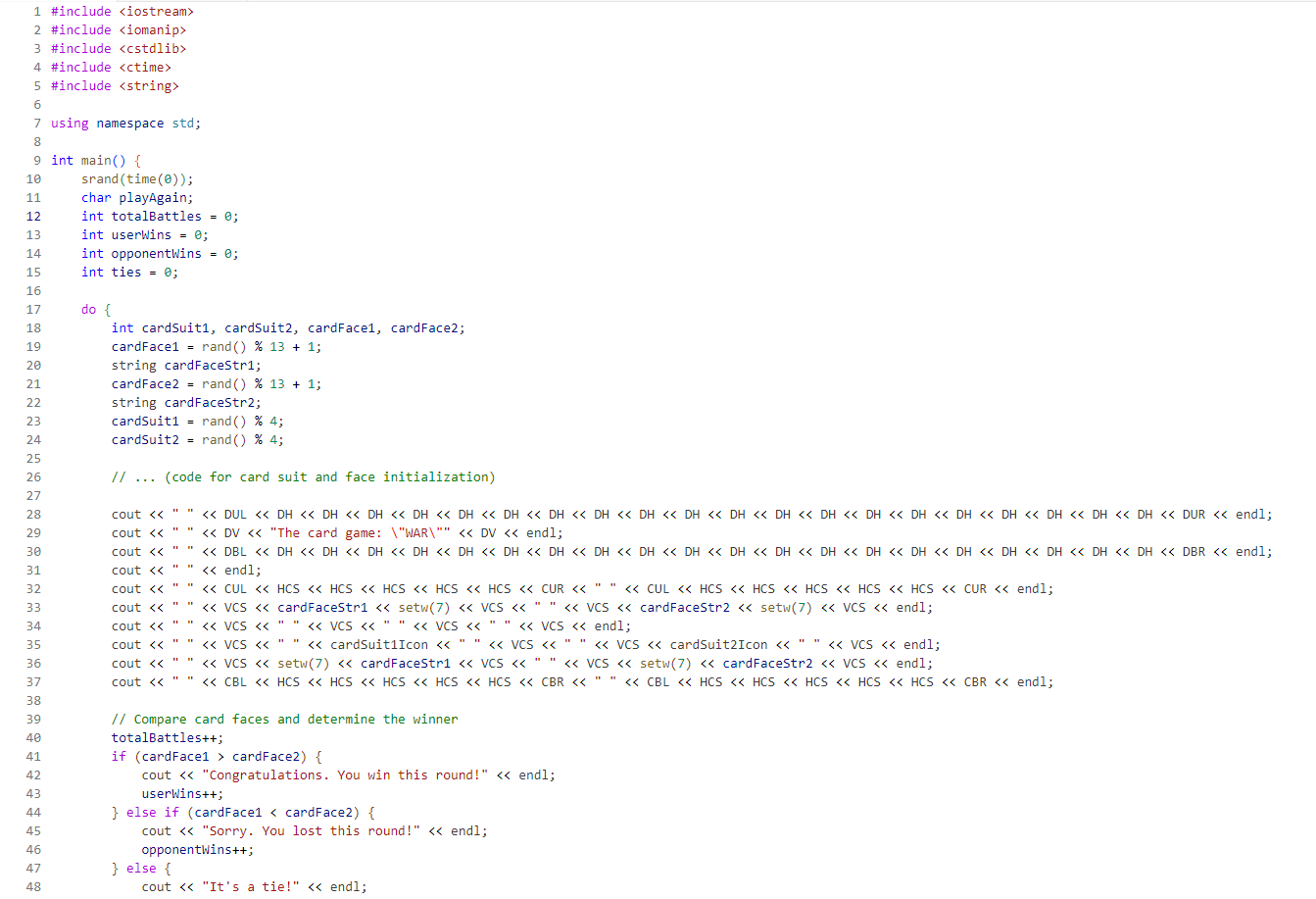
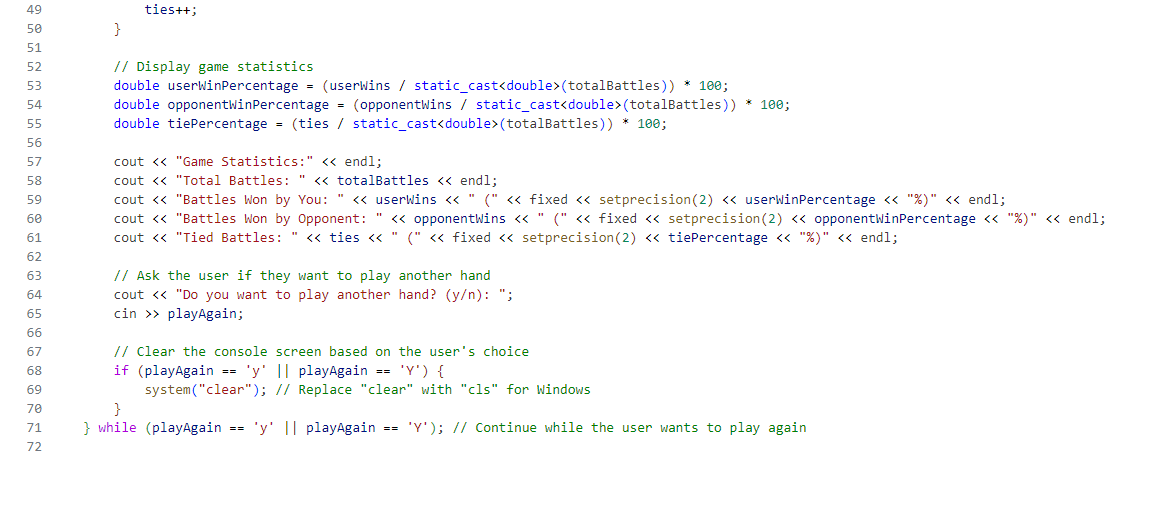
lude iomanip Iude ctime> lude string g namespace std; main(){ srand (time( ) ); char playAgain; int totalBattles =0; int userWins =0; int opponentWins =; int ties =0; do \{ int cardSuit1, cardSuit2, cardFace1, cardFace2; cardFace1 =rand()%13+1; string cardFacestr 1 ; cardFace 2=rand()%13+1; string cardFacestr2; cardSuit1 = rand () \% 4; cardSuit2 = rand ()%4; // (code for card suit and face initialization) cout " " DV "The card game: \ "WAR \"" DV endl; cout " " end 1 ; cout ""VCSsetw(7)cardFaceStr1VCS"VCSsetw(7) cardFaceStr2 VCS endl; cout ""CBLHCSHCSHCSHCSHCSCBR""CBLHCSHCSHCSHCSHCSCBRHAl; // Compare card faces and determine the winner totalBattles++; if (cardFace 1> cardFace2) \{ cout "Congratulations. You win this round!" endl; userwins++; \} else if (cardFace1 ( totalBattles ) ) 100; cout "Game Statistics:" endl; cout "Total Battles: " totalBattles endl; cout "Battles Won by You: " userWins " (" fixed setprecision( 2 ) userWinPercentage "\%)" playAgain; // Clear the console screen based on the user's choice if ( playAgain == ' y ' || playAgain == ' Y ') \{ system("clear"); // Replace "clear" with "cls" for Windows \} \} while (playAgain == ' y playAgain == ' Y '); // Continue while the user wants to play again
Step by Step Solution
There are 3 Steps involved in it

Get step-by-step solutions from verified subject matter experts
 Study Help