







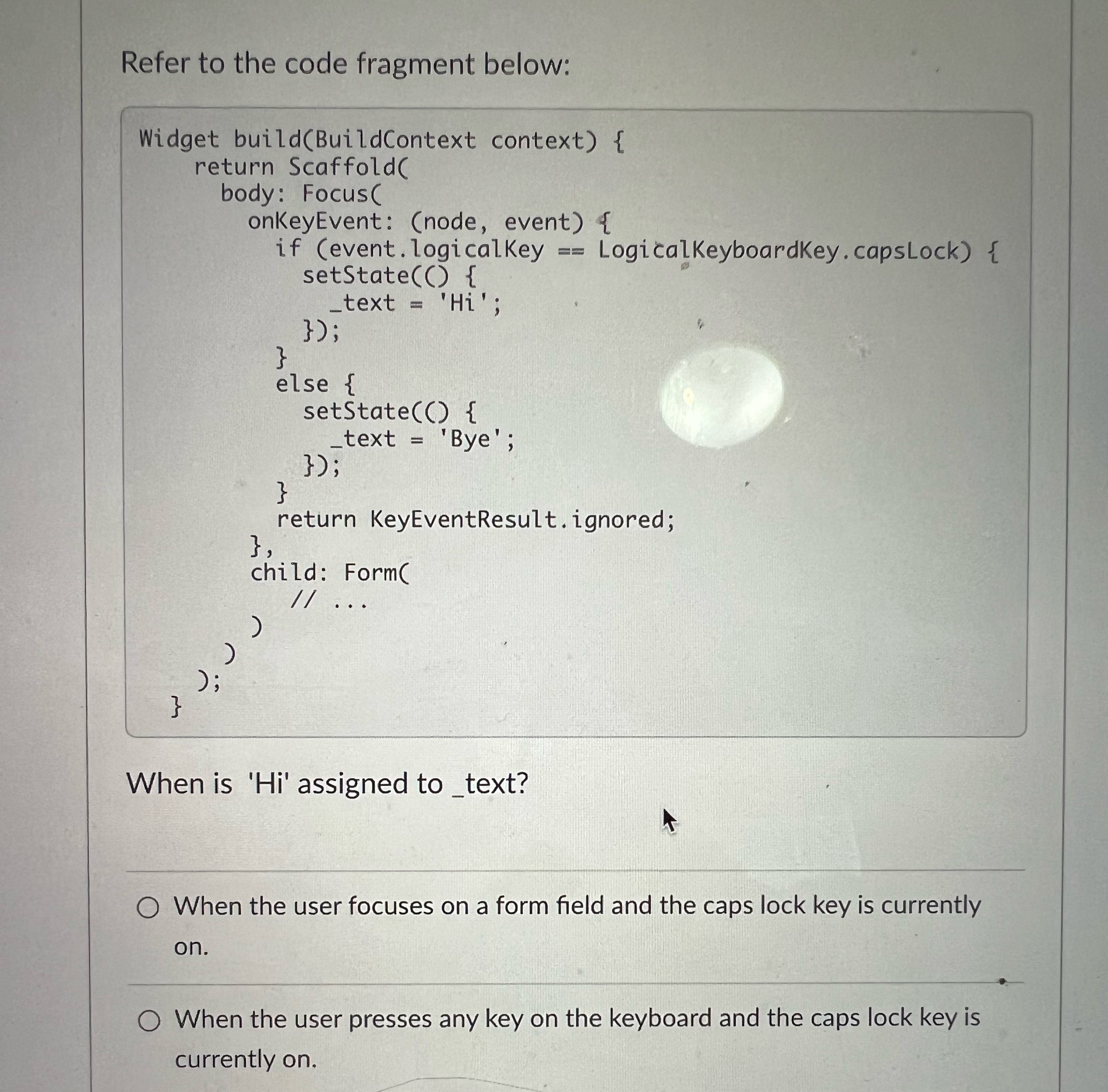
Question: Refer to the code fragment below: Widget build ( BuildContext context ) { return ScaffoldC body: FocusC onkeyEvent: ( node , event ) { if
Refer to the code fragment below:
Widget buildBuildContext context
return ScaffoldC
body: FocusC
onkeyEvent: node event
if event logicalKey LogicalKeyboardKey.capsLock
setStateC
text Hi;
;
else
setState
text 'Bye';
;
return KeyEventResult.ignored;
child: FormC
;
When is Hi assigned to text?
When the user focuses on a form field and the caps lock key is currently on
When the user presses any key on the keyboard and the caps lock key is currently on
Step by Step Solution
There are 3 Steps involved in it
1 Expert Approved Answer
Step: 1 Unlock

Question Has Been Solved by an Expert!
Get step-by-step solutions from verified subject matter experts
Step: 2 Unlock
Step: 3 Unlock
 Study Help