







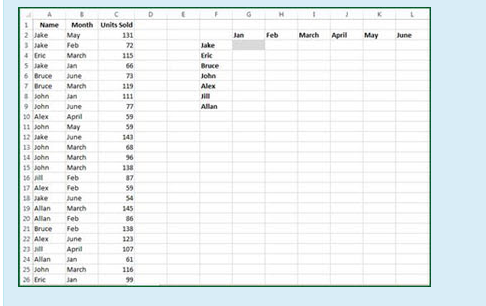
Question: Refer to the screenshot below. What function can be used in cell G3 (and then copied through the range G3:L9) to summarize the total number
Refer to the screenshot below. What function can be used in cell G3 (and then copied through the range G3:L9) to summarize the total number of transactions (assume that each row in the dataset represents one transaction) by month and salesperson? Again assume that the three columns of the dataset have been named Name, Month, and Units_Sold.
Select one:
a. =SUBTOTAL(Name,$F3,Month,G$2)
b. =SUBTOTAL(Name=$F3,Month=G$2)
c. =COUNTA(Name,$F3,Month,G$2)
d. =COUNTA(Name=$F3,Month=G$2)
e. =COUNTIF(Name,$F3,Month,G$2)
f. =COUNTIF(Name=$F3,Month=G$2)
g. =COUNTIFS(Name,$F3,Month,G$2)
h. =COUNTIFS(Name=$F3,Month=G$2)
\f
Step by Step Solution
There are 3 Steps involved in it
1 Expert Approved Answer
Step: 1 Unlock

Question Has Been Solved by an Expert!
Get step-by-step solutions from verified subject matter experts
Step: 2 Unlock
Step: 3 Unlock
 Study Help