







Question: Regularization can be added to gradient descent by modifying the theta update step from: tempj=jn1i=1n(h(,x(i))y(i))(x(i)) To: tempj=jn{[i=1n(h(,x(i))y(i))(x(i))]+[j]} Copy gradientDescentMulti.m from Hwk2 to gradientDescentMultiReg.m. Update gradientDescentMultiReg.m
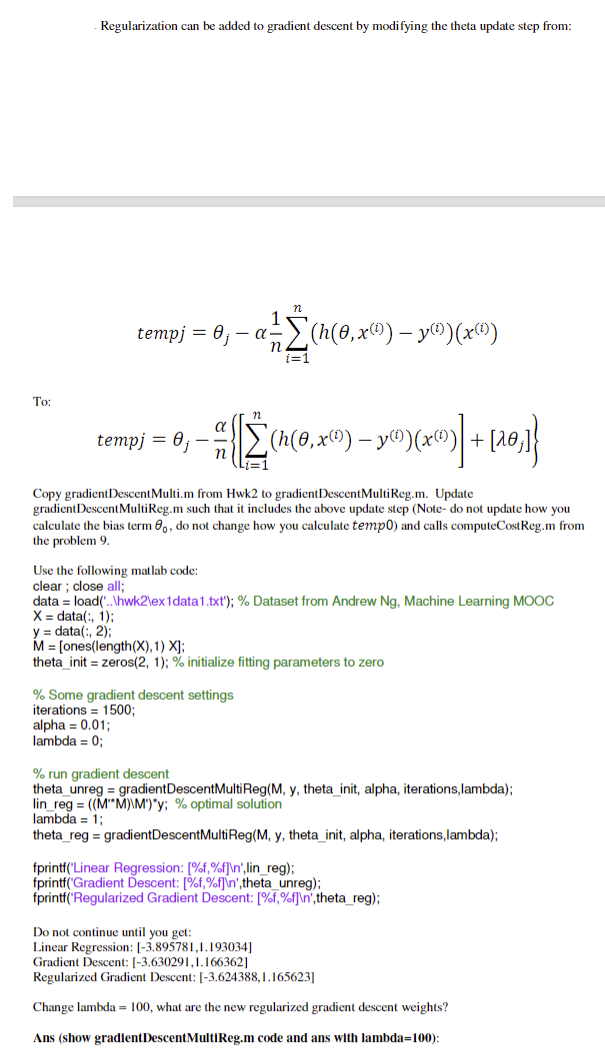
Regularization can be added to gradient descent by modifying the theta update step from: tempj=jn1i=1n(h(,x(i))y(i))(x(i)) To: tempj=jn{[i=1n(h(,x(i))y(i))(x(i))]+[j]} Copy gradientDescentMulti.m from Hwk2 to gradientDescentMultiReg.m. Update gradientDescentMultiReg.m such that it includes the above update step (Note- do not update how you calculate the bias term 0, do not change how you calculate temp 0 ) and calls computeCostReg.m from the problem 9. Use the following matlab code: clear ; close all; data = load('...'hwk2lex1data1.txt'); \% Dataset from Andrew Ng, Machine Learning MOOC X=data(:,1); y=data(:,2) M=[ ones ( length (X),1)X]; theta init = zeros(2,1); \% initialize fitting parameters to zero % Some gradient descent settings iterations =1500; alpha =0.01; lambda =0; % run gradient descent theta unreg = gradientDescentMultiReg(M, y, theta init, alpha, iterations,lambda); lin_reg =((MM)\M)y;% optimal solution lambda =1; theta_reg = gradientDescentMultiReg(M, y, theta init, alpha, iterations,lambda); fprintf('Linear Regression: [\%f, \%f] \ ',lin_reg); fprintf('Gradient Descent: [\%f,\%f]ln',theta unreg); fprintf('Regularized Gradient Descent: [\%f, %f] ',theta_reg); Do not continue until you get: Linear Regression: [3.895781,1.193034] Gradient Descent: [3.630291,1.166362] Regularized Gradient Descent: [-3.624388,1.165623] Change lambda =100, what are the new regularized gradient descent weights? Ans (show gradientDescentMultiReg.m code and ans with lambda=100)
Step by Step Solution
There are 3 Steps involved in it

Get step-by-step solutions from verified subject matter experts
 Study Help