





Question: Remove the Adj Close column # Load the dataset df = pd. read_cav(multiTimeline. cav, encoding='150-8859-1') # Correct column names (removed spacing) df . columns =

Remove the "Adj Close" column
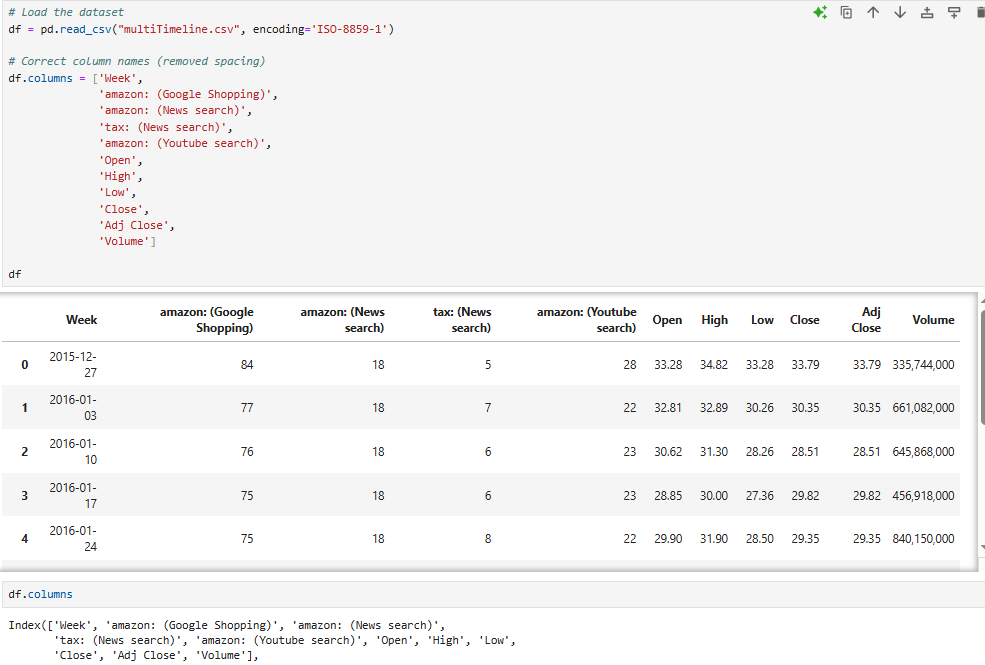
Remove the "Adj Close" column # Load the dataset
# Load the dataset df = pd. read_cav("multiTimeline. cav", encoding='150-8859-1') # Correct column names (removed spacing) df . columns = ['Week" , amazon: (Google Shopping) " , 'amazon: (News search)' , "tax: (News search)' , amazon: (Youtube search)' , Open' 'High" ' Low' , 'Close' , 'Adj Close' , 'Volume' ] df Week amazon: (Google amazon: (News tax: (News amazon: (Youtube search) Open High Low Close Adj Shopping) search) Close Volume search) 2015-12- 0 84 18 5 28 33.28 34.82 27 33.28 33.79 33.79 335,744,000 2016-01- 77 18 03 22 32.81 32.89 30.26 30.35 30.35 661,082,000 2 2016-01- 76 18 6 23 30.62 31.30 28.26 28.51 10 28.51 645,868,000 3 2016-01- 75 18 6 23 28.85 30.00 27.36 29.82 17 29.82 456,918,000 2016-01- 75 18 8 24 22 29.90 31.90 28.50 29.35 29.35 840,150,000 df . columns Index([ 'Week', 'amazon: (Google Shopping)', 'amazon: (News search)' , tax: (News search)', 'amazon: (Youtube search) ', 'Open', 'High', 'Low', 'Close', 'Adj Close' , "Volume' ]

Step by Step Solution

There are 3 Steps involved in it

1 Expert Approved Answer
Step: 1 Unlock blur-text-image

Question Has Been Solved by an Expert!

Get step-by-step solutions from verified subject matter experts

Step: 2 Unlock
Step: 3 Unlock

Students Have Also Explored These Related Accounting Questions!