







Question: Report date: use a function to generate the current date invoice NO.: randomly generate invoice numbers between 23100 to 23209 Billing date: randomly generate dates
Report date: use a function to generate the current date
invoice NO.: randomly generate invoice numbers between 23100 to 23209
Billing date: randomly generate dates between Jan 28, 2018 and Sep 25, 2018
Amount: provided
Recieved: provided
due: calculate amount due
comment: create a formula that willl....
- display "30 or more days past due" if the difference between Report Date and Billing Date is greater than 30 AND Amount due is greater than 0.
- otherwise, display "Up-to-date".
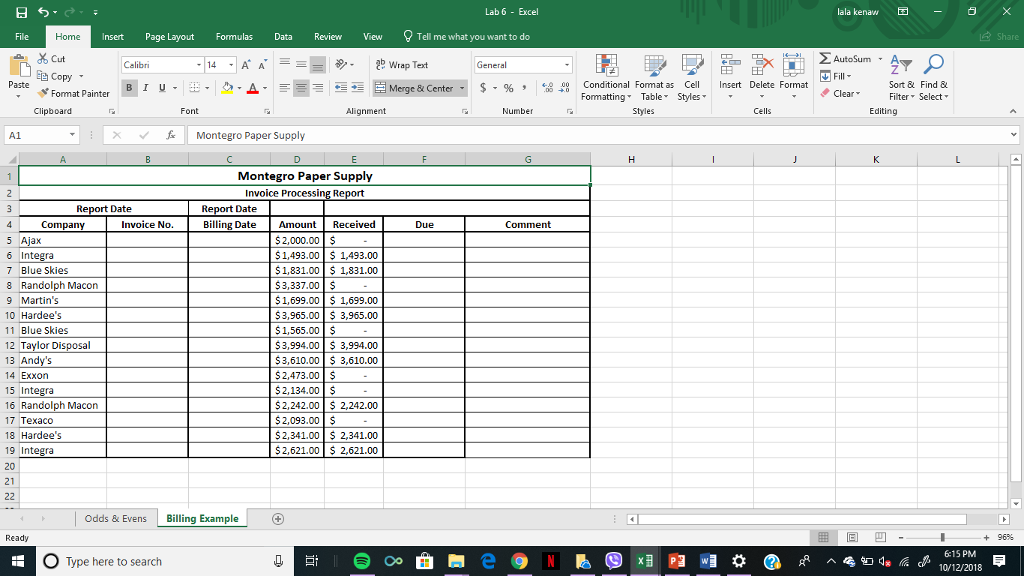
My work (confused on how to do the if statment in the same cell for both the amount due at 0 and days after 30)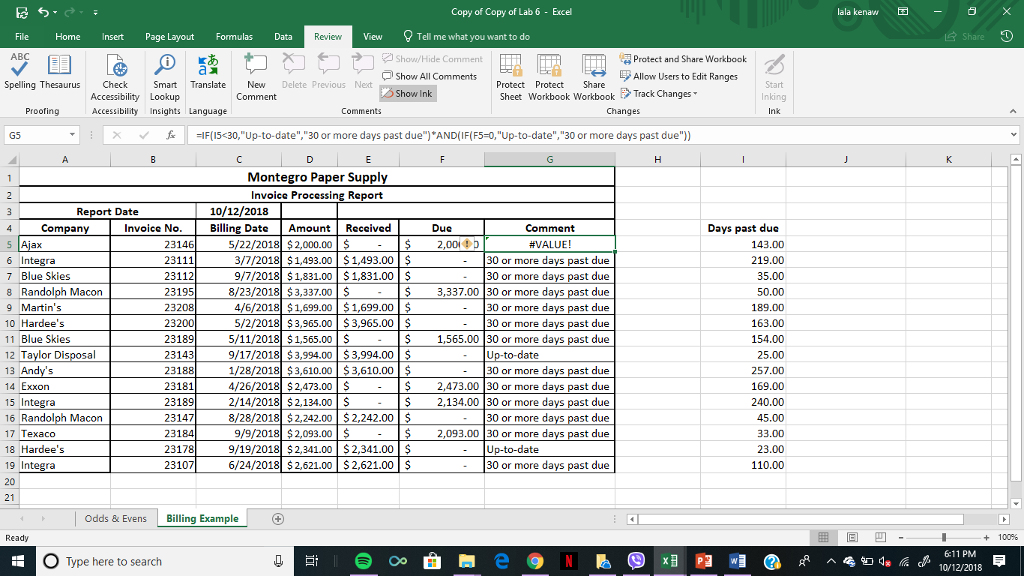
Lab 6 Excel lala kenaw- Insert Page Layout FormulasData Review View Tell me what you want to do Cut E Copy AutoSum A General Paste 1 u , tis , E Merge & Center- s-% , Conditional Fomat as Cell Insert Delete Format Fomatting Table Styles Sort & Find & Filter Select Format PainterI Clear Clipboard Font Alignment Number Cells Editing A1 Montegro Paper Supply Montegro Paper Supply Invoice Processin Report Date any Invoice No. Report Date Billing Date ate Amount Received Due Comment 5 Ajax 6 Inte 7 Blue Skies 8 Randolph Macon 9 Martin's 10 Hardee's 11 Blue Skies 12 Taylor Dis 13 14 Exxon 15 Inte 16 Randolph Macon 17 Texaco 18 Hardee's 19 Inte 20 21 2,000.00 $1,493.00S 1,493.00 $1,831.00$ 1,831.00 $3,337.00 $ $1,699.00$ 1,699.00 S 3,905.00 3,965.00 $1, 55.00 $3,994.00 3,994.00 $3,610.00 3,610.00 $2,473.00 $ $2,134.00 $ $2,242.00 2,242.00 $2,093.00 $ $2,341.00 2,341.00 $2,621.00$ 2,621.00 Odds & Evens Billing Example - + 96% O Type here to search 6:15 PM 10/12/2018
Step by Step Solution
There are 3 Steps involved in it
To implement the formula for the Comment column you can use the IF function in Excel with a combination of DATEDIF to calculate the days between the R... View full answer

Get step-by-step solutions from verified subject matter experts
 Study Help