







Question: Required information Chapter 2: Applying Excel Step 1: Download the Applying Excel form located on the left-hand side, under files. Step 2: Then enter formulas
Required information
Chapter 2: Applying Excel
Step 1: Download the Applying Excel form located on the left-hand side, under files.
Step 2: Then enter formulas in all cells that contain question marks. For example, in cell B25 enter the formula "=B10".
Step 3: Check your worksheet by changing the total fixed manufacturing overhead cost for the Milling Department in the Data area to $300,000, keeping all other data the same as in the original example. If your worksheet is operating properly, the total cost of Job 407 should now be $2,350. If you do not get this answer, find the errors in your worksheet and correct them.
Step 4: Proceed to the requirements below only after completing your worksheet as it will be used to answer the following questions.
| Chapter 2: Applying Excel | |||
| Data | |||
| Markup on job cost | 75% | ||
| Department | |||
| Milling | Assembly | ||
| Machine-hours | 60,000 | 3,000 | |
| Direct labor-hours | 8,000 | 80,000 | |
| Total fixed manufacturing overhead cost | $390,000 | $500,000 | |
| Variable manufacturing overhead per machine-hour | $2.00 | ||
| Variable manufacturing overhead per direct labor-hour | $3.75 | ||
| Cost summary for Job 407 | Department | ||
| Milling | Assembly | ||
| Machine-hours | 90 | 4 | |
| Direct labor-hours | 5 | 20 | |
| Direct materials | $800 | $370 | |
| Direct labor cost | $70 | $280 | |
| Enter a formula into each of the cells marked with a ? below | |||
| Step 1: Calculate the estimated total manufacturing overhead cost for each department | |||
| Milling | Assembly | ||
| Total fixed manufacturing overhead cost | ? | ? | |
| Variable manufacturing overhead per machine-hour or direct labor-hour | ? | ? | |
| Total machine-hours or direct labor-hours | ? | ? | |
| Total variable manufacturing overhead | ? | ? | |
| Total manufacturing overhead | ? | ? | |
| Step 2: Calculate the predetermined overhead rate in each department | |||
| Milling | Assembly | ||
| Total manufacturing overhead | ? | ? | |
| Total machine-hours or direct labor-hours | ? | ? | |
| Predetermined overhead rate per machine-hour or direct labor-hour | ? | ? | |
| Step 3: Calculate the amount of overhead applied from both departments to Job 407 | |||
| Milling | Assembly | ||
| Predetermined overhead rate per machine-hour or direct labor-hour | ? | ? | |
| Machine-hours or direct labor-hours for the job | ? | ? | |
| Manufacturing overhead applied | ? | ? | |
| Step 4: Calculate the total job cost for Job 407 | |||
| Milling | Assembly | Total | |
| Direct materials | ? | ? | ? |
| Direct labor cost | ? | ? | ? |
| Manufacturing overhead applied | ? | ? | ? |
| Total cost of Job 407 | ? | ||
| Step 5: Calculate the selling price for Job 407 | |||
| Total cost of Job 407 | ? | ||
| Markup | ? | ||
| Selling price of Job 407 | ? | ||
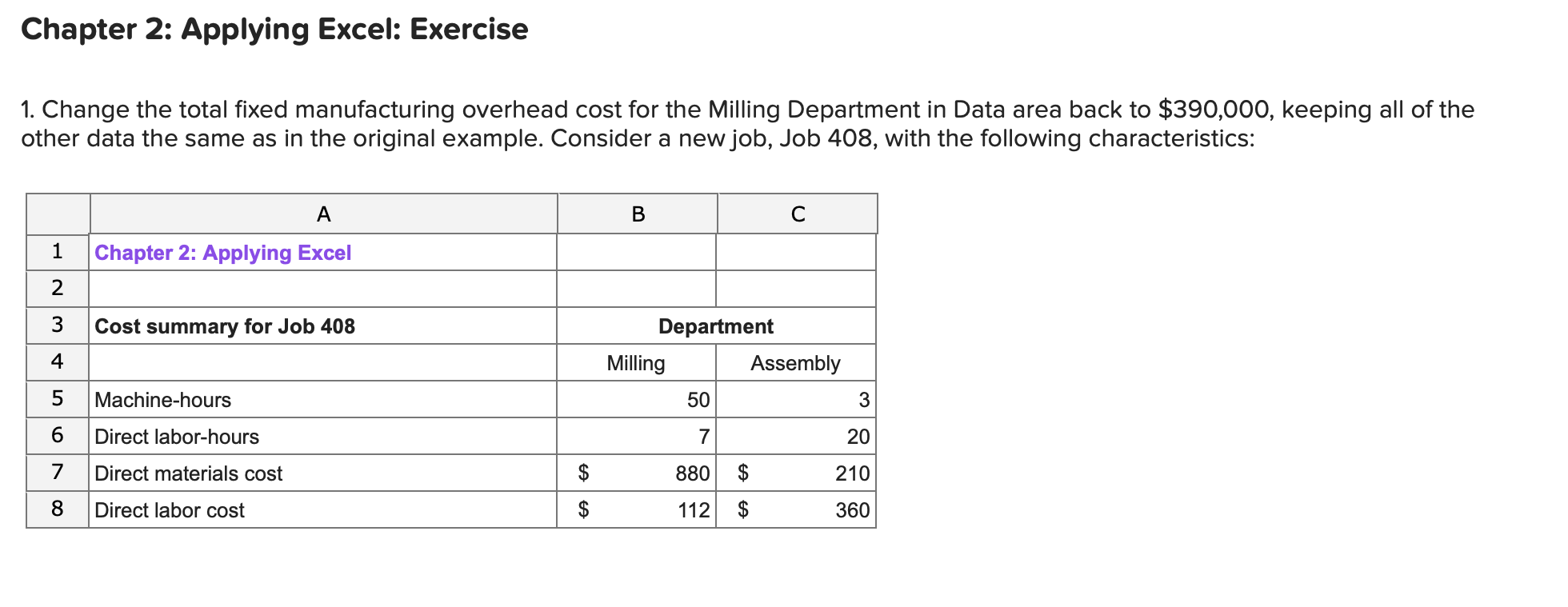
1)
In your worksheet, enter this new data in the cells for Job 407.
What is the new selling price for Job 408? (Round your final answer to 2 decimal places.)
2)
Without changing the data for the job from requirement 2 above, what is the selling price for Job 408 if the total number of machine-hours in the Assembly Department increases from 3,000 machine-hours to 6,000 machine-hours? (Round your final answer to 2 decimal places.)
3)
Restore the total number of machine-hours in the Assembly Department to 3,000 machine-hours. And keep the job data the same as it was in Requirement 2. What is the selling price for Job 408 if the total number of direct labor-hours in the Assembly Department decreases from 80,000 direct labor-hours to 40,000 direct labor-hours? (Round your final answer to 2 decimal places.)
Chapter 2: Applying Excel: Exercise 1. Change the total fixed manufacturing overhead cost for the Milling Department in Data area back to $390,000, keeping all of the other data the same as in the original example. Consider a new job, Job 408, with the following characteristics: A B 1 Chapter 2: Applying Excel 2 3 Cost summary for Job 408 Department Milling Assembly 4 Machine-hours 50 3 5 6 Direct labor-hours 7 20 7 Direct materials cost 210 $ $ 880 $ 112 $ 8 Direct labor cost 360
Step by Step Solution
There are 3 Steps involved in it

Get step-by-step solutions from verified subject matter experts
 Study Help