







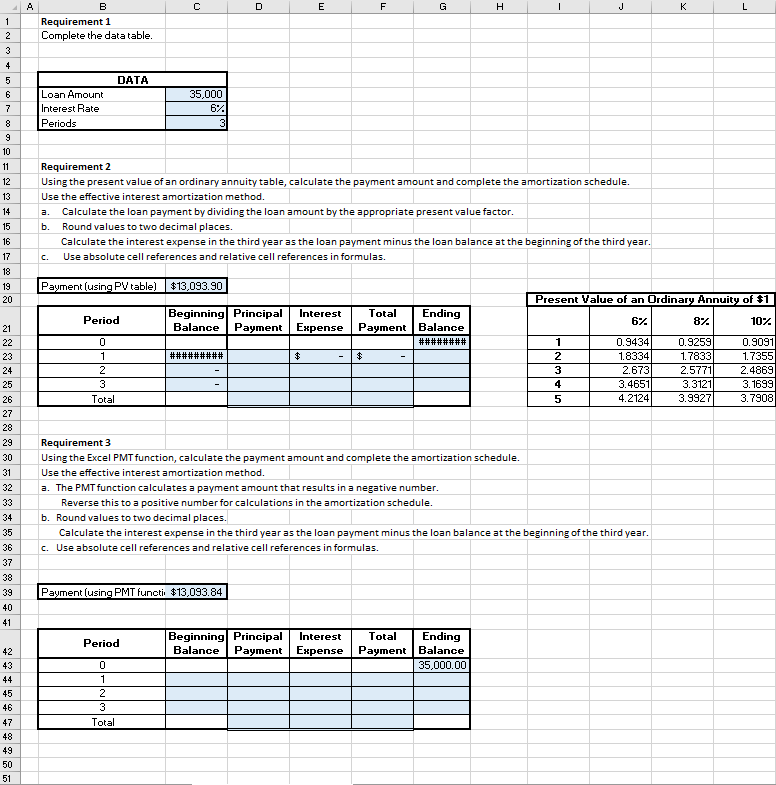
Question: Requirements 1. Complete the data table. 2. Using the present value of an ordinary annuity table, calculate the payment amount and complete the amortization schedule.
Requirements
1. Complete the data table.
2. Using the present value of an ordinary annuity table, calculate the payment amount and complete the amortization schedule. Use the effective interest amortization method. a. Calculate the loan payment by dividing the loan amount by the appropriate present value factor. b. Round values to two decimal places. Calculate the interest expense in the third year as the loan payment minus the loan balance at the beginning of the third year. c. Use absolute cell references and relative cell references in formulas.
3. Using the Excel PMT function, calculate the payment amount and complete the amortization schedule. Use the effective interest amortization method. a. The PMT function calculates a payment amount that results in a negative number. Reverse this to a positive number for calculations in the amortization schedule. b. Round values to two decimal places. Calculate the interest expense in the third year as the loan payment minus the loan balance at the beginning of the third year. c. Use absolute cell references and relative cell references in formulas.
Excel Skills
1. Formulas using both absolute and relative cell references. 2. PMT function
QUESTION: How were these calculations were made and want to see the number column and letter row to understand the numbers in the chart. If possible please follow the same format as my excel sheet so I can easily tell the calculations and easily look at the letter corresponding to the number in the Excel
A C D E F G H. J K L 1 B Requirement 1 Complete the datatable. 2 3 4 DATA 5 6 7 Loan Amount Interest Rate Periods 35,000 6% 3 9 10 11 12 13 14 Requirement 2 Using the present value of an ordinary annuity table, calculate the payment amount and complete the amortization schedule. Use the effective interest amortization method. Calculate the loan payment by dividing the loan amount by the appropriate present value factor. b. Round values to two decimal places. Calculate the interest expense in the third year as the loan payment minus the loan balance at the beginning of the third year. Use absolute cell references and relative cell references in formulas. a. 15 16 17 c. 18 19 20 Payment (using PV table) $13,093.90 Present Value of an Ordinary Annuity of $1 Period Beginning Principal Interest Balance Payment Expense 6% 87 107 Total Ending Payment Balance ######## $ ######### $ 0 1 2 3 Total 1 2 3 4 5 0.9434 1.8334 2.673 3.4651 4.2124 0.9259 1.7833 2.57711 3.31211 3.9927 0.9091 1.7355 2.4869 3.1699 3.7908 21 22 23 24 25 26 27 28 29 30 31 32 33 Requirement 3 Using the Excel PMT function, calculate the payment amount and complete the amortization schedule. Use the effective interest amortization method. a. The PMT function calculates a payment amount that results in a negative number. Reverse this to a positive number for calculations in the amortization schedule. b. Round values to two decimal places. Calculate the interest expense in the third year as the loan payment minus the loan balance at the beginning of the third year. c. Use absolute cell references and relative cell references in formulas. 34 35 36 37 38 39 40 Payment (using PMT functie $13,093.84 41 Period Beginning Principal Interest Balance Payment Expense Total Ending Payment Balance 35,000.00 42 43 44 45 46 0 1 2 3 Total 47 48 49 50 51
Step by Step Solution
There are 3 Steps involved in it

Get step-by-step solutions from verified subject matter experts
 Study Help