







Question: Requirements - ( 2 5 pts ) : You must implement a Map from Leaflet, this map should default to US Coordinates, you must determine
Requirements pts:
You must implement a Map from Leaflet, this map should default to US Coordinates, you must determine the best view to be able to show all the randomly generated coordinates below
You must then add a Random Coordinator Generator function to be able to generate coordinates for you, The code is provided below:
function getRandomInRangefrom to fixed
return Mathrandomto from fromtoFixedfixed;
toFixed returns string, so is a trick to convert to number
You must create Random Sets of Coordinates from this Please use exact numbers I outlined
Latitude Coordinates: getRandomInRange;
Longitude Coordinates: getRandomInRange;
Below the Map you should have Text for the following
Marker Randomly Generated Coordinates Point
Marker Randomly Generated Coordinates Point
Marker Randomly Generated Coordinates Point
For Each of these Markers you must make an API call to get the Locality of the Coordinate
The API to use is as follows:
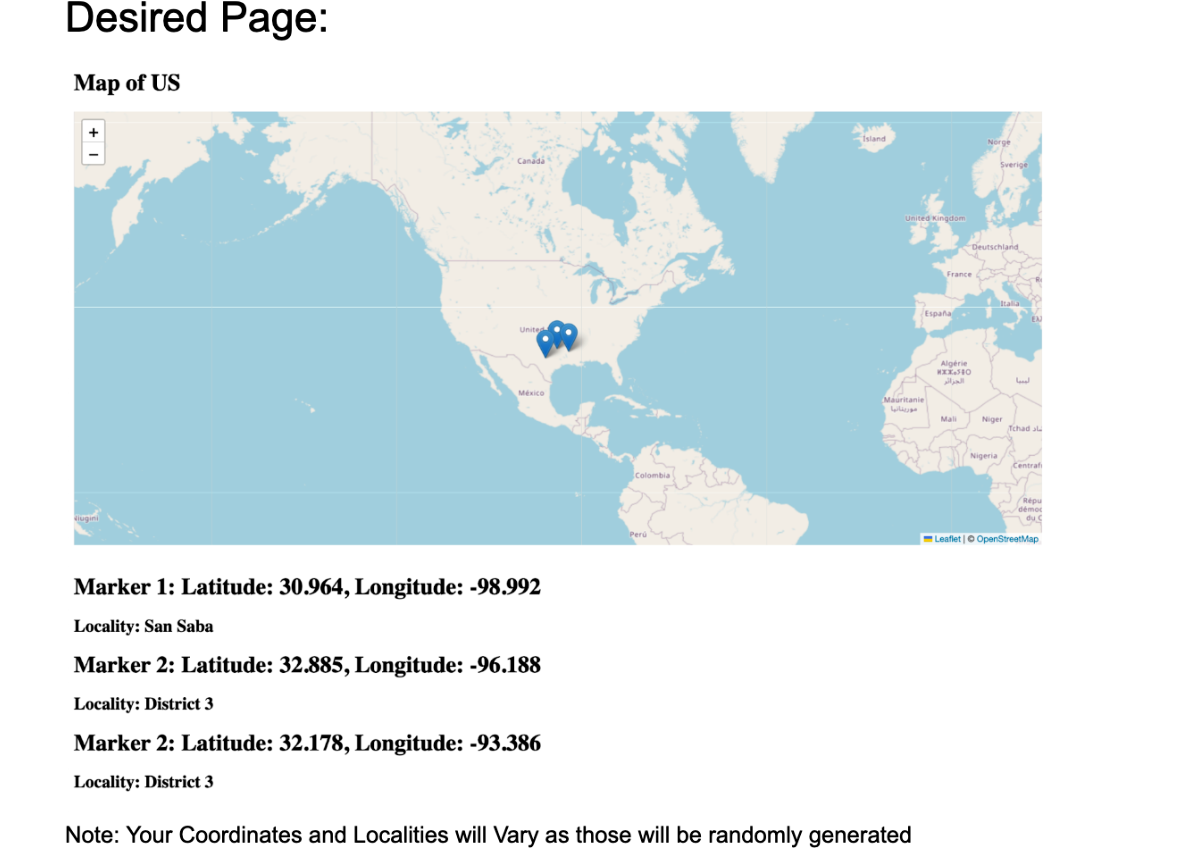
The Locality of each should be shown below the Marker Text for each respective coordinate Desired Page:
Map of US
Marker : Latitude: Longitude:
Locality: San Saba
Marker : Latitude: Longitude:
Locality: District
Marker : Latitude: Longitude:
Locality: District
Note: Your Coordinates and Localities will Vary as those will be randomly generated
Background
For this Lab we will be using Leaflet.js this is a mapping Library.
This will help you implement a basic map.
Desired Page:
Map of US
Marker : Latitude: Longitude:
Locality: San Saba
Marker : Latitude: Longitude:
Locality: District
Marker : Latitude: Longitude:
Locality: District
Note: Your Coordinates and Localities will Vary as those will be randomly generated
Step by Step Solution
There are 3 Steps involved in it
1 Expert Approved Answer
Step: 1 Unlock

Question Has Been Solved by an Expert!
Get step-by-step solutions from verified subject matter experts
Step: 2 Unlock
Step: 3 Unlock
 Study Help