







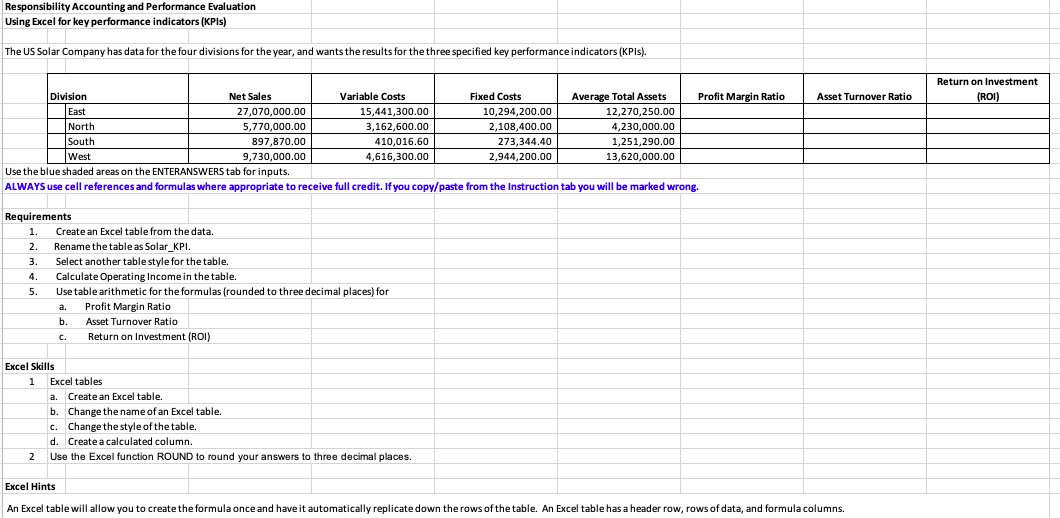
Question: Responsibility Accounting and Performance Evaluation Using Excel for key performance indicators ( KPIs ) The US Solar Company has data for the four divisions for
Responsibility Accounting and Performance Evaluation
Using Excel for key performance indicators KPIs
The US Solar Company has data for the four divisions for the year, and wants the results for the three specified key performance indicators KPIs
Use the blue shaded areas on the ENTERANSWERS tab for inputs.
ALWAYS use cell references and formulas where appropriate to receive full credit. If you copypaste from the Instruction tab you will be marked wrong.
Requirements
Create an Excel table from the data.
Rename the table as SolarKPI.
Select another table style for the table.
Calculate Operating Income in the table.
Use table arithmetic for the formulas rounded to three decimal places for
a Profit Margin Ratio
b Asset Turnover Ratio
c Return on Investment ROI
Excel Skills
Excel tables
a Create an Excel table.
b Change the name of an Excel table.
c Change the style of the table.
d Create a calculated column.
Use the Excel function ROUND to round your answers to three decimal places.
Excel Hints
An Excel table will allow you to create the formula once and have it automatically replicate down the rows of the table. An Excel table has a header row, rows of data, and formula columns.Requirement
Create an Excel table from the data.
a Rename the table as SolarKPI.
b Select Medium table style for the table.
c Calculate Operating Income in the table.
Requirement
Use table arithmetic for the formulas rounded to three decimal places for
a Profit Margin Ratio
b Asset Turnover Ratio
c Return on Investment ROI
Always use cell references and formulas where appropriate to receive full credit. If you copypaste from the Instruction tab you will be marked wrong.
ALWAYS use cell references and formulas where appropriate to receive full credit. If you copypaste from the Instruction tab you will be marked wrong.
Requirements
Create an Excel table from the data.
Rename the table as SolarKPI.
Select another table style for the table.
Calculate Operating Income in the table.
Use table arithmetic for the formulas rounded to three decimal places for
a Profit Margin Ratio
b Asset Turnover Ratio
c Return on Investment ROI
Excel Skills
Excel tables
a Create an Excel table.
b Change the name of an Excel table.
c Change the style of the table.
d Create a calculated column.
Use the Excel function ROUND to round your answers to three decimal places.
Excel Hints
An Excel table will allow you to create the formula once and have it automatically replicate down the rows of the table. An Excel table has a header row, rows of data, and formula columns.
Step by Step Solution
There are 3 Steps involved in it
1 Expert Approved Answer
Step: 1 Unlock

Question Has Been Solved by an Expert!
Get step-by-step solutions from verified subject matter experts
Step: 2 Unlock
Step: 3 Unlock
 Study Help