







Question: Restrictions: You cannot import any Java classes except those listed below. In particular you cannot use any methods from the Java Array(s) class to copy
Restrictions: You cannot import any Java classes except those listed below. In particular you cannot use any methods from the Java Array(s) class to copy an array, check for equality, or otherwise manipulate an array. You also may not call the Java System.arraycopy method
You must write the Java code to perform these functions.
You will need to use (import):
the Java File class. You may use any of the methods that are available in the Java File class in developing your algorithm. In particular, you should need to use the:
java.io.File
java.io.FileNotFoundException
the Java Scanner class
the Java wrapper classes if needed.
any of the classes that you created in any previous assignment in this course. Specifically, if needed, you can use your ArrayBag, LinkedBag or SinglyLinkedList (from textbook Code Fragments) classes if needed.
any Java exception class.
Be sure to read the entire assignment before you begin.
Create a NetBeans project using the convention Lab105-LastFM and ensure it is saved to a location like desktop or your flash drive. In the project you will do the following:
Create a Recursion Class that will implement the following recursive algorithms:
Algorithm 1 - Implement a recursive algorithm to compute the sum of positive integers between 1 and n inclusively. This can be express mathematically as:
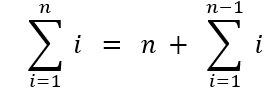
Make sure that your solution correctly handles all possible parameter values.
Algorithm 2 A recursive algorithm implements Isabels technique for summing the values in an Array of n integers. Isabels technique is described in the Creativity problem C-5.24 on page 223 of the textbook.
Make sure that your solution tests for invalid parameters.
Algorithm 3 - Implement a recursive method with the signature
void findFile( String targetFileName, String startPath )
that finds and prints the absolute paths of all entries of the files named targetFileName starting at the given path and searching all of the entries in startPath and its subdirectories. Note that a startPath might look something like C:\Windows\DigitalLocker
If the user enters an invalid startPath your program should generate an appropriate error message and ask the user if they want to try again.
The startPath must be a directory.
Create a Client Class that will fully test each of the recursive methods that you created above in an interactive menu fashion. In this class:
The user should be provided with a menu/list to select from
If the user selects an invalid option, the program should inform the user of their mistake and allow them to try again
The last option in the menu/list should allow the user to quit the program.
For each recursive technique ask the user for any parameters/values needed for the test.For the Harmonic method the program should ask the user to enter a positive integer
If the user enters invalid input the program needs to print an error message and give the user the choice of trying again or giving up.
When the user enters a valid input, the program should display the results for that input.
After the results are displayed the program should ask the user if they want to enter another input or exit back to the main menu.
For the sum of positive integers parameter should be the value for n.
If the user enters invalid input the program needs to print an error message and give the user the choice of trying again or giving up.
When the user enters a valid input, the program should display the results for that input.
After the results are displayed the program should ask the user if they want to enter another input or exit back to the main menu.
The findFile method should follow a similar pattern.
The program asks the user for a starting directory and a target filename.
If the starting directory is not valid, the program should display an error message and as the user if they want to try again or give up Note that you cannot check to see if the target filename is valid.
Once a valid starting directory has been entered the program should search the file structure and print the full paths for every file whose filename matches the target filename and that is in the starting directory and any subdirectories underneath the starting directory.
After the results are displayed the program should ask the user if they want to enter another input or exit back to the main menu.
Output for each test must be shown in the system console and must include:
The name of the algorithm being tested.
The parameters entered by the user
The results of the test.
At the end of a test the user should be given the options of running another test or exiting the program, i.e. after running one of the recursive algorithms the user should be given the option of running the recursive algorithm again or returning to the main menu.
i=1ni=n+i=1n1i
Step by Step Solution
There are 3 Steps involved in it

Get step-by-step solutions from verified subject matter experts
 Study Help