







Question: Re-type the following command in the correct format : Note: Only type the corrected command with no prompt and no explanation and it must



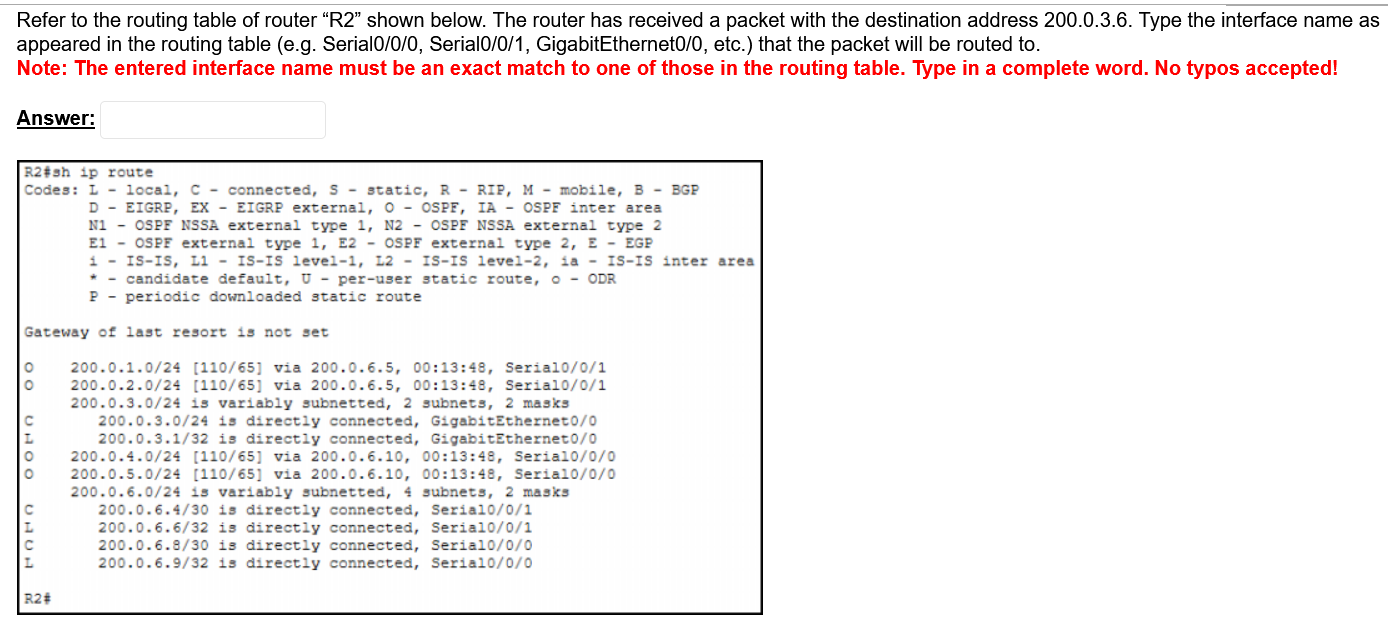


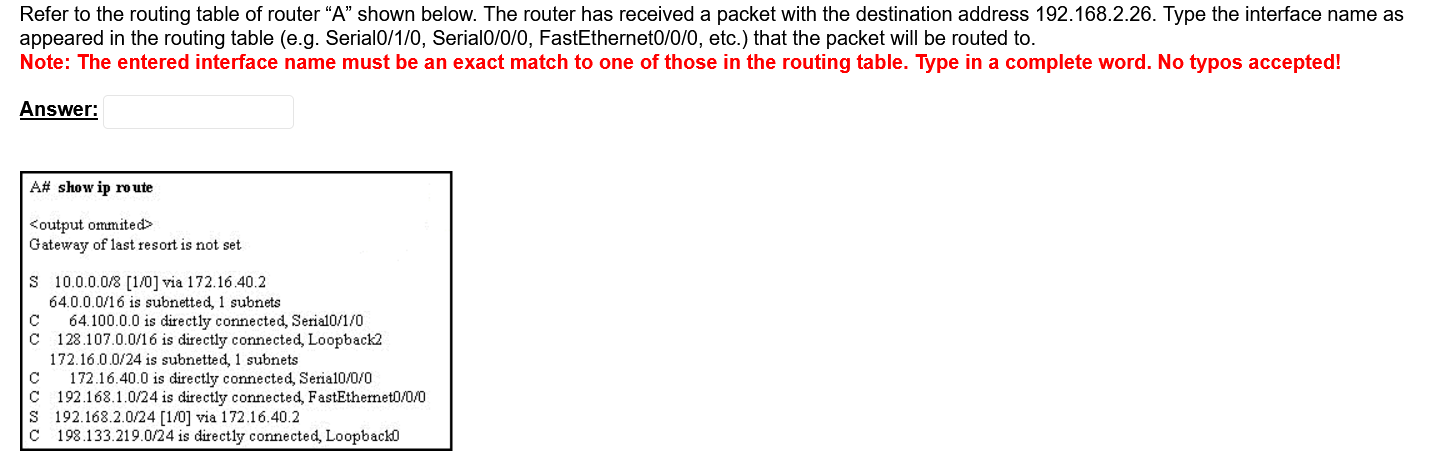
Re-type the following command in the correct format : Note: Only type the corrected command with no prompt and no explanation and it must be an exact matching answer. Type the command in a complete word. Router(config)#icmp access-list 12 any hosts deny Answer: Fix the following command to prevent the access of the packets coming from any source subnet. Note: Only type the corrected command with no prompt and it must be an exact matching answer. Type the command in a complete word. Router(config)#access-list 11 many block Router(config)# In the following configuration re-type the only command that is entered wrong in the correct format. Note: Only type the corrected command with no prompt and no explanation and it must be an exact matching answer. Type the command in a complete word. Router(config)#router ospf 20 Router(config-router)#network 10.10.0.5 0.0.255.255 area 0 Answer: Refer to the routing table of router "R2" shown below. The router has received a packet with the destination address 200.0.3.6. Type the interface name as appeared in the routing table (e.g. Serial0/0/0, Serial0/0/1, GigabitEthernet0/0, etc.) that the packet will be routed to. Note: The entered interface name must be an exact match to one of those in the routing table. Type in a complete word. No typos accepted! Answer: R2#sh ip route Codes: L - local, C- connected, S - static, R RIP, M - mobile, B- BGP 00 UH00 UH D - EIGRP, EX- EIGRP external, O- OSPF, IA - OSPF inter area N1 OSPF NSSA external type 1, N2- OSPF NSSA external type 2 E1 OSPF external type 1, E2 - OSPF external type 2, E - EGP IS-IS, L1 - IS-IS level-1, 12-IS-IS level-2, ia- IS-IS inter area candidate default, U-per-user static route, O - ODR P periodic downloaded static route Gateway of last resort is not set 200.0.1.0/24 [110/65] via 200.0.6.5, 00:13:48, Serial0/0/1 200.0.2.0/24 [110/65] via 200.0.6.5, 00:13:48, Serial0/0/1 200.0.3.0/24 is variably subnetted, 2 subnets, 2 masks 200.0.3.0/24 is directly connected, GigabitEthernet0/0 200.0.3.1/32 is directly connected, GigabitEthernet0/0 200.0.4.0/24 [110/65] via 200.0.6.10, 00:13:48, Serial0/0/0 200.0.5.0/24 [110/65] via 200.0.6.10, 00:13:48, Serial0/0/0 200.0.6.0/24 is variably subnetted, 4 subnets, 2 masks 200.0.6.4/30 is directly connected, Serial0/0/1 200.0.6.6/32 is directly connected, Serial0/0/1 200.0.6.8/30 is directly connected, Serial0/0/0 200.0.6.9/32 is directly connected, Serial0/0/0 R2# 1 i The Admin wanted to set all interfaces with access mode on a switch to act as PortFast mode. He/She typed the following command and the command received an error. Re-type the right command in the blank. Note: Only type the corrected command with no prompt and no explanation and it must be an exact matching answer. Type the command in a complete word. Switch(config-if-range)#switchport portfast Answer: A company has received the full class network address 80.0.0.0. The company has planned to create up to 1000 equal-size subnets. Write the IP address of host 35 in subnet 66. Note: Take the first subnet as subnet 1, and type only the required IP address in decimal dotted format with no explanation. Any unwanted characters will make the answer wrong. Answer: Refer to the routing table of router "A" shown below. The router has received a packet with the destination address 192.168.2.26. Type the interface name as appeared in the routing table (e.g. Serial0/1/0, Serial0/0/0, FastEthernet0/0/0, etc.) that the packet will be routed to. Note: The entered interface name must be an exact match to one of those in the routing table. Type in a complete word. No typos accepted! Answer: A# show ip route Gateway of last resort is not set S 10.0.0.0/8 [1/0] via 172.16.40.2 64.0.0.0/16 is subnetted, 1 subnets C C 64.100.0.0 is directly connected, Serial0/1/0 128.107.0.0/16 is directly connected, Loopback2 172.16.0.0/24 is subnetted, 1 subnets 172.16.40.0 is directly connected, Seria10/0/0 C 192.168.1.0/24 is directly connected, FastEthernet0/0/0 S 192.168.2.0/24 [1/0] via 172.16.40.2 C 198.133.219.0/24 is directly connected, Loopback0
Step by Step Solution
There are 3 Steps involved in it

Get step-by-step solutions from verified subject matter experts
 Study Help