







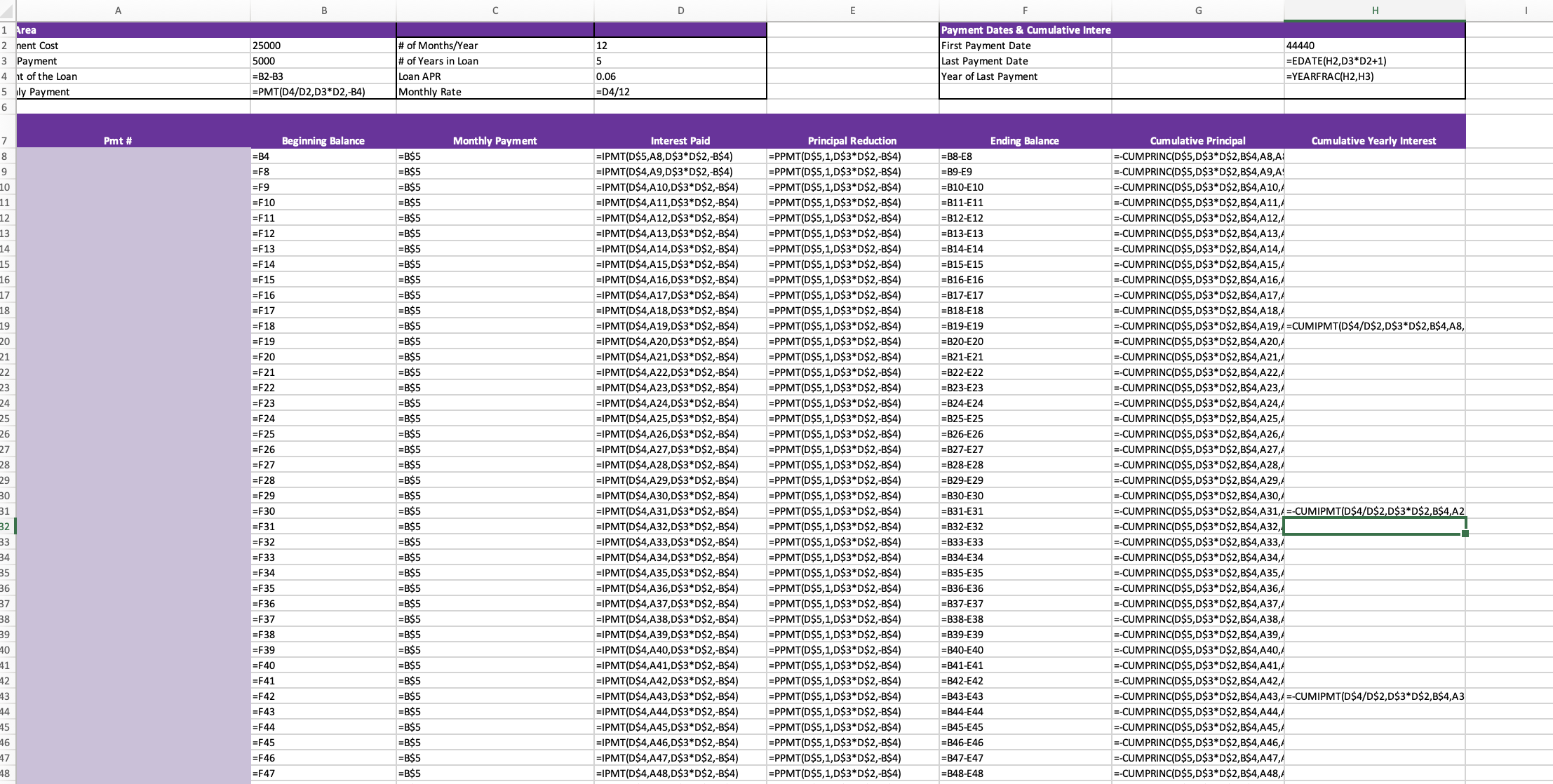
Question: Review the Loan sheet. Insert a comment in cell B8 that identifies the error and correct the error. Review the functions in cells D8, E8,
Review the Loan sheet. Insert a comment in cell B8 that identifies the error and correct the error. Review the functions in cells D8, E8, and G8. Correct the errors and copy the functions down their respective columns. Insert comments in cells D8, E8, and G8 that explain the errors. Insert a comment in cell H19 to explain the error after comparing the function to the function in cell H31. Correct the error in cell H19. Review the EDATE function in cell H3. The last payment date should be 8/1/2026. Insert a comment in cell H3 and correct the error. Review the function in cell H4. The wrong date function was used, and the number format is not correct. Insert the correct date function and insert a comment in cell H4 to explain the errors.
Step by Step Solution
There are 3 Steps involved in it

Get step-by-step solutions from verified subject matter experts
 Study Help