







Question: # robbysearch.py # Use breadth-first search to help robby the robot navigate a maze. from robby import World from graphics import * from queue import
# robbysearch.py # Use breadth-first search to help robby the robot navigate a maze.
from robby import World from graphics import * from queue import Queue import time import argparse
# Use argparse to allow user to enter command line arguments for the maze text # file and the order of actions (default case if 'NESW') #***ENTER CODE HERE***
def main(txtfile, actions): # Read maze from file #***ENTER CODE HERE***
# Create Robby's world based on the input maze # (HINT: use addwall, addstart, and addgoal methods) #***ENTER CODE HERE***
# Play in Robby's world while True: key = rw.checkKey() if key: if key == "Escape": break elif key == "Up": rw.north() elif key == "Right": rw.east() elif key == "Down": rw.south() elif key == "Left": rw.west() elif key == 's': # Run BFS print('Starting breadth-first search...', end='') time.sleep(1) path = bfs(rw, maze, actions) print('done!')
# Simulate path # Use the discovered path (from bfs) to actually move robby # through the maze! Update the "score" as you go (+1 for each # action). Use time.sleep so that robby does not move too fast # to be seen. #***ENTER CODE HERE***
def addscore(rw): '''Add score GUI element to robby's world.''' score = 0 txt = Text(Point(46, 23), "SCORE = 0") txt._reconfig("anchor", "w") txt.setSize(18) txt.draw(rw)
return score, txt
def addwall(rw, maze, row, col): '''Add wall to the maze at a specified location (row, col).''' #***ENTER CODE HERE*** pass
def addstart(rw, row, col): '''Add wall to the maze at a specified location (row, col).''' #***ENTER CODE HERE*** pass
def addgoal(rw, maze, row, col): '''Add wall to the maze at a specified location (row, col).''' #***ENTER CODE HERE*** pass
def bfs(rw, maze, actions): '''Perform breadth-first search on the maze given an ordered string of action to check (e.g. 'NESW').''' #***ENTER CODE HERE***
return path
def solved(rw, maze, actions): '''Check whether a series of actions taken in robby's world results in a solved problem.''' rows, cols = rw.numRows, rw.numCols # size of the maze row, col = rw.getCurrentPosition() # robby's current (starting) position for action in actions: if action == 'N': #***ENTER CODE HERE*** elif action == 'E': #***ENTER CODE HERE*** elif action == 'S': #***ENTER CODE HERE*** elif action == 'W': #***ENTER CODE HERE***
return maze[row * cols + col] == 2 # see if you made it to the goal!
def updatescore(txt, score): '''Update the score in robby's world.''' txt.setText("SCORE = {}".format(score))
def valid(rw, maze, actions): '''Check whether a series of actions taken in robby's world from a given starting position is valid.''' rows, cols = rw.numRows, rw.numCols # size of the maze row, col = rw.getCurrentPosition() # robby's current (starting) position memory = [] # keep track of where robby has been to prohibit "loops" for action in actions: # Move robby if action == 'N': row -= 1 elif action == 'E': col += 1 elif action == 'S': row += 1 elif action == 'W': col -= 1
# Path is invalid if robby's goes "out of bounds" if something: # ***ENTER CODE HERE*** (change "something"!) return False
# Path is invalid if robby run into a wall if something: # ***ENTER CODE HERE*** (change "something"!) return False
# Path is invalid if robby repeats a state in memory if something: # ***ENTER CODE HERE*** (change "something"!) return False
memory.append(row * cols + col) # add the new state to memory
return True # if we made it this far, the path is valid
if __name__ == '__main__': #***ENTER CODE HERE*** main(txtfile, actions)
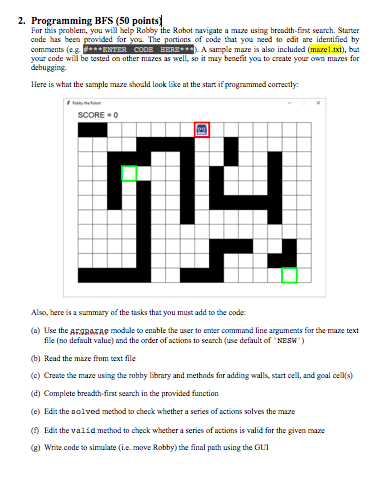
2. Programming BFS (50 points For this problem, you will help Robby the Robotsavigate amue b ethfint och Sa code has been provided for you. The parties of code that you need to edit ane dentified by cemetse ENTER CODE BERE LA sample is also included area your code will be tested on other mazes as well.se it may benefit you to create your own mare for deng Here is what the sample mure should look like at the start if programmed correctly SCORE - Also, here is a summary of the tasks that you must add to the code (a) Use the Argpara modale to enable the user to enter command line arguments for the maze text file no default value) and the order of actions to search (use default of "NESW) (b) Read the mare from text file (c) Create the maze using the robby library and methods for adding walls, start cell, and goal cells) ( Complete breadth first search is the provided function (c) Edit the solved method to check whether a series of actions solves the maze Edit the valid method to check whether a series of actions is valid for the given maze (8) Write code to simulate (i.. move Robby) the final path using the GUT 2. Programming BFS (50 points For this problem, you will help Robby the Robotsavigate amue b ethfint och Sa code has been provided for you. The parties of code that you need to edit ane dentified by cemetse ENTER CODE BERE LA sample is also included area your code will be tested on other mazes as well.se it may benefit you to create your own mare for deng Here is what the sample mure should look like at the start if programmed correctly SCORE - Also, here is a summary of the tasks that you must add to the code (a) Use the Argpara modale to enable the user to enter command line arguments for the maze text file no default value) and the order of actions to search (use default of "NESW) (b) Read the mare from text file (c) Create the maze using the robby library and methods for adding walls, start cell, and goal cells) ( Complete breadth first search is the provided function (c) Edit the solved method to check whether a series of actions solves the maze Edit the valid method to check whether a series of actions is valid for the given maze (8) Write code to simulate (i.. move Robby) the final path using the GUT
Step by Step Solution
There are 3 Steps involved in it

Get step-by-step solutions from verified subject matter experts
 Study Help