







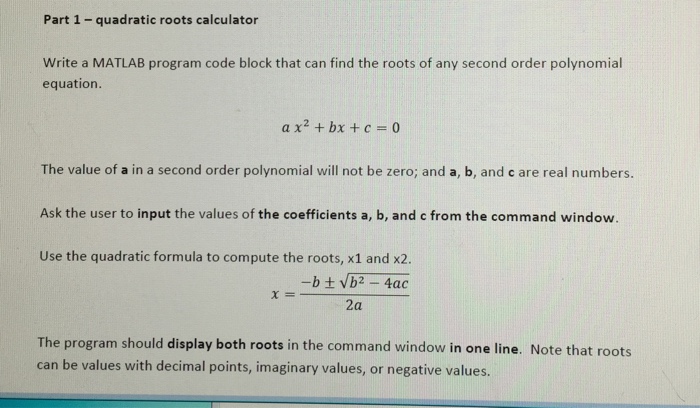
Question: Roots: x 1 = 1 , x 2 = 0 . 5 Part 2 - variable size distance conversion table Write a MATLAB program or
Roots: x x
Part variable size distance conversion table
Write a MATLAB program or a MATLAB code block that can generate a conversion table to convert distance from Miles mathbfm i to Yards mathbfy d and to feet ft
Ask the user to input the following information from the command window:
The starting mile of the conversion table mathrmpt
The increment between lines in miles mimathrmpt
The number of lines to show in the conversion table mathrmpt
Generate an array of miles based on the user inputs mathrmpt
Test different values and confirm your program with an online conversion calculator to ensure correctness: Conversion Calculator
Print conversion table heading ie miles, yards, feet and mathrmpt
Combine the miles array, the yards array, and the feet array together and print conversion table values mathrmpt
Use the fprintf function to format the values in the distance conversion table to show:
mathbf digits after the decimal point for miles mathrmpt
mathbf digit after the decimal point for yards and feet mathrmpt
Here is an example of running the user interactive conversion table. The light blue text is generated by the Part program. The numbers type in by the user are shown in purple.
Step by Step Solution
There are 3 Steps involved in it
1 Expert Approved Answer
Step: 1 Unlock

Question Has Been Solved by an Expert!
Get step-by-step solutions from verified subject matter experts
Step: 2 Unlock
Step: 3 Unlock
 Study Help