







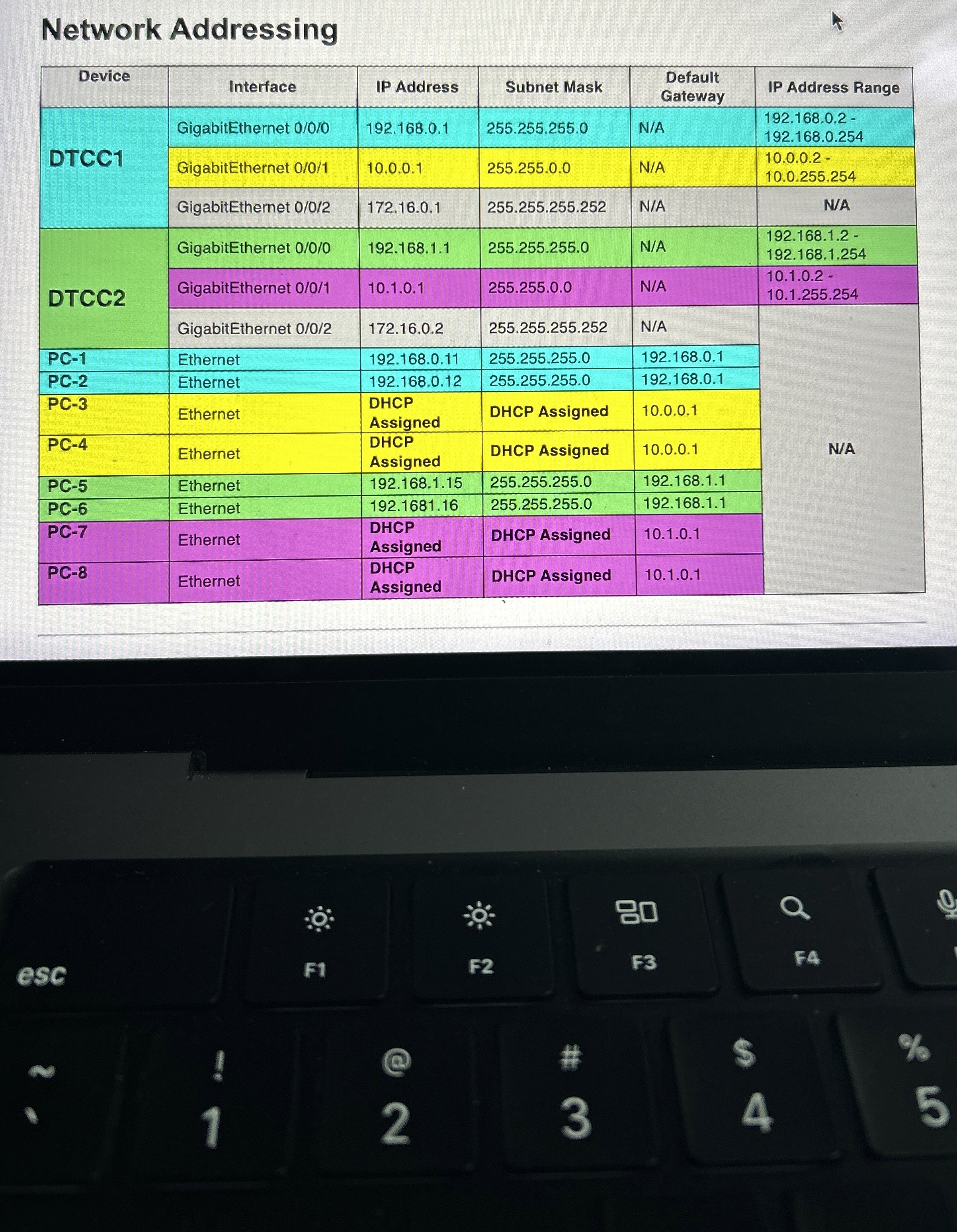
Question: Router 2 : Create a DHCP pool for the 1 0 . 1 . 0 . 0 / 1 6 subnet ( IP range: 1
Router:
Create a DHCP pool for the subnet IP range:
Set the default router for the DHCP pool.
Configure a DHCP exclusion range for the first IP addresses in the network.
Add a static route with this command:
Routerconfig# ip route g
Network Addressing
tableDeviceInterface,IP Address,Subnet Mask,Default Gateway,IP Address RangeDTCCGigabitEthernet NA
Step by Step Solution
There are 3 Steps involved in it
1 Expert Approved Answer
Step: 1 Unlock

Question Has Been Solved by an Expert!
Get step-by-step solutions from verified subject matter experts
Step: 2 Unlock
Step: 3 Unlock
 Study Help