







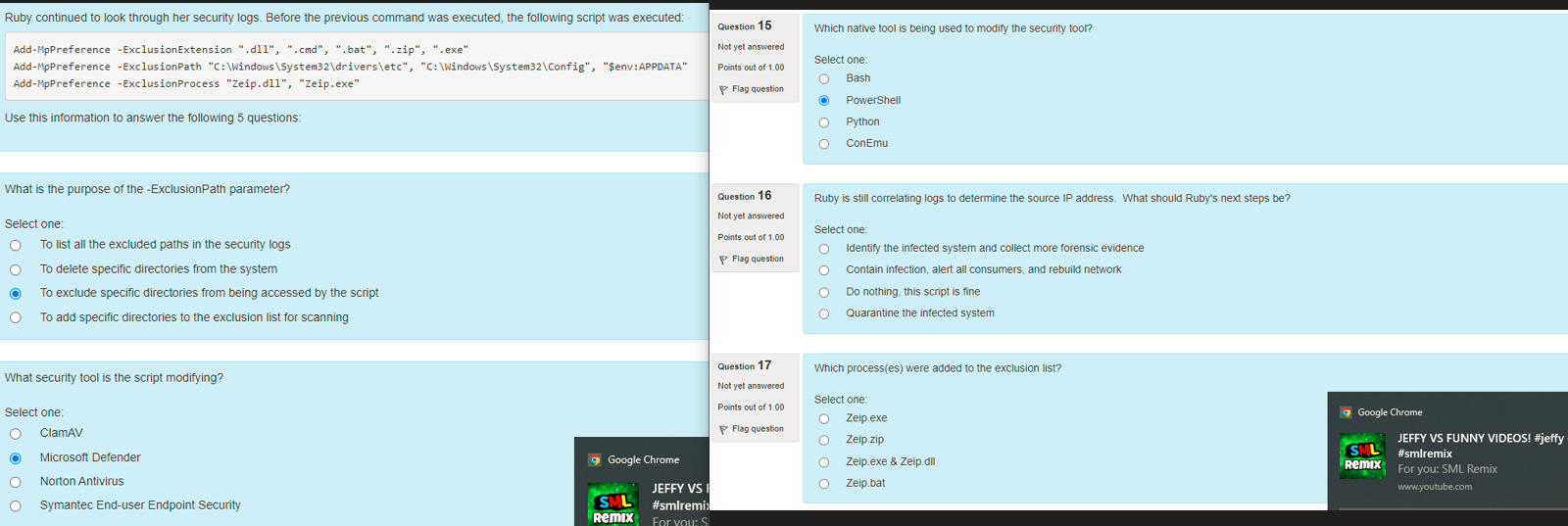
Question: Ruby continued to look through her security logs . Before the previous command was executed, the following script was executed: Add - MpPreference - ExclusionExtension
Ruby continued to look through her security logs Before the previous command was executed, the following script was executed:
AddMpPreference ExclusionExtension dllcmdbat", zip", exe"
AddMpPreference ExclusionPath C:WindowsSystemdriversetcC:WindowsSystemConfig$env:APPDATA"
AddMpPreference ExclusionProcess "Zeip.dll "Zeip.exe"
Use this information to answer the following questions:
Question
Not yet answered
Points out of
Not flaggedFlag question
Question text
What is the purpose of the ExclusionPath parameter?
Select one:
To list all the excluded paths in the security logs
To delete specific directories from the system
To exclude specific directories from being accessed by the script
To add specific directories to the exclusion list for scanning
Question
Not yet answered
Points out of
Not flaggedFlag question
Question text
What security tool is the script modifying?
Select one:
ClamAV
Microsoft Defender
Norton Antivirus
Symantec Enduser Endpoint Security
Question
Not yet answered
Points out of
Not flaggedFlag question
Question text
Which native tool is being used to modify the security tool?
Select one:
Bash
PowerShell
Python
ConEmu
Question
Not yet answered
Points out of
Not flaggedFlag question
Question text
Ruby is still correlating logs to determine the source IP address. What should Ruby's next steps be
Select one:
Identify the infected system and collect more forensic evidence
Contain infection, alert all consumers, and rebuild network
Do nothing, this script is fine
Quarantine the infected system
Question
Not yet answered
Points out of
Not flaggedFlag question
Question text
Which processes were added to the exclusion list?
Select one:
Zeip.exe
Zeip.zip
Zeip.exe & Zeip.dll
Zeip.bat
Step by Step Solution
There are 3 Steps involved in it
1 Expert Approved Answer
Step: 1 Unlock

Question Has Been Solved by an Expert!
Get step-by-step solutions from verified subject matter experts
Step: 2 Unlock
Step: 3 Unlock
 Study Help