







Question: Sample codes CalenderSelectionMode.aspx protected void btnSubmit_Click(object sender, EventArgs e) { bltResults.DataSource = Calendar1.SelectedDates; bltResults.DataBind(); } Calendar SelectionMode CalendarJS.aspx protected void calEventDate_SelectionChanged(object sender, EventArgs e) {
Sample codes
CalenderSelectionMode.aspx
protected void btnSubmit_Click(object sender, EventArgs e)
{
bltResults.DataSource = Calendar1.SelectedDates;
bltResults.DataBind();
}
CalendarJS.aspx
protected void calEventDate_SelectionChanged(object sender, EventArgs e)
{
txtEventDate.Text = calEventDate.SelectedDate.ToString("d");
}
protected void btnSubmit_Click(object sender, EventArgs e)
{
lblResult.Text = "You picked: " + txtEventDate.Text;
}
function displayCalendar()
{
var datePicker = document.getElementById('datePicker');
datePicker.style.display = 'block';
}
#datePicker {display:none; position:absolute; border:solid 2px black; background-color:white;}
.content {width:400px; background-color:white; margin:auto; padding:10px;}
html {background-color:silver;}
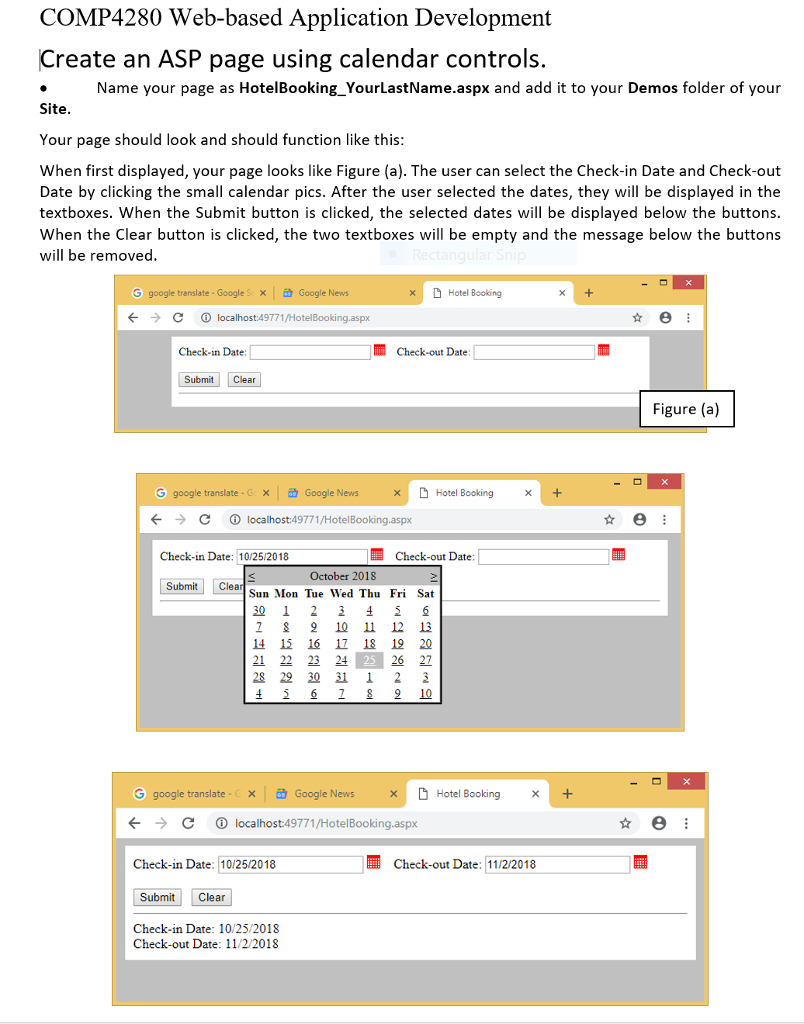
COMP4280 Web-based Application Development Create an ASP page using calendar controls. Name your page as HotelBooking_YourLastName.aspx and add it to your Demos folder of your Your page should look and should function like this When first displayed, your page looks like Figure (a). The user can select the Check-in Date and Check-out Date by clicking the small calendar pics. After the user selected the dates, they will be displayed in the textboxes. When the Submit button is clicked, the selected dates will be displayed below the buttons When the Clear button is clicked, the two textboxes will be empty and the message below the buttons will be removed G google translate-Google' Google News xHotel Booking C localhost49771/HotelBooking.aspx Check-in Date Check-out Date Submit Clear Figure (a) G google translate-cX Google News XD Hotel Booking x + KClocalhost:49771/HotelBooking.aspx Check-in Date: 10/25/2018 Check-out Date October 2018 Sun Mon Tue Wed Thu Fri Sat 2 SubmitClea 2 S 210 11 12 13 14 15 16 1 18 12 20 26 22 21 22 23 24 25 2618210 G google translate- Google News D Hotel Booking + C localhost 49771/HotelBooking.aspx Check-in Date: 10/25/2018 Submit Clear Check-in Date: 10/25/2018 Check-out Date: 11/2/2018 Check-out Date: 11/2/2018
Step by Step Solution
There are 3 Steps involved in it

Get step-by-step solutions from verified subject matter experts
 Study Help