







Question: | | Sample-Processorm + % Problem(03): Using the file Porosity-Sample.bmp , provided as the output | % from a well simulation software, calculated the relative
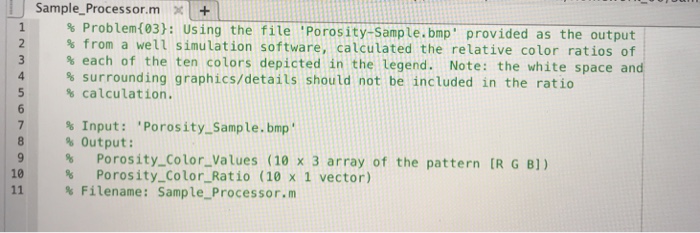
| | Sample-Processorm + % Problem(03): Using the file Porosity-Sample.bmp , provided as the output | % from a well simulation software, calculated the relative color ratios of % each of the ten colors depicted in the legend. Note: the white space and % surrounding graphics/details should not be included in the ratio % calculation. 3 5 % Input: 'Porosity.-Sample.bmp' 8 % Output: 9 %Porosity Color_Values (10 x 3 array of the pattern [R G B]) 10 % Porosity-Color-Ratio (10 x 1 vector) 11 | % Filename : Sample-Processorm | | Sample-Processorm + % Problem(03): Using the file Porosity-Sample.bmp , provided as the output | % from a well simulation software, calculated the relative color ratios of % each of the ten colors depicted in the legend. Note: the white space and % surrounding graphics/details should not be included in the ratio % calculation. 3 5 % Input: 'Porosity.-Sample.bmp' 8 % Output: 9 %Porosity Color_Values (10 x 3 array of the pattern [R G B]) 10 % Porosity-Color-Ratio (10 x 1 vector) 11 | % Filename : Sample-Processorm
Step by Step Solution
There are 3 Steps involved in it

Get step-by-step solutions from verified subject matter experts
 Study Help