







Question: ## ---------------------------- ## ## ## sample_student.py ## import numpy as np #It's kk to import whatever you want from the local util module if you
| ## ---------------------------- ## | |
| ## | |
| ## sample_student.py | |
| ## | |
| import numpy as np | |
| #It's kk to import whatever you want from the local util module if you would like: | |
| #from util.X import ... | |
| def classify(im): | |
| ''' | |
| Example submission for coding challenge. | |
| Args: im (nxmx3) unsigned 8-bit color image | |
| Returns: One of three strings: 'brick', 'ball', or 'cylinder' | |
| ''' | |
| #Let's guess randomly! Maybe we'll get lucky. | |
| labels = ['brick', 'ball', 'cylinder'] | |
| random_integer = np.random.randint(low = 0, high = 3) | |
| return labels[random_integer] |
Instructions
Write a method classify.py that takes in an image and returns a prediction - ball, brick, or cylinder.
An example script in located in challenge/sample_student.py
Your script will be automatically evaluated on a set of test images.
The testing images are quite similar to the training images, and organized into the same difficulty categories.
You are allowed 10 submissions to the evaluation server, which will provide immediate feedback.
The Data
Easy Examples
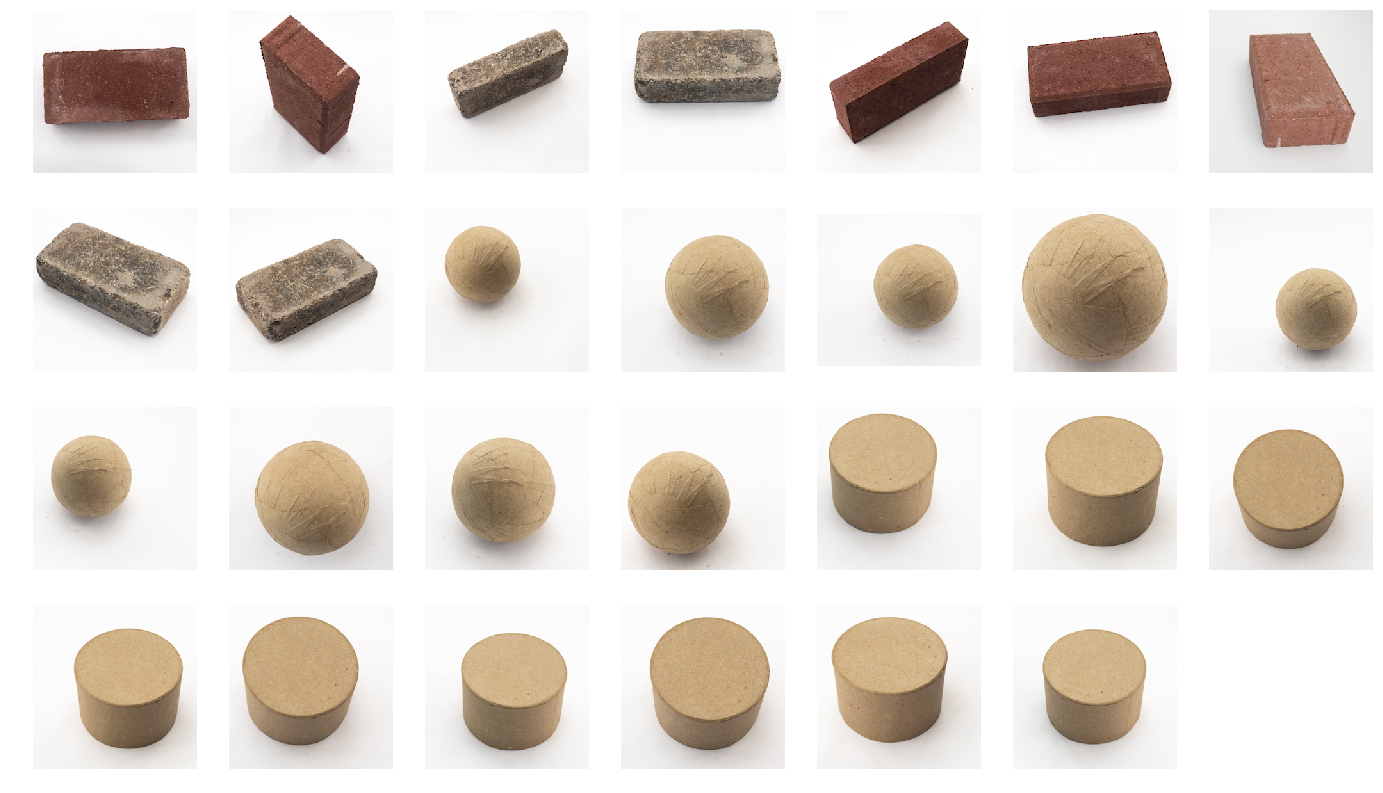
| ## ------------------------- ## | |
| ## | |
| ## evaluate.py | |
| ## Basic image processing utilties. | |
| ## | |
| ## | |
| ## ------------------------- ## | |
| import numpy as np | |
| import glob | |
| from easydict import EasyDict | |
| from matplotlib.pyplot import imread | |
| #Import student's method: | |
| from sample_student import classify | |
| dataset_names = ['easy', 'medium_1', 'medium_2', 'hard'] | |
| weights = [0.5, 0.2, 0.2, 0.1] | |
| classes = ['ball', 'brick', 'cylinder'] | |
| data_path = '../data' #Assuming data is stored in current directory. | |
| dataset_weights = {} | |
| for i in range(len(dataset_names)): | |
| dataset_weights[dataset_names[i]] = weights[i] | |
| #Store data performance data in a nested easydict: | |
| performance = EasyDict() | |
| #Iterate through images: | |
| for dataset_name in dataset_names: | |
| performance[dataset_name] = EasyDict() | |
| performance[dataset_name]['overall'] = np.array([0, 0]) #overall Correct/incorrect | |
| for image_class in classes: | |
| performance[dataset_name][image_class] = np.array([0, 0]) | |
| image_paths = glob.glob(data_path + '/' | |
| + dataset_name + '/' | |
| + image_class + '/*.jpg') | |
| for image_path in image_paths: | |
| im = imread(image_path) | |
| prediction = classify(im) | |
| if image_class == prediction: | |
| performance[dataset_name][image_class][0] += 1 | |
| else: | |
| performance[dataset_name][image_class][1] += 1 | |
| #Tally overall performance for class | |
| performance[dataset_name]['overall'] = performance[dataset_name]['overall'] \ | |
| + performance[dataset_name][image_class] | |
| #Print out errors: | |
| print('Fraction of Correct Predictions: ') | |
| overall_accuracy = 0 | |
| for dataset_name in dataset_names: | |
| total_correct, total_incorrect = performance[dataset_name]['overall'] | |
| total = total_correct + total_incorrect | |
| accuracy = np.round(float(total_correct)/total, 4) | |
| overall_accuracy += accuracy * dataset_weights[dataset_name] | |
| performance[dataset_name]['accuracy'] = accuracy | |
| print(dataset_name + ': ' + \ | |
| '(' + str(total_correct) + '/' + str(total) + ' = ' + \ | |
| str(accuracy) + ')') | |
| for image_class in classes: | |
| print(' ' + image_class + ': ' | |
| + str(performance[dataset_name][image_class][0]) | |
| + '/' | |
| + str(np.sum(performance[dataset_name][image_class]))) | |
| overall_accuracy = np.round(overall_accuracy, 2) | |
| score = 0 | |
| if overall_accuracy >= 0.6: | |
| score = 10 | |
| elif overall_accuracy >= 0.55: | |
| score = 9 | |
| elif overall_accuracy >= 0.5: | |
| score = 8 | |
| elif overall_accuracy >= 0.45: | |
| score = 7 | |
| elif overall_accuracy >= 0.4: | |
| score = 6 | |
| elif overall_accuracy >= 0.35: | |
| score = 5 | |
| elif overall_accuracy >= 0: | |
| score = 4 | |
| print(" Overall Accuracy = ", overall_accuracy) | |
| print("Score = ", score)
|
Step by Step Solution
There are 3 Steps involved in it
1 Expert Approved Answer
Step: 1 Unlock

Question Has Been Solved by an Expert!
Get step-by-step solutions from verified subject matter experts
Step: 2 Unlock
Step: 3 Unlock
 Study Help