







Question: SAS program statistics. Can some help me? What am I doing wrong ? The ranks are not in order. How can I get them in
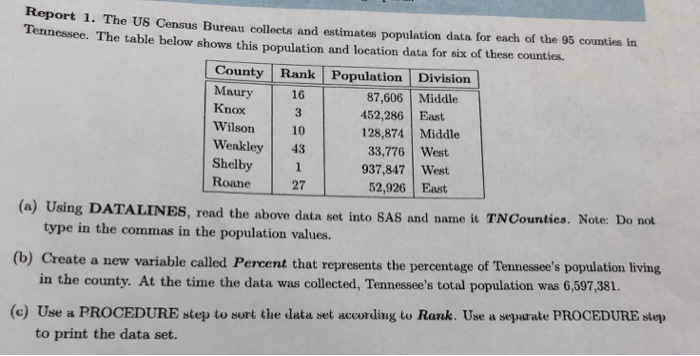
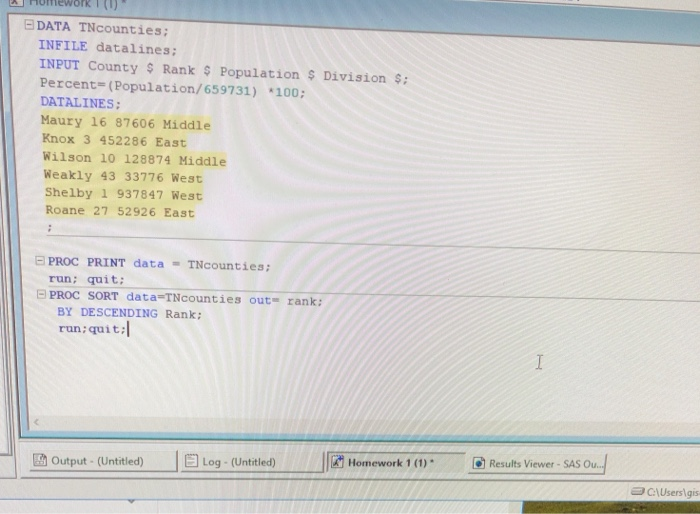
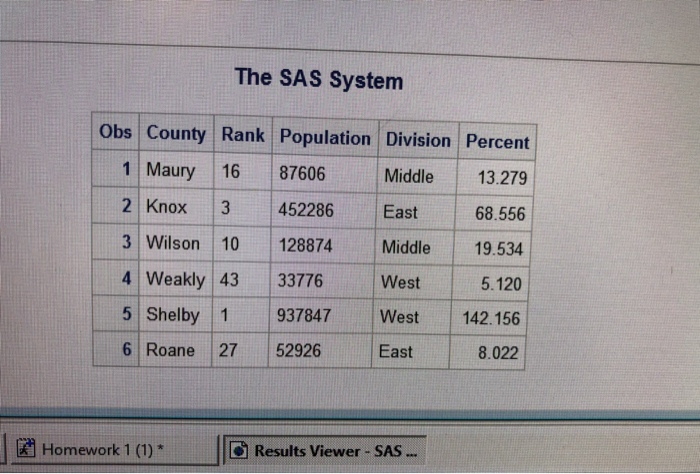
Rteport 1. The US Census Burean collocts and estimates population data for each of the 95 counties in Tennesse. The table below shows this population and location data for six of these counties County Rank Population Division Maury Knox Wilson 10 Weakley 43 Shelby1 Roane 87,606 Middle 452,286 East 128,874 Middle 33,776 West 937,847 West 52,926 East 16 27 (a) Using DATALINES, read the above data set into SA8 and name it TNCountics. Note: Do not (b) Create a new variable called Percent that represents the percentage of Tennessee's population living (e) type in the commas in the population values. in the county. At the time the data was collected, Tennessee's total population was 6,597,381. Use a PROCEDURE step to sort the data set according to Rank. Use a sepurate PROCEDURE step to print the data set. work I (1) DATA TNcounties; INFILE datalines INPUT County $Rank $ Population Division : Percent Population/659731) *100; DATALINES: Maury 16 87606 Middle Knox 3 452286 East Wilson 10 128874 Middle Weakly 43 33776 West Shelby 1 937847 West Roane 27 52926 East PROC PRINT data-T counties; run: quit: PROC SORT data=T counties out-rank; BY DESCENDING Rank: run:quit: ja Homework ' (1). d Results Viewer-SAS Ou Output-(Untitled) Log (Untitled) C\Userslgis The SAS System Obs County Rank Population Division Percent 1 Maury 16 87606 Middle 13.279 2 Knox 3 452286 East 3 Wilson 10 128874 Middle 19.534 4 Weakly 43 33776 West 5.120 5 Shelby 1 937847 West 142.156 6 Roane 27 52926 68.556 East 8.022 Homework 1 (1)* Results Viewer SAS
Step by Step Solution
There are 3 Steps involved in it

Get step-by-step solutions from verified subject matter experts
 Study Help