







Question: SCREENSHOTS ACCEPTABLE! PART A: For the snowfall data, create a single Ppt slide for insertion into a Ppt presentation. The one slide must include: an
SCREENSHOTS ACCEPTABLE! PART A:
For the snowfall data, create a single Ppt slide for insertion into a Ppt presentation. The one slide must include: an appropriate title, the data an appropriate graph
PART B:
For the acceleration formula, create a single Ppt slide for insertion into a Ppt presentation. The one slide must include: an appropriate title the formula, identification of all variables in the formula an Excel spreadsheet of v values t = 0 to t = 100 (using appropriate intervals) an appropriate graph.
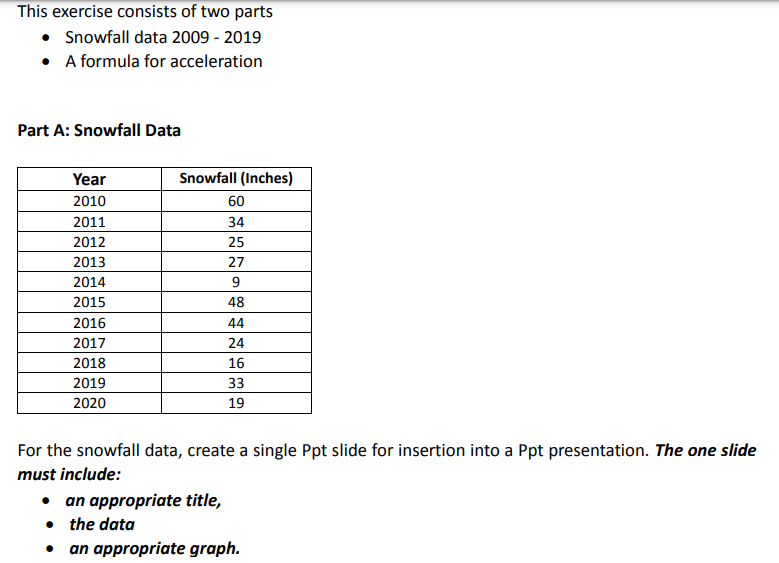
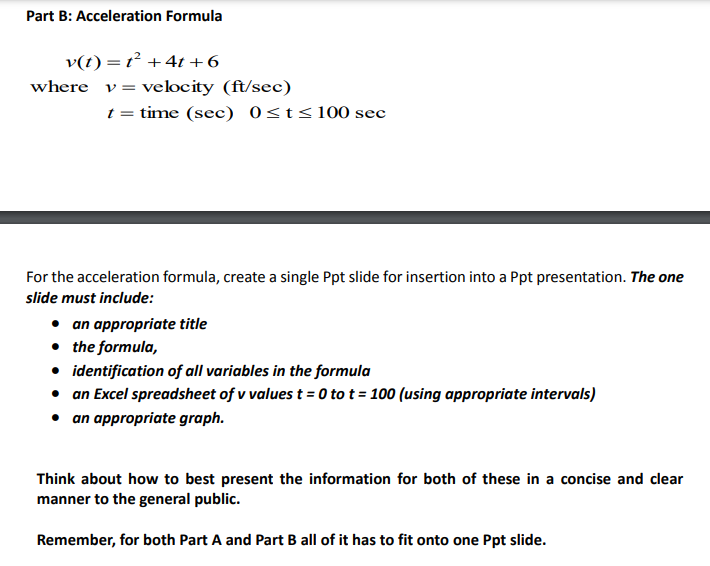
This exercise consists of two parts Snowfall data 2009 - 2019 A formula for acceleration Part A: Snowfall Data Year 2010 2011 2012 2013 2014 2015 2016 2017 2018 2019 2020 Snowfall (Inches) 60 34 25 27 9 48 44 24 16 33 19 For the snowfall data, create a single Ppt slide for insertion into a Ppt presentation. The one slide must include: an appropriate title, the data an appropriate graph. Part B: Acceleration Formula v(t) = +4t +6 where v = velocity (ft/sec) t = time (sec) Osts 100 sec For the acceleration formula, create a single Ppt slide for insertion into a Ppt presentation. The one slide must include: an appropriate title the formula, identification of all variables in the formula an Excel spreadsheet of v values t = 0 to t = 100 (using appropriate intervals) an appropriate graph. Think about how to best present the information for both of these in a concise and clear manner to the general public. Remember, for both Part A and Part B all of it has to fit onto one Ppt slide
Step by Step Solution
There are 3 Steps involved in it

Get step-by-step solutions from verified subject matter experts
 Study Help