







Question: Scripting in Python 3 (perf using PyCharm). *************Please make sure each category is in a method function (def)****************** Objectives: 1. Demonstrate ability to execute python
Scripting in Python 3 (perf using PyCharm).
*************Please make sure each category is in a method function ("def")******************
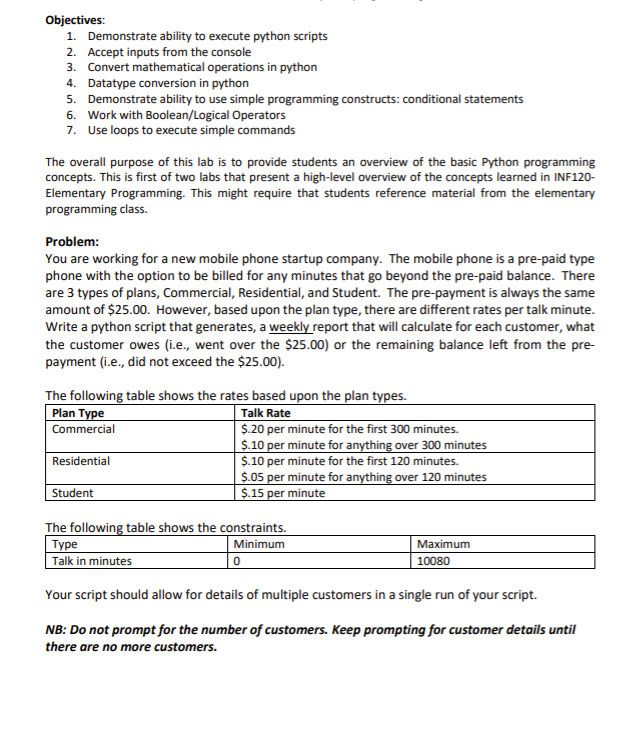
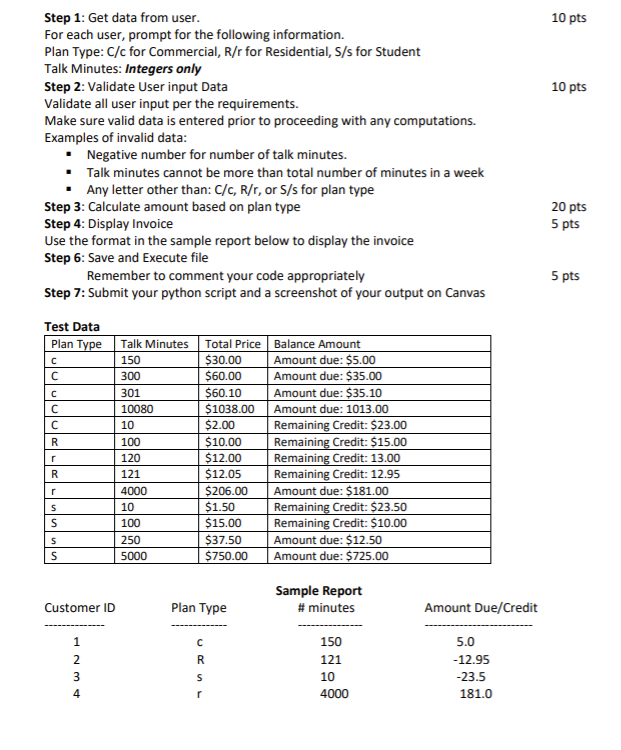
Objectives: 1. Demonstrate ability to execute python scripts 2. Accept inputs from the console 3. Convert mathematical operations in python 4. Datatype conversion in python 5. Demonstrate ability to use simple programming constructs: conditional statements 6. Work with Boolean/Logical Operators 7. Use loops to execute simple commands The overall purpose of this lab is to provide students an overview of the basic Python programming concepts. This is first of two labs that present a high-level overview of the concepts learned in INF120- Elementary Programming. This might require that students reference material from the elementary programming class. Problem: You are working for a new mobile phone startup company. The mobile phone is a pre-paid type phone with the option to be billed for any minutes that go beyond the pre-paid balance. There are 3 types of plans, Commercial, Residential, and Student. The pre-payment is always the same amount of $25.00. However, based upon the plan type, there are different rates per talk minute. Write a python script that generates, a weekly report that will calculate for each customer, what the customer owes (i.e., went over the $25.00) or the remaining balance left from the pre- payment (i.e., did not exceed the $25.00). The following table shows the rates based upon the plan types. Plan Type Talk Rate Commercial $.20 per minute for the first 300 minutes. $.10 per minute for anything over 300 minutes Residential $.10 per minute for the first 120 minutes. $.05 per minute for anything over 120 minutes Student $.15 per minute The following table shows the constraints. Minimum Talk in minutes 0 Type Maximum 10080 Your script should allow for details of multiple customers in a single run of your script. NB: Do not prompt for the number of customers. Keep prompting for customer details until there are no more customers. 10 pts 10 pts Step 1: Get data from user. For each user, prompt for the following information. Plan Type: C/c for Commercial, R/r for Residential, S/s for Student Talk Minutes: Integers only Step 2: Validate User input Data Validate all user input per the requirements. Make sure valid data is entered prior to proceeding with any computations. Examples of invalid data: Negative number for number of talk minutes. Talk minutes cannot be more than total number of minutes in a week Any letter other than: C/C, R/r, or S/s for plan type Step 3: Calculate amount based on plan type Step 4: Display Invoice Use the format in the sample report below to display the invoice Step 6: Save and Execute file Remember to comment your code appropriately Step 7: Submit your python script and a screenshot of your output on Canvas 20 pts 5 pts 5 pts Test Data Plan Type R Talk Minutes 150 300 301 10080 10 100 120 121 4000 10 100 250 5000 Total Price Balance Amount $30.00 Amount due: $5.00 $60.00 Amount due: $35.00 $60.10 Amount due: $35.10 $1038.00 Amount due: 1013.00 $2.00 Remaining Credit: $23.00 $10.00 Remaining Credit: $15.00 $12.00 Remaining Credit: 13.00 $12.05 Remaining Credit: 12.95 $206.00 Amount due: $181.00 $1.50 Remaining Credit: $23.50 $15.00 Remaining Credit: $10.00 $37.50 Amount due: $12.50 $750.00 Amount due: $725.00 un -- 5 S Sample Report #minutes Customer ID Plan Type Amount Due/Credit R 1 2 3 4 150 121 10 4000 5.0 -12.95 -23.5 181.0 S r
Step by Step Solution
There are 3 Steps involved in it

Get step-by-step solutions from verified subject matter experts
 Study Help