







Question: second time Use P 5 . js and index.html 1 . Load an image using the webcam: you can either take a snapshot, save it
second time
Use Pjs and index.html
Load an image using the webcam: you can either take a snapshot, save it to disk and
load it back or you can use this snapshot as a buffer image and use it without saving
it to disk. Use keymousesnapshot button interaction to take the snapshot or save the image.
Scale that image to x pixels ie minimum resolution
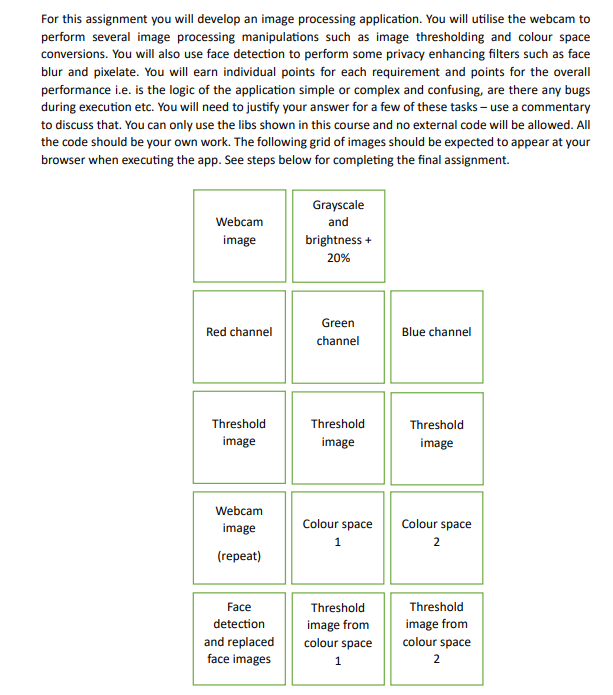
Display the webcam image in the grid at the position titled Webcam imageThen
using this webcam image complete all tasks
Convert image to grayscale and increase the brightness by This should happen
within the same nested for loop that you use to convert the image to greyscale.
Display the image at the appropriate position as seen in the grid.
Increasing the brightness can cause the pixel intensity to get beyond the levels
Write code to prevent this from happening.
Using the original webcam image: split into three colour channels RGBand show
each channel. Again, use the appropriate positions as seen in the grid.
Perform image thresholding with a slider for each channel separately. Similarly,
display the results using the appropriate positions as seen in the grid.
Step by Step Solution
There are 3 Steps involved in it
1 Expert Approved Answer
Step: 1 Unlock

Question Has Been Solved by an Expert!
Get step-by-step solutions from verified subject matter experts
Step: 2 Unlock
Step: 3 Unlock
 Study Help